Deephaven Data Lifecycle
The scaling of Deephaven to handle large data sets is mostly driven by the data lifecycle. Deephaven has been designed to separate the write-intensive applications (Data Import Server or DIS, db_dis, and importers) from the read/compute-intensive applications (db_query_server, db_query_workers, etc.).
The diagram below shows a generalized version of the processes responsible for handling data as part of the Deephaven engine. An external data source can be imported via a stream by generating binary logs fed to the DIS process or by manually running an import using one of Deephaven's many importers. Once in the system, end-users can query either type via the db_query_server and its workers.
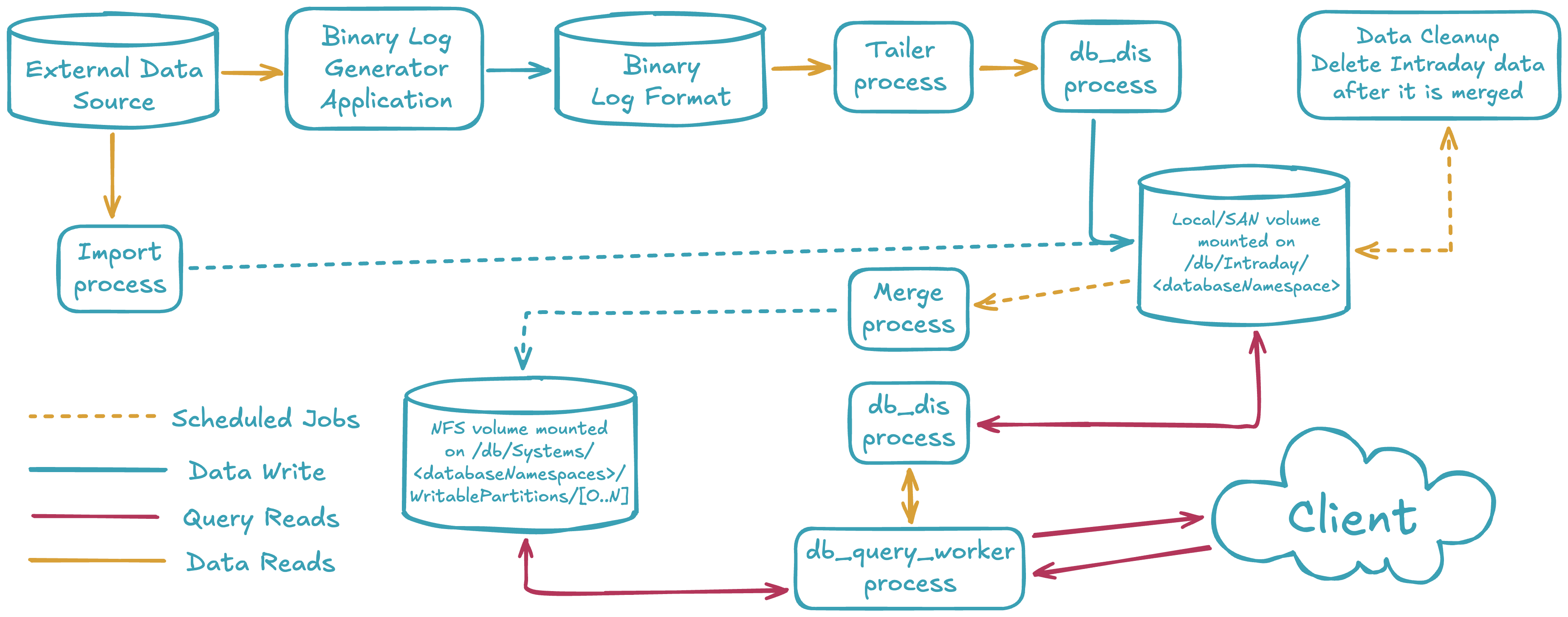
Two types of data
Deephaven views data as one of two types: intraday (near real-time) or historical. Each data type is stored in different locations in the database filesystem.
Intraday data
- Intraday data is typically stored in
/db/Intraday/<databaseNamespace>/<tableName>. When deploying servers, it is advised that each of these be on low-latency, high-speed disks connected either locally or via SAN. All reads and writes of this data are done through this mount point. Depending on data size and speed requirements, one or more mount points could be used at the/db/Intraday,/db/Intraday/<databaseNamespace>, or/db/Intraday/<databaseNamespace>/<tableName>levels. - The Data Import Server (DIS,
db_dis) reads and writes data to and from these directories. - If configured to run, the Local Table Data Service (LTDS,
db_ltds) reads data from these directories. - If an administrator doesn't create mount points for new namespaces and/or tables before using them, Deephaven will automatically generate the required subdirectories when data is first written to the new tables.
Historical data
- Historical data is stored in
/db/Systems/<databaseNamespace>. - Intraday data is typically merged into historical data by a scheduled Merge PQ. It may also be merged by a Merge Script manually or via
cron. - An attempted merge will fail if the required subdirectories don't exist.
- Each historical database namespace directory contains two directories that the administrator must configure:
WritablePartitionsis used for all writes to historical data.Partitionsis used for all reads from historical data.- The (historical)
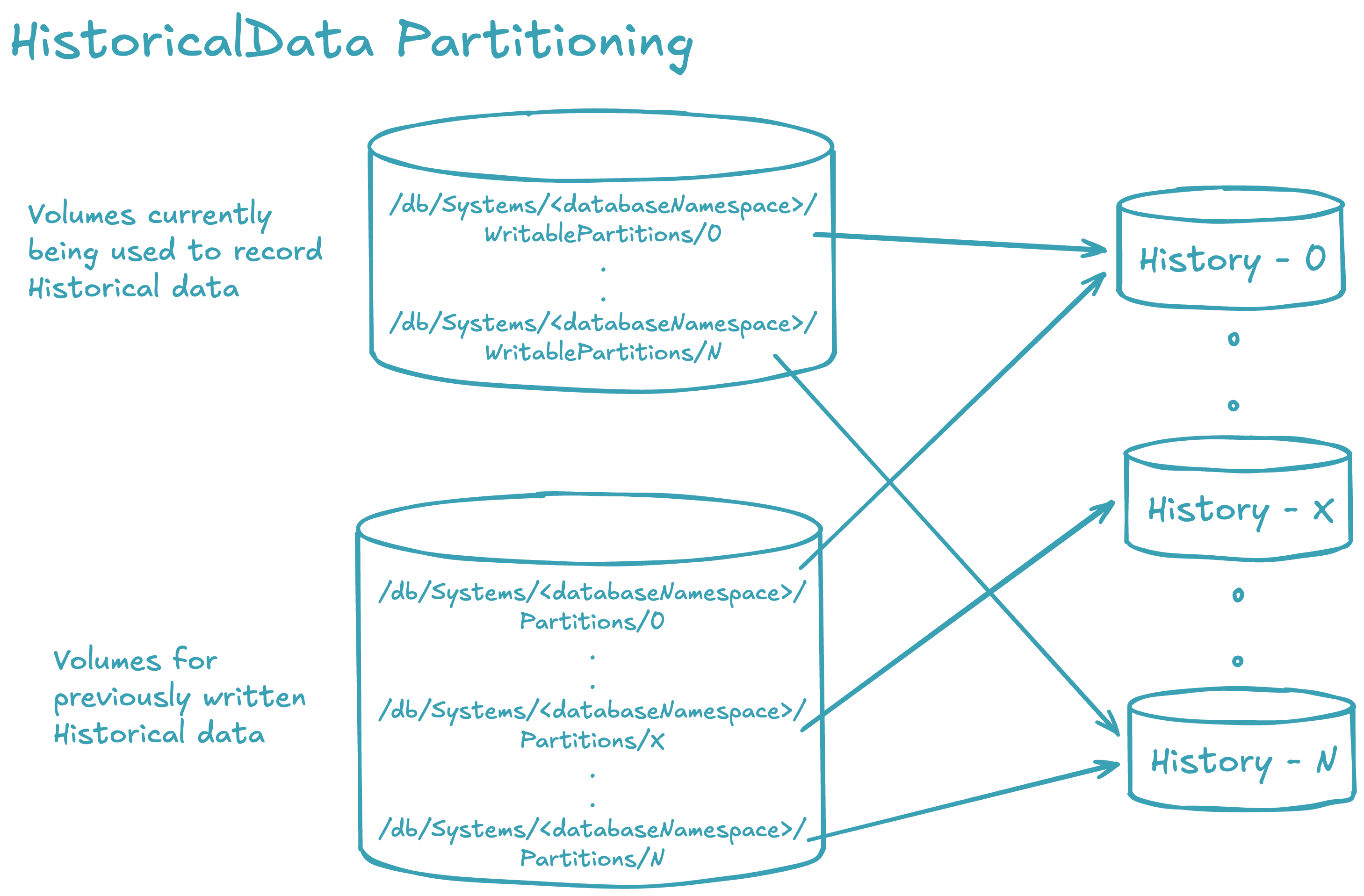
<databaseNamespace>is divided into aPartitionsandWritablePartitionspair of directories. The subdirectories of these two will contain the data. Each of these subdirectories are either mounted shared volumes or links to mounted shared volumes.Partitionsshould contain a strict superset ofWritablePartitions. It is recommended that each<databaseNamespace>be divided across multiple shared volumes to increase IO access to the data. - Initially, when historical partitions are created for a namespace, the
WritablePartitionsandPartitionssubdirectories usually point to identical storage locations. For instance, with six partitions named "0" to "5", theWritablePartitionsdirectory will contain six links named "0" to "5" that correspond to the respectivePartitionsdirectories. As the storage devices become full, more space is needed. To accommodate this, new directories (e.g., "6" to "11") can be created withinPartitions, linking to new storage. TheWritablePartitionslinks are then updated to reflect these new directories. This update involves deleting the old links inWritablePartitionsand creating new links with the same names as the newPartitionsdirectories. Consequently, the previously written historical data becomes read-only via thePartitionsdirectory, while subsequent merges will write data to the newly allocated storage through theWritablePartitiondirectory.
- All volumes mounted under
WritablePartitionsandPartitionsmay be mounted on all Query and Merge servers. However, since these are divided by read and write functions, it is possible to have a Query Server that only had the read partitions mounted (Partitions) or a Merge Server with only theWritablePartitionsmounted. Filesystem permissions could also be controlled in a like manner: thePartitionsvolumes only need to be mounted with read-only access. A server that only performs queries does not need anything underWritablePartitions, and does not need writable access toPartitions.
A large historical data installation will look like this:
Data lifecycle summary
- Intraday disk volumes (or subdirectory partitions thereof) should be provided for each database namespace via local disk or SAN and be capable of handling the write and read requirements for the data set.
- Intraday data is merged into historical data by a configured Merge process.
- Once merged into historical data, intraday partitions may be removed from the intraday disk using a Data Validation PQ with the
Delete intraday dataflag set. It is also possible to remove intraday data with the Data control tool. Manually removing data from the filesystem is not recommended because doing so may cause an inconsistent state within DIS and/or TDCP. - Historical shared (NFS) volumes (or subdirectory partitions thereof) should be provided for each database namespace via a shared filesystem that is mounted under
/db/Systems/<databaseNamespace>/WritablePartitionsand/db/Systems/<databaseNamespace>/Partitionson appropriate servers. Historical data for each database namespace usesWritablePartitionsto merge new data andPartitionsto read data. - Data should not be deleted or altered while it is actively being used by a query. Changing underlying data during a query's execution can lead to query failure because the query loads and caches column-level data as needed and releases the cache when possible. This approach enables us to work with large datasets without having to load all the data into memory at once.
If a file changes while being actively used, an exception may be raised. The exception may be disabled by adding
FileHandle.safetyCheckEnabled=falseto the configuration for the query. This flag should be used with discretion.