SAML authentication plugin
Security Assertion Markup Language (SAML) can be used for external authentication of users for both the Deephaven Web interface and the Deephaven Classic (Java/Swing) interface.
SAML is an open standard whereby third-party Identity Providers such as Google, Okta, OneLogin, and others, can validate the identity of a user requesting to log on to a Deephaven system. The main benefits of SAML authentication are single sign-on to multiple services, including Deephaven, and the possibility to manage various forms of two-factor authentication.
There are two systems involved in authentication using SAML: the Identity Provider and the Service Provider. The Identity Provider is responsible for authenticating a user and providing evidence of that user's identity in the form of a SAML assertion. Google, Okta, and other accounts management solutions that support SAML 2.0 can act as Identity Providers for Deephaven. The other side of the configuration is the Service Provider, which makes services available to authenticated users. In the context of this document, the Service Provider is the Deephaven installation, with the Service Provider endpoint being a component of the Deephaven authentication server.
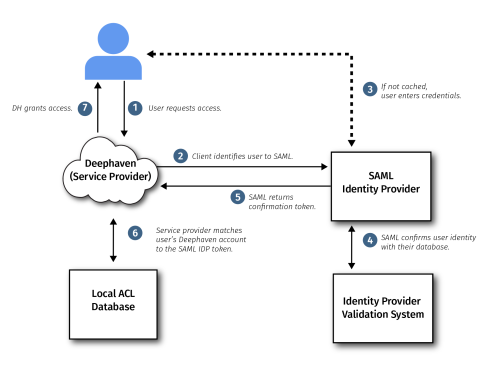
Both systems need to be configured for SAML authentication: the Identity Provider so it will accept authentication requests and return responses in the expected format from the specific Service Provider installation, and the Service Provider so it will know what Identity Provider instance to work with and will trust assertions received from it.
Once both systems are properly configured, users attempting to log in to Deephaven can choose to authenticate with the external Identity Provider. If they do so, they will be redirected to a login process managed by the Identity Provider. Upon completion of that process, the result will be sent as a SAML-formatted assertion message to the Deephaven authentication server. If the login was successful, the authentication server will grant the user the rights associated with the user name indicated in the assertion.
For a user to access Deephaven with SAML authentication, the Identity Provider administrator must create a login in the Identity Provider system and then grant the user access to the Deephaven application there. In addition, a Deephaven administrator must create a Deephaven login to match the user's Identity Provider login name, and grant the user's Deephaven account any needed privileges with the Deephaven system.
Configure Deephaven to use SAML Authentication
The extensions to the authentication process are implemented as a Deephaven plugin. This plugin is installed from an RPM using yum, which will place its components into /etc/sysconfig/illumon.d/plugins:
After this step, activate the plugin:
To configure the authentication server to present the option of SAML authentication, two sets of properties need to be added to the iris-environment.prop properties: one for front-end configuration and one for server-level configuration.
Configure front-end
The front-end must also be configured to properly utilize the server-level module. The front-end configuration is defined within the following stanza in the iris-environment.prop file. These properties are used to enable the SAML login option within the Deephaven console and web UI:
Enable SAML-based auth requests
The second set is to enable the authentication server to accept and handle SAML-based authentication requests. This set of properties should be added to the authentication server stanza:
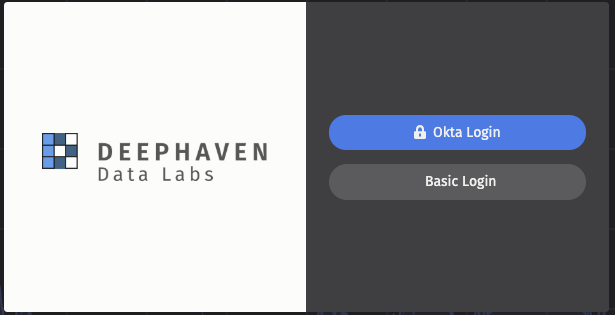
When SAML is configured, the Deephaven login screen will look similar to the following:
For a complete list of properties and sample configurations for the Okta and Google IdPs, see the README.md included in the installer. This can be found in the /etc/sysconfig/deephaven/plugins/samlAuth directory once the plugin is installed.
Example configuration
This plugin leverages the OneLogin java-saml toolkit. For additional details on the available properties, see the OneLogin Java-SAML Toolkit Configuration. Please note that the "onelogin.saml." properties required by this toolkit are identified in the SAML-Auth plugin as "authentication.samlauth."; these properties will be copied to the appropriate property-names during startup.
Minimal Okta-IdP Example
Minimal Google-IdP Example
SAML over Envoy
Once the Envoy Proxy is properly configured on the system, it is possible to use SAML authentication through the proxy by leveraging Extra Envoy XDS routes. In addition to changing the target-port from 9032 to the appropriate envoy port in all of the above properties, it is also required that the IdP's ACS be redirected to the Envoy port. That is, the IdP should always be configured to use the URL identified by authentication.samlauth.sp.assertion_consumer_service.url. The following should be added to the configuration so that appropriate routing is done for the SAML URLs.