Mingle Pandas, NumPy, and Deephaven
Using Deephaven from within Python is very easy. Let’s dive in.
Key Difference Between Deephaven and Pandas
Both Deephaven and Pandas provide functionality for working with tables of data -- Pandas dataframes and Deephaven tables. While both products can perform many of the same operations, the syntax and a few approaches are different.
The biggest conceptual difference between Pandas dataframes and Deephaven tables is mutability. There are two types of mutability to consider: recipe and data.
| Pandas | Deephaven | |
|---|---|---|
| Recipe | Mutable | Immutable |
| Data | Immutable | Mutable |
First, let’s consider the recipe used to create a table. In Pandas, the recipe for creating a dataframe is mutable and can be changed. In this example, Pandas dataframe df is created. Next, df is modified by adding a new column.
The exact same scenario using Deephaven tables looks like:
Here Deephaven table t1 is created. Next, a new column is added to t1. Because the recipe to create Deephaven tables cannot be changed, a new table t2 is created, instead of modifying t1.
Next, consider data mutability. In Pandas, data within a table does not change. Dataframe content is static. To change data in a dataframe, the recipe for the dataframe must change. On the other hand, Deephaven tables support real-time, dynamic data. Once a Deephaven table is created, the data inside can dynamically change.
Here a Deephaven table is created which adds one new row per second. The code above defines the immutable recipe for creating the table. This recipe is then used to update the contents of the resulting table as new data becomes available.
Common Operations
Conversions Between Pandas and Deephaven
In many cases, it can be beneficial to convert between Deephaven tables and Pandas dataframes.
Create a Table
Table creation tools are located in the deephaven.TableTools module.
Load a Table
Deephaven tables can be loaded from files, such as CSV, or they can be loaded from tables already stored in the database.
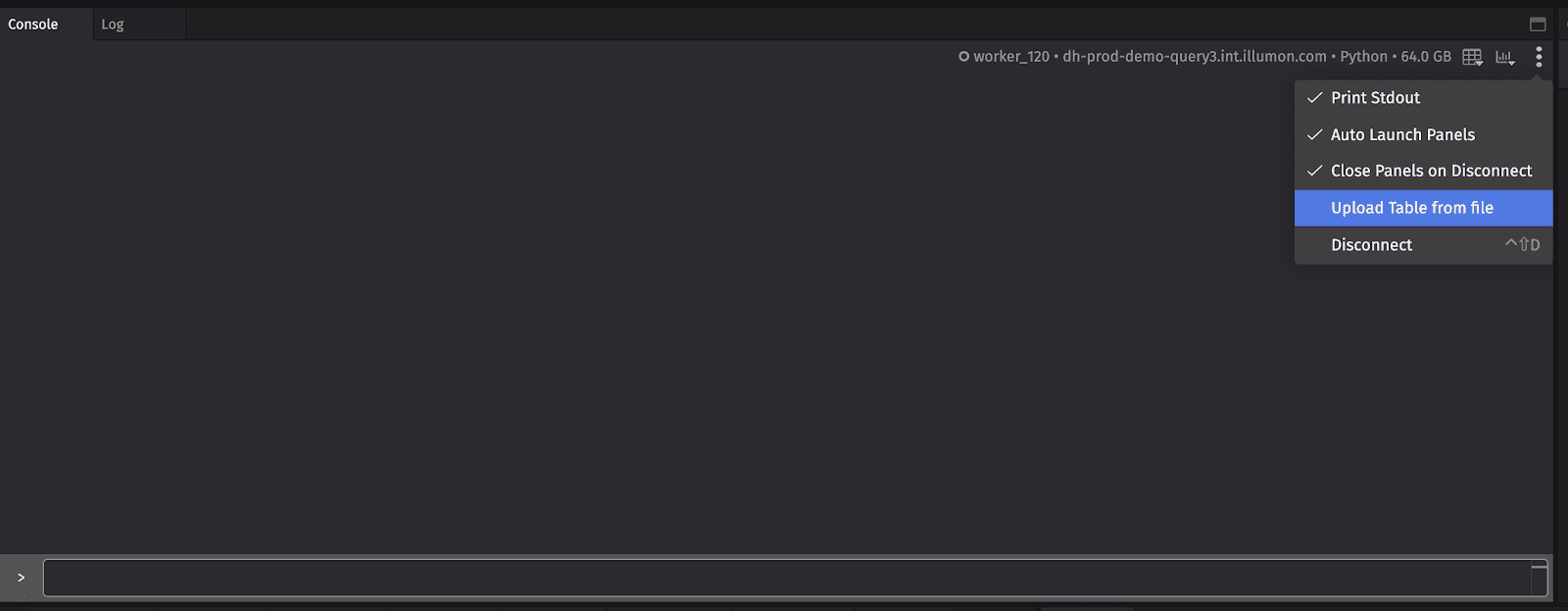
It is also possible to load tables directly into the web user interface:
Add and Remove Columns
Deephaven tables have methods for adding and removing columns. The most commonly used methods are update, view, updateView, select, renameColumns, and dropColumns. Each of these methods has different memory and performance characteristics. See Select for details.
Deephaven’s query language can be used to make complex logic very readable. Here, a table is created which
- contains a subset of the original columns,
- has renamed the Last column to Price,
- added a new column Dollars, which is computed on demand, and
- added a new in-memory column Importance, which is computed from a user-defined Python function.
Filtering
Selecting a subset of a table’s data is very straightforward. For Deephaven, these selections will work for both real-time and static tables.
Here, the data selection is performed using a simple statement as well as a user-defined function. In addition to basic filtering, Deephaven provides more advanced filtering options.
Metadata
When working with tables, it is important to understand the data contained within the table. In Pandas, table metadata can be obtained through df.frames. In Deephaven, a metadata table can be obtained through getMeta().

In addition to basic column name and column type information, getMeta() provides details about how columns are stored, so that you can make informed decisions about how to structure your query. See Think like a Deephaven ninja for details.
Sorting
Sort tables by the contents of columns. For Deephaven, these sorts will work for both real-time and static tables.
Concatenate
Concatenate multiple tables into a single table. For Deephaven, these concatenations will work for both real-time and static tables.
Aggregations
Data can be aggregated and analyzed in many different ways. The most simple case is averaging the values in a table.
The same operation is easy in Deephaven. They work with both real-time and static tables. Additionally, the data can be grouped by key columns and averaged (t2 below).
Deephaven tables have many of these dedicated aggregators. The most commonly used are firstBy, lastBy, sumBy, avgBy, stdBy, varBy, medianBy, minBy, maxBy, countBy, headBy, and tailBy.
Sometimes you will want to compute more than one type of aggregation on a table at once. For example, you would like to compute a min and a max of a column. This can be done using combined aggregations. Combined aggregations work with both real-time and static tables, and data can be grouped by key columns (t2 below).
The most commonly used combined aggregations are AggMin, AggMax, AggSum, AggVar, AggAvg, AggWAvg, AggStd, AggFirst, AggLast, AggMed, AggPct, AggCount, and AggArray.
Deephaven tables also have the ability to group data into and ungroup data from arrays. This is somewhat similar to groupby in Pandas.
Finally, Deephaven tables support user-defined aggregations.
Note
See also: Aggregate
Joins
There are many ways to join data from multiple tables into a single table. The most common Deephaven join operations are naturalJoin, exactJoin, aj (as-of join), raj (reverse as-of join), leftJoin, and join. All of these joins work for both real-time and static tables. Many of these operations do not have analogs in Pandas. Full coverage of joins is beyond the scope of this document.
Note
See also: Join
Missing Data
Each Deephaven datatype has a special value to indicate missing data. Primitive data types use NULL_FLOAT, NULL_DOUBLE, NULL_CHAR, NULL_BYTE, NULL_SHORT, NULL_INT, and NULL_LONG. Complex data types use Python’s None / Java’s null.
String Operations
In the Deephaven Query Language, Java String methods can be used.
Plotting
Just as Pandas has extensive plotting functionality built-in and via matplotlib, Deephaven has a powerful plotting library which can operate on real-time, static, and OneClick tables.
Note
See also: Plotting