Data routing service configuration via YAML
Data is central to Deephaven. There are many ways to configure the storage, ingestion, and retrieval of the data. The Data Routing Service is a central API for managing the configuration of a Deephaven system. The YAML configuration file format centralizes the information governing the locations, servers, and services that determine how data is handled. Because the information is stored in one place, the entire configuration can be viewed at a glance. This also makes it easier to make changes and understand the implications.
Like most Deephaven configuration, this routing information is stored in etcd and accessed via the configuration service. See our Configuration guide for information about exporting and editing the data routing configuration.
YAML file format
The YAML data format is designed to be human readable. However, there are some aspects that are not obvious to the unfamiliar reader. The following pointers will make the rest of this document easier to understand.
- YAML leans heavily on maps and lists.
- A string followed by a colon ( e.g.,
filters:) indicates the name of a name-value pair (the value can be a complex type). This is used in "map" sections. - A dash (e.g.,
- name) indicates an item in a list or array. In this structure, the item is often a map. However, the item can be any type, simple or complex. Maps are populated with key:value sets, and the values can be arbitrary complex types. - Anchors are defined by
&identifier, and they are global to the file. Anchors might refer to complex data. - Aliases refer to existing anchors (e.g.,
*identifier). - Aliased maps can be spliced in (e.g.,
<<: *DIS-default). In the context below, all the items defined by the map with anchorDIS-defaultare duplicated in the map containing the<<:directive.
The Data Routing Service needs certain data to create a system configuration. It looks for that data under defined sections in a single YAML document.
Note
The full YAML specification can be found here.
Data types
Only a few of the possible data types are used by Deephaven and mentioned in this document:
- List (or sequence) - consecutive items beginning with
-. - Map - set of "name: value" pairs
- Scalars - single values mainly integer, floating point, boolean, and string
The YAML parser will guess at the data type for a scalar, and it cannot be always correct. The main opportunity for confusion is with strings that can be interpreted as other data types. Any value can be clarified as a string by enclosing it in quotation marks (e.g., "8" puts the number in string format).
We will simply refer to scalars as values or their value types (e.g., string) from here on out.
Note
More information about data types can be found here.
Placeholder values
Any value of the form <env:TOKEN> or <prop:property_name> will be replaced by the value of the named environment variable or property. Note that this is not standard YAML, but rather a Deephaven extension to allow for customization in certain environments.
For example:
Sections
The Data Routing Configuration file contains a single YAML document with sections, which we define as important maps and lists directly under the root "config" map.
The document must contain this "config" map, which must have the following sections:
storagedataImportServerslogAggregatorServerstableDataServices
Optional sections may be included in the YAML file that define anchors and default values (e.g., "anchors"), and those that combine default data into one location (e.g., "default"). Each section is discussed below.
Anchors
Anchors can be defined and then referenced throughout the data routing configuration file. These can represent strings, numbers, lists, maps, and more. In this case, we use them to define names for machine roles and for port values. In a later section, they define the default set of properties in a DIS.
The syntax &identifer defines an anchor, which allows "identifier" to be referenced elsewhere in the document. This is often useful to concentrate default data in one place to avoid duplication. Note: because anchors are global, the names must be unique.
See the example "anchors" section below. This collection of anchors defines the layout of the cluster, defines default values for ports that were previously defined in properties files, and defines default values for DIS configurations that will be referenced later in the document (see Data Import Servers below for a detailed explanation of these values):
Note: Anchors can be defined anywhere in the YAML file. However, the anchors must be defined earlier in the file than where they are used. For example, the hosts and default ports could also be defined in their own sections (e.g., "hosts" and "defaultPorts") rather than consolidated into one section.
Storage
This required section defines locations where Deephaven data will be stored. This will include the default database root and any alternate locations used by additional data import servers.
Note
Many components still get the root location from properties (e.g., OnDiskDatabase.rootDirectory).
For example:
The value of this section must be a list:
name: [String]- Other parts of the configuration will refer to a storage instance by this name.dbRoot: [String]- This refers to an existing directory.
Note
Data Import Servers
This section supports Data Import Server (DIS) and Tailer processes.
The DIS process will load the configuration matching its process.name property (e.g., db_dis) . The configuration names can be set to match the process names in use. This can be overridden with property DataImportServer.routingConfigurationName.
The Tailer process uses this configuration section to determine where to send the data it tails. Note that a given table might have multiple DIS destinations.
The two consumers have slightly different needs, such as the host name, which is not needed by the DIS process.
The following example defines two data import servers. Note that the defaults defined in the previous section are imported into each map entry:
The value of this section must be a map. The keys of the map will be used as Data Import Server names. The value for each key is also a map:
host: [String]- The tailer will connect to this data import server on the given host and porttailerPort: [int]- The Data Import Server will receive Tailer connections on this port. If set to-1, then tailing is disabled.throttleKbps: [int]- (Optional) If omitted or set to-1, then there is no throttling.storage: [String]- This must be the name of a storage instance defined in the storage section. This data import server will write data in the location specified by this storage instance.definitionsStorage: [String]- (Optional) If a Data Import Server is configured with storage other than the default, table definitions generally must still be read from the default storage. This must be the name of a storage instance defined in the storage section.userIntradayDirectoryName: [String]- (Optional) Intraday user data will be stored in this folder under the defined storage. If not specified, the default is "Users".filters: [filter definition]- (Optional) This filter determines the tables for which tailers will send data to this Data Import Server.tableDataPort: [int]- (Optional) - This port will be used to publish table data. If not set, or set to-1, this import server will not publish table data.webServerParameters: [map]- (Optional) This defines an optional web server for internal status.enabled: [boolean]- (Optional) If set, andtrue, then a webserver will be created.port: [int](if enabled)authenticationRequired: [boolean]- (Optional) Defaults totrue.sslRequired: [boolean]- (Optional) Defaults totrue. IfauthenticationRequiredistrue, thensslRequiredmust also betrue.tags: [list]- (Optional) Strings that are used to categorize this Table Data Service.description:- (Optional) Text description of this Table Data Service. This text is displayed in user interface contexts.properties:- (Optional) Map of properties to be applied to this DIS instance. See full details below.
Properties
The properties value is a map of properties to be applied to this data import server instance.
Valid properties include:
requestTimeoutMillis: intStringCacheHint.<various>
DataImportServers have string caches, which are configured with properties starting with DataImportServer.StringCacheHint:
DataImportServer.StringCacheHint.tableNameAndColumnNameEquals_DataImportServer.StringCacheHint.columnNameEquals_DataImportServer.StringCacheHint.columnNameContains_DataImportServer.StringCacheHint.tableNameStartsWith_DataImportServer.StringCacheHint.default
These properties define the global default values, but they are augmented and overridden in any given data import server configuration by properties starting with StringCacheHint:
StringCacheHint.tableNameAndColumnNameEquals_StringCacheHint.columnNameEquals_StringCacheHint.columnNameContains_StringCacheHint.tableNameStartsWith_StringCacheHint.default
Example:
Log Aggregator Servers
This section defines Log Aggregator Servers. Unlike the way a Tailer uses DIS entries, only one LAS will be selected for a given table location. This allows a section with a specific filter to override a following section with more general filters. The LAS process will load the configuration matching its process.name property. That can be overridden with property LogAggregatorService.routingConfigurationName.
The following example shows one service for user data (RTA) and a local service for everything else:
The value for this section must be a list, and should be an ordered list. The !!omap directive ensures that the datatype is an ordered list. Consumers of the Log Aggregator Service will send data to the first server in the list for which the filter matches.
Each item in the list is a map, where the key is taken to be the name of a Log Aggregator Server.
The value of each item within the map is a key-value pair:
host: [String]- Clients of this Log Aggregator Server will connect to the given host and port. This is oftenlocalhost.port: [int]- The Log Aggregator Service of this name will listen on this port.filters: [filter definition]- (Optional) This filter defines whether data for a given table should be sent to this server.properties:- (Optional) Map of properties to be applied to this Log Aggregator instance. See below.
Properties
The properties value is a map of properties to be applied to this log aggregator instance.
Valid properties include:
binaryLogTimeZonemessagePool.minBufferSizemessagePool.maxBufferSizemessagePool.bucketSizeBinaryLogQueueSink.pollTimeoutMsBinaryLogQueueSink.idleShutdownTimeoutMsBinaryLogQueueSink.queueSize
Table Data Services
This is the most important section and requires careful set-up.
This section supports both providers and consumers of the TableDataService protocol. Providers include Data Import Servers, the Table Data Cache Proxy and the Local Table Data Service. All Data Import Servers are implicitly Table Data Service (TDS) providers. The TDCP and LTDS load their TDS configurations from the TableDataService section by matching its process.name property, or the one of the optional overriding properties:
TableDataCacheProxy.routingConfigurationNameLocalTableDataServer.routingConfigurationName
Any TDS that will be used by a consumer process (query server, merge process, etc.) must have filters configured so that any table location will be provided by exactly one source, either because of filter exclusions or because of local availability of data.
A table location is composed of a namespace, tableName, internalPartition, and columnPartition. It is common for one TDS to provide certain column partition values (e.g., currentDate, currentDate+N) and another to provide locations for the other column partition values.
For example:
The value for this section must be a map. The key of each entry will be used as the name of the table data service.
The value of each item is also a map:
host: [String]- (Optional) Host and port define the address of a remote table data service. Both must be set, or neither.port: [int]- (Optional) Host and port define the address of a remote table data service. Both must be set, or neither.storage: [String]- (Optional) Either storage or sources must be specified. If present, this must be the name of a defined storage instance. This is valid for a local table data service, or a local table data proxy.sources: [list]- (Optional) Either storage or sources must be specified. Sources defines a list of other table data services that will be presented as a new table data service:name: [String or List]- A string value refers to a configured table data service. A list indicates multiple configured table data services that are deemed to be equivalent. This can be used for redundancy or failover.filters: [filter definition]- (Optional) In a composed table data service, it is essential that data is segmented to be non-overlapping via filters and data layout. A given table location should not be served by multiple table data services in a group.tags: [list]- (Optional) Strings that are used to categorize this Table Data Service.description- (Optional) Text description of this Table Data Service. This text is displayed in user interface contexts.properties:- (Optional) Map of properties to be applied to this Table Data Service instance. See below.
Properties
The properties value specifies properties to be applied to this table data service instance.
Valid properties for LocalTableDataService instances include:
tableLocationsRefreshMillistableSizeRefreshMillisrefreshThreadPoolSizeallowLiveUserTables
Note: The following properties apply only to standalone uses of the LocalTableDataService:
LocalTableDataService.tableLocationsRefreshMillisLocalTableDataService.tableSizeRefreshMillis=1000LocalTableDataService.refreshThreadPoolSize
Valid properties for RemoteTableDataService instances include:
requestTimeoutMillis
Tags and descriptions
All Table Data Service configuration sections now support tags and descriptions. Data Import Servers are implicitly Table Data Services, and tags and descriptions apply there as well.
This information is used to influence the user interface in several places.
In general:
- The
[description]item provides explanatory text that can be displayed along with the name - A
[tag]provides one or more labels that can be used to categorize the tagged item.
The default tag identifies an item in a set to be used as the default selection.
Persistent query type "In-Worker Service"
When "In-Worker Service" is selected as the Configuration Type in the Persistent Query Configuration Editor, routing services may be available. These routing services are taken from this routing file, and are based on the subsection. For example, only DIS services can see the dataImportServers entries. Options here impact the in-worker service configuration panel.
If a configuration has a "description", then that description will be displayed alongside the name in the routing service drop-down menu.
Note that:
- If a configuration has the tag
default, that item will be selected by default for a new query of the appropriate type. - Only for Data Import Server - any DIS configurations with the tag
dis_scriptwill be excluded from the panel's routing services list. - Only for "Data Import Server with Script" - if any DIS configurations have the tag
dis_script, then only DIS instances with that tag will be included in the drop-down list.
Persistent query type "Data Merge"
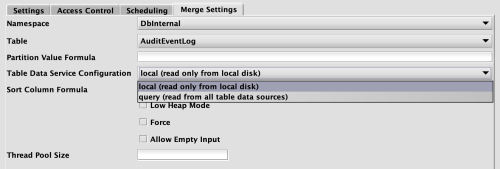
When "Data Merge" is selected as the Configuration Type in the Persistent Query Configuration Editor, the Merge Settings tab becomes available. This tab includes a drop-down list for Table Data Service Configuration.
Items in this list will show any configured descriptions. Note that:
- If any Table Data Service configurations have the tag
merge, then only instances with that tag will be included in the drop-down list. - If any Table Data Service configuration has the tag
default, that item will be selected by default for a new query of this type.
For example:
The default selection is local. Because local and query include the tag merge, they appear in the drop-down list below. The default selection is local:
Data filters
Filters specify which services apply to a given data location, or which locations apply to a given service. In the filters section, which may be used within many of the primary sections discussed above, a single filter may be defined, or an array of filters. A location will be accepted if any defined filter accepts it.
There are two ways to specify these filters: using Query Language or Attribute Values. The filter attributes for the two modes are mutually exclusive.
Query language filters
Filter attributes whereTableKey and whereLocationKey contain boolean clauses in the Deephaven query language. These clauses can define the following:
NamespaceSet (String)-NamespaceSetisUserorSystem, and divides tables and namespaces betweenUserandSystem.Namespace (String)TableName (String)Online (Boolean)- Online tables are those that are expected to change, or tick. This includes system intraday tables and all user tables.Offline (Boolean)- Offline tables are those that are expected to be historical and unchanging. This is system data for past dates, and all user tables.OnlineandOfflinecategories both include user data, soOfflineis not the same as!Online.InternalPartition (String)ColumnPartition (String)-whereLocationKeyqueries apply to the Location Key (InternalPartitionandColumnPartition) associated with a given Table Key.
If your sequence of filters relies on externally changing values such as the date, then you must provide a consistent view of those values for each routing decision. For the common case of currentDateNy(), you can use the alternative com.illumon.iris.db.v2.locations.CompositeTableDataServiceConsistencyMonitor.consistentDateNy() function. For arbitrary functions, you guard instances with the FunctionConsistencyMonitor defined in com.illumon.iris.db.v2.locations.CompositeTableDataServiceConsistencyMonitor.INSTANCE.
Examples
The following example filters to System namespaces except LASTBY_NAMESPACE, for the current date and the future:
The next example filters to the same tables, but for all dates before the current date:
Unlike the first two filters, the following example includes all locations for these tables:
Attribute Values filter
This type of filter allows you to stipulate specific values for the named attributes. Since multiple filters can be specified disjunctively, you can build an inclusive filter by specifying the parts you want included in separate filters.
The attributes for a filter are:
namespaceSet-UserorSystem.namespace- The table namespace must match this value.tableName- The table name must match this value.online-trueorfalse.online==falsemeans historical system data, or any user data.online==truemeans intraday system data, or any user data.class- This specifies a fully qualified class name which can be used to evaluate locations. This class must implementDataRoutingService.LocationFilterorDataRoutingService.TableFilter, or both (which is defined asDataRoutingService.Filter).
A filter may define zero or more of these fields. A value of "*" is the same as not specifying the attribute. A filter will accept a location if all specified fields match.
Examples
There are several ways to specify filters in the YAML format, as illustrated in the examples below.
Inline map format:
Map elements on separate lines:
An aray of filters. Each filter can be inline or on multiple lines:
An empty filter:
No filter (same as an empty filter)
YAML file validation tool
Deephaven includes a tool to validate data routing service configuration files, which can be used before putting them on a system. This will test for various common errors in the YAML file, and is performed by invoking a Java class, VerifyDataRoutingConfiguration. This can be accomplished in one of two ways: via validate_routing_yml, or directly via Java.
Running each respective command should return 0 for a successful parse, and non-zero otherwise. The parsing or IOException will be printed on failure.
validate_routing_yml script
A script named validate_routing_yml is provided in /usr/illumon/latest/bin. This script takes a YAML filename to be validated as a parameter.
Example command
Example output
Java
Note that the location specified for the workspace must be a directory, or creatable as a directory, in which the user has write permission.