Your AI writes your morning market briefing
Deephaven + MCP = automated analysis of overnight moves, portfolio impact, and what to watch
April 17 2026

It's 6:47 AM. You haven't had coffee yet. And you've already got 30 minutes of catch-up ahead of you — overnight futures, Asian closes, figuring out which position moved while you slept. By the time you have a clear picture, the window for acting on it is shrinking.
That 30 minutes is the most valuable part of your trading day. It shouldn't be manual.
Here's what we built: an AI analyst that runs at 6:30 AM without you. By the time you open Slack, it's already:
- Scanned overnight futures and Asian market closes.
- Checked your portfolio against pre-market moves.
- Identified the three things you actually need to know.
- Written a briefing in plain English.
Your AI analyst never sleeps. By the time you wake up, it's already done the work.
You could build this in a couple of hours on a Saturday afternoon — Deephaven, MCP, and a few free data APIs. It'll literally take you longer to perfect the prompt than to wire up the system.
What we're building
A system that:
- Pulls live market data — futures, indices, your watchlist.
- Connects to an AI agent via MCP.
- Generates a morning briefing automatically.
- Delivers it wherever you want (Slack, email, dashboard).
The AI doesn't just summarize numbers. It interprets them: "Tech futures are down 1.2% on NVIDIA guidance concerns — your NVDA position is likely to open lower."
The data layer
First, we need market data. This demo uses yfinance — no API key required. If you have a paid subscription (Bloomberg, Refinitiv, your broker's API), the swap is straightforward: replace the fetch function and keep everything else.
Note
The code in this post is designed to run in a Deephaven console. If you haven't set up Deephaven yet, please refer to the Quickstart guide for instructions on using Docker or pip. The setup process takes less than five minutes. Once Deephaven is running, be sure to install the additional dependencies in your environment.
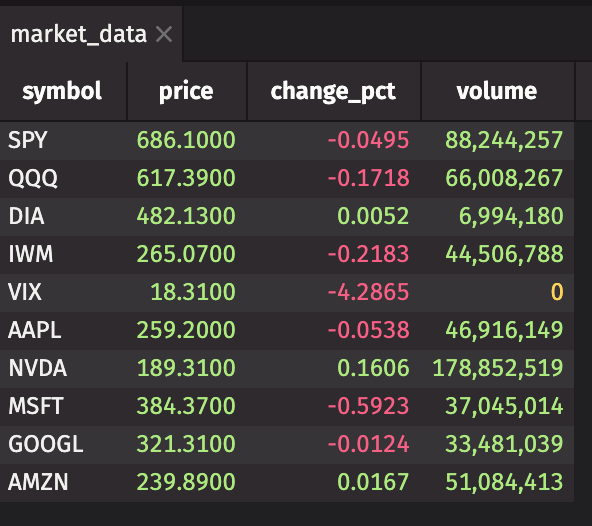
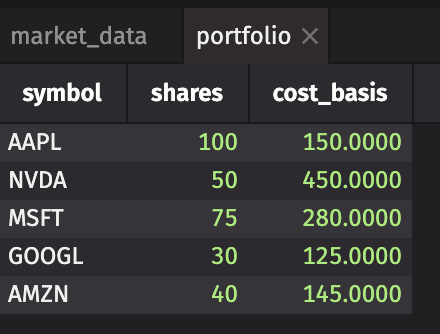
Add your portfolio:
Join them for real-time P&L:
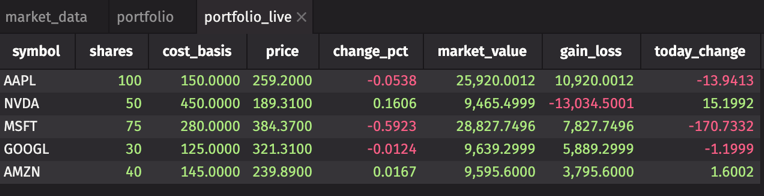
Your portfolio now ticks with the market. That's the foundation. What matters is what you do with it.
Connect your AI analyst
With Deephaven MCP, your AI agent can read your tables, run queries, and return answers — without you writing a single query. If you ran the install above, the MCP package is already there.
Open ~/Library/Application Support/Claude/claude_desktop_config.json (macOS) and add:
Create deephaven_mcp.json:
Restart Claude Desktop. When the Deephaven tools appear, Claude can see market_data and portfolio_live directly. Use this to explore and refine your prompt. This post uses Claude Desktop, but Cursor, Windsurf, and any other MCP-compatible agent work identically — see the MCP setup guide for per-tool steps.
This is your interactive development environment. Once your prompt is dialed in, the next step is automating it.
The morning briefing prompt
The prompt is where most of the actual work happens. With Deephaven MCP connected, your AI can query the tables directly — so you tell it what to look for, not what numbers to crunch.
Paste this into your AI tool:
Automating the delivery
MCP is your interactive development environment — explore the data, ask questions, refine the prompt until it gives you exactly what you want. Once it's dialed in, automate it.
For the scheduled run, you go direct: a Python script that connects to Deephaven, fetches your live tables, builds the prompt with real numbers embedded, and calls Claude's API — no human in the loop. Save this as briefing.py:
Put your API keys in a protected env file:
Schedule with cron:
Note
For this to run unattended at 6:30 AM, Deephaven must be running and your setup code must have already executed. Keep deephaven-server alive as a background process and use a startup script to re-create the tables after any restart.
What the briefing looks like
Here's what it actually produced:
☀️ Morning Market Briefing — April 14, 2026
Market overview: Indices are quiet. SPY, QQQ, DIA, and IWM all within ±0.25%. One significant mover: VIX down 5.5% to 18.1 — the only name crossing the 1% threshold. Volatility is compressing. No macro alarm bells today.
Your portfolio: Total exposure: $83,448. Today's projected P&L: -$169.
Key movers:
- Worst: MSFT — down 0.59%, costing -$171 today. Responsible for nearly all of your daily loss. Still $7,828 above cost basis.
- Best: NVDA — up 0.16%, adding +$15. Still deeply underwater ($450 cost vs. $189 price, -$13,034 unrealized), but the trend is your friend this morning.
- AAPL, GOOGL, AMZN are essentially flat.
Watch today: MSFT is the only name that moves the needle on your daily P&L. If it can't hold $384, expect your -$169 to worsen. NVDA's continued upward momentum is the single most important thing for your long-term portfolio recovery. VIX at 18 with a 5% drop signals a calm open — no reason to be defensive.
Generated at 6:30 AM ET
The AI doesn't just read numbers. It tells you what they mean for your positions.
Why this matters
You could build this in fragments: pandas for data, ChatGPT for analysis, and cron for scheduling. People do. It works until your data goes stale, your paste overflows the context window, or the scheduling silently breaks.
Here the data is always live — market_data polls yfinance every minute. The AI queries it at runtime, not from a stale export. When you add a position to portfolio, the prompt includes it automatically. When NVDA gaps down at 4 AM on earnings, your 6:30 briefing already knows. Nothing to rebuild.
Make it yours
Start smaller than you think you need to.
- Install Deephaven — free, 5 minutes.
- Set up MCP — connect your AI.
- Add your data feeds — Alpha Vantage, Yahoo Finance, or your broker's API.
- Customize the prompt — what do you want to know each morning?
Start simple: just ask about your portfolio.
You ask:
The AI responds:
The AI does the analysis. You drink your coffee.
By the time you open your laptop, the work is already done.
When you need more
Everything in this post runs on pip-installed Deephaven Community Core — free, open-source, runs on your laptop.
One thing to be realistic about: if the Deephaven process restarts, market_data stops ticking until you re-run the setup code. For a personal setup, add the server and a setup script to your @reboot crontab, or use a process supervisor like supervisord to keep both alive.
So, here's when teams talk to us about Enterprise:
- Persistent queries. Your setup code runs automatically every time the server starts — no manual intervention, no missed briefings.
- Your data lives behind a firewall. Enterprise connects to internal feeds, data lakes, and trading systems without exposing them.
- Multiple people need access. Role-based permissions, audit logging, and SSO for your whole desk.
- Uptime matters. Managed infrastructure, monitoring, and support SLAs — your 6:30 AM briefing can't fail on earnings day.
- Scale beyond one user. When your PM, analysts, and risk team all want their own AI briefings hitting the same real-time data.
Start with the personal setup. When you need it production-ready for a team, we can help with that too.
What's next
This is just the beginning. Once your AI analyst is connected:
- Intraday alerts: "NVDA just broke below your stop-loss level."
- Research on demand: "What's the correlation between VIX and my portfolio?"
- Strategy backtesting: "How would this portfolio have performed in 2022?"
The data's already there. You'll run out of questions before you run out of answers.
Questions or want to share your own AI briefing setup? Join us on Slack.