The median of medians is wrong: true medians in Deephaven rollups
Formula aggregations bring median, percentile, and any custom statistic to every level of a rollup
November 6 2026


Your housing report has a rollup: country, then region, then state, then city. Every analyst on the team wants the same number at every level: the median sale price. Means are easy to roll up, but one $9 million mansion drags them upward, which is why housing data is reported as medians.
Deephaven 42 gives you that number. Put a formula aggregation like median(Price) in a rollup, and it runs against every sale under each node, so every level shows the true median. The rollup still updates in real time as new sales arrive.
That beats the usual shortcut, which is to take the median of each city and then the median of those. In this post's example, the shortcut overstates the West's median price by more than $300,000.
Why a median doesn't roll up
A sum rolls up cleanly. The total for a region is the sum of its state totals, so the engine can compute each level from the level below. Counts, minimums, and maximums work the same way.
A median doesn't. The median of a region depends on every sale in it, not on its states' medians. Here is the region-level arithmetic for the three West cities in this post's example:
| City | Sales | Median price |
|---|---|---|
| San Francisco | 300 | $1,298,000 |
| Fresno | 1,500 | $388,000 |
| Seattle | 900 | $856,000 |
The median of those three medians is Seattle's $856,000. But Fresno accounts for 1,500 of the West's 2,700 sales, so the West's real median sale is far lower: $554,500. The median of medians ignores how many sales sit behind each number.
This is also why agg.median and agg.pct raise not supported for rollup(). The built-in rollup aggregations compute each level from the one below, and a median can't be computed that way. Before version 42, a Deephaven rollup had no way to show a median. Formula aggregations take a different route, shown in the next section.
A median depends on every value underneath it. You can't build it from the medians of the groups below.
Medians and percentiles in a rollup
The example generates 11,600 home sales across eight cities. Prices follow a log-normal distribution, the usual shape for housing prices: most sales cluster around the city's typical price, with a long tail of expensive homes. The random seed is fixed, so you'll see the same numbers this post reports.
A formula aggregation applies any query-language expression to the group of values under each key. In a rollup, it does that at every node, from each city up to the root. So median(Price) at the West node receives all 2,700 West sale prices, not three city medians.
Here is home_prices in the IDE, with every level expanded:
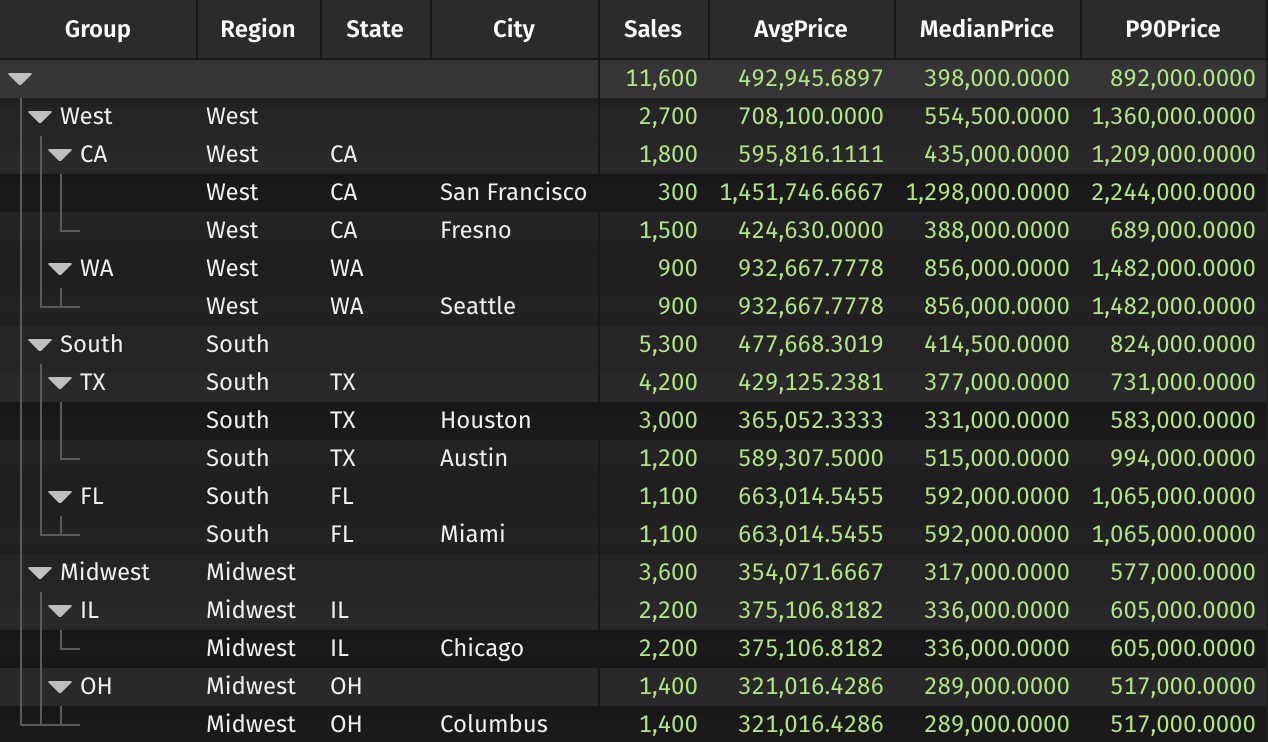
Three things stand out:
- The mean runs high everywhere. Nationally it's $492,946 while the median is $398,000, because expensive homes stretch the tail.
- The West's median is $554,500, not $856,000. Fresno's 1,500 sales pull it down, as they should.
- The 90th percentile shows how far that tail reaches. One in ten West sales closed above $1.36 million.
median and percentile are only two of the functions you can use. Any expression over the group's values works, so you can combine them: percentile(0.75, Price) - percentile(0.25, Price) gives the interquartile range, and percentile(0.9, Price) / median(Price) measures how far the high end stretches past a typical sale. Before version 42, a rollup had no way to compute either.
Check the numbers yourself
You don't have to take the rollup's word for it. A plain agg_by computes the median for a single level directly, and agg.median works there. This block computes the true regional medians and, for comparison, the median of the city medians:
The true medians match the rollup's MedianPrice at each region. The shortcut misses by $301,500 in the West and $100,500 in the South. In the Midwest it happens to land close, which is exactly what makes it dangerous: it looks right often enough to go unnoticed.
It keeps working as sales tick in
A rollup over a ticking table updates in real time, and formula aggregations update with it. This block feeds the same eight markets with ten new sales per second:
Open live_prices in the IDE and expand a region. The counts climb, and the medians settle toward each market's typical price as sales accumulate.
What it costs
A median can't be built from the level below, so the engine doesn't try. At each node, the formula receives the full group of values beneath it, and the root node receives the whole table. When a sale arrives, Deephaven re-evaluates the formula for that sale's city, state, region, and root.
For a median, that's the price of a correct answer. For statistics that do roll up, such as sums and counts, use the built-in aggregations like agg.sum_ and agg.count_, which update each level from the one below. If you write a custom formula that also rolls up, pass reaggregating=True to agg.formula and the engine applies it to the child results instead of to every row. The rollup reference shows how.
Building your own front end? Expand to any depth
A rollup like home_prices opens fully collapsed, so a dashboard user sees one root row and has to click down to the regions they care about. Deephaven 42 adds expand-to-depth to the JavaScript API for hierarchical tables: instead of expanding nodes one at a time, a single call opens a node and a set number of levels below it. This opens the root plus regions and states, and leaves cities collapsed:
Passing true instead of a number expands every level, the same as expandAll(). It's a good fit for dashboards that should always open at the same level of detail.
Try it yourself
Roll up your own data with true medians in minutes:
- Try Deephaven in your browser with no installation.
- Install Deephaven locally. Formula aggregations in rollups require version 42 or later.
- Paste the examples above into the IDE, then swap in your own table and
bycolumns. - Read the rollup reference for formula reaggregation and the
__FORMULA_DEPTH__and__FORMULA_KEYS__variables, which let a formula behave differently at each level.
The next time a summary table shows you a median, check where it came from. If you have questions or want to show us what you're rolling up, join us on Slack.