consume

consume reads a Kafka stream into an in-memory table.

Syntax

Parameters

ParameterTypeDescription
kafka_configdict

Configuration for the associated Kafka consumer and the resulting table. Once the table-specific properties are stripped, the remaining one is used to call the constructor of org.apache.kafka.clients.consumer.KafkaConsumer; pass any KafkaConsumer-specific desired configuration here.

topicstr

The Kafka topic name.

partitions optionallist[int]

An int list of partition numbers to subscribe to. The default is to subscribe to all partitions. Specify partitions as a comma-separated list; e.g.,partitions=[1, 3, 5 ] to only listen to partitions 1, 3, and 5.

offsets optionaldict[int, int]
  • ALL_PARTITIONS_DONT_SEEK (default) - Only recieve new messages produced after this call is processed (default). This matches the default if offsets is not specified.
  • ALL_PARTITIONS_SEEK_TO_END - Go to the newest available message for every partition.
  • ALL_PARTITIONS_SEEK_TO_BEGINNING - Go to the oldest available message for every partition.
  • { _number_ : _offset_, ... } Map partition numbers to numeric offsets or one of the constants DONT_SEEK, SEEK_TO_END, SEEK_TO_BEGINNING.
    • For example, { 1 : SEEK_TO_END, 3 : SEEK_TO_BEGINNING, 5 : 27 } means:
      • Start from the last message sent in partition 1.
      • Go to the oldest available message in partition 3.
      • Start with offset 27 in partition 5.
key_spec optionalKeyValueSpec

Specifies how to map the Key field in Kafka messages to table column(s). Any of the following found in deephaven.stream.kafka.consumer can be used:

  • simple_spec - Creates a spec that defines how a single column receives a key or value field from a Kafka message when consuming a Kafka stream.
  • avro_spec - Creates a spec that defines how to use an Avro schema when consuming a Kafka stream.
  • json_spec - Creates a spec for how to use JSON data when consuming a Kafka stream.
  • protobuf_spec - Creates a spec for parsing a Kafka protobuf stream. Uses the schema, schema_version, and schema_message_name to fetch the schema from the schema registry, or uses message_class to get the schema from the classpath.
  • object_processor_spec - Creates a Kafka key-value spec implementation from a named object processor provider.
  • KeyValueSpec.IGNORE - Ignore the field in the Kafka event.
  • KeyValueSpec.FROM_PROPERTIES (default) - The kafka_config parameter should include values for dictionary keys deephaven.key.column.name and deephaven.key.column.type for the single resulting column name and type.
value_spec optionalKeyValueSpec

Specifies how to map the Value field in Kafka messages to table column(s). Any of the following found in deephaven.stream.kafka.consumer can be used:

  • simple_spec - Creates a spec that defines how a single column receives a key or value field from a Kafka message when consuming a Kafka stream.
  • avro_spec - Creates a spec that defines how to use an Avro schema when consuming a Kafka stream.
  • json_spec - Creates a spec for how to use JSON data when consuming a Kafka stream.
  • protobuf_spec - Creates a spec for parsing a Kafka protobuf stream. Uses the schema, schema_version, and schema_message_name to fetch the schema from the schema registry, or uses message_class to get the schema from the classpath.
  • object_processor_spec - Creates a Kafka key-value spec implementation from a named object processor provider.
  • KeyValueSpec.IGNORE - Ignore the field in the Kafka event.
  • KeyValueSpec.FROM_PROPERTIES (default) - The kafka_config parameter should include values for dictionary keys deephaven.key.column.name and deephaven.key.column.type for the single resulting column name and type.
table_type optionalTableType

One of the following TableType enums:

  • TableType.append() - Create an append-only table.
  • TableType.blink() (default) - Create a blink table.
  • TableType.ring(N) - Create a ring table of size N.

Returns

An in-memory table.

Examples

In the following example, consume is used to read the Kafka topic testTopic into a Deephaven table. Only the first two positional arguments are required to read a Kafka stream into a Deephaven table.

  • The first positional argument, {'bootstrap.servers': 'redpanda:9092'}, is a Python dictionary that is standard for any Python library consuming messages from Kafka. This dictionary gives the underlying Kafka library information about the Kafka infrastructure.
    • Here, the host and port for the Kafka server to use to bootstrap the subscription are specified. This is the minimal amount of required information.
    • The value redpanda:9092 corresponds to the current setup for development testing with Docker images (which uses an instance of redpanda).
  • The second positional argument is the name of the topic (testTopic).

The above result table

In the following example, consume is used to read Kafka topic share_price with additional settings enabled and a specific key_spec spec and value_spec defined.

  • partitions is set to ALL_PARTITIONS, which listens to all partitions.
  • offsets is set to ALL_PARTITIONS_DONT_SEEK, which only listens to new messages produced after this call is processed.
  • key_spec is set to simple_spec('Symbol', dht.string), which expects messages with a Kafka key field of type string, and creates a Symbol column to store the information.
  • value_spec is set to simple_spec('Price', dht.double), which expects messages with a Kafka value field of type double, and creates a Price column to store the information.
  • table_type is set to TableType.append(), which creates an append-only table.

The above result table

In the following example, consume reads the Kafka topic share_price with an additional dictionary set and keys ignored.

  • deephaven.partition.column.name is set to None. The result table will not include a column for the partition field.
  • key_spec is set to IGNORE. The result table will not include a column associated with the Kafka field key.

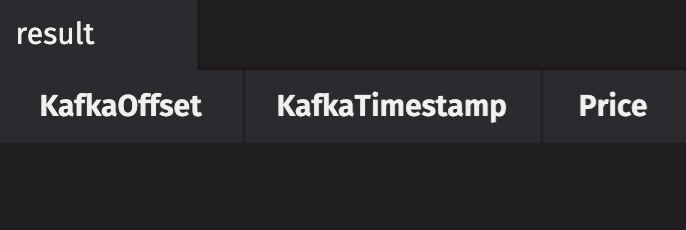
The above result table

In the following example, consume reads the Kafka topic share_price in JSON format.

The above result table

The following example also reads the Kafka topic orders in JSON format, but this time, uses a Jackson provider object processor specification.

In the following example, consume reads the Kafka topic share_price in Avro format.
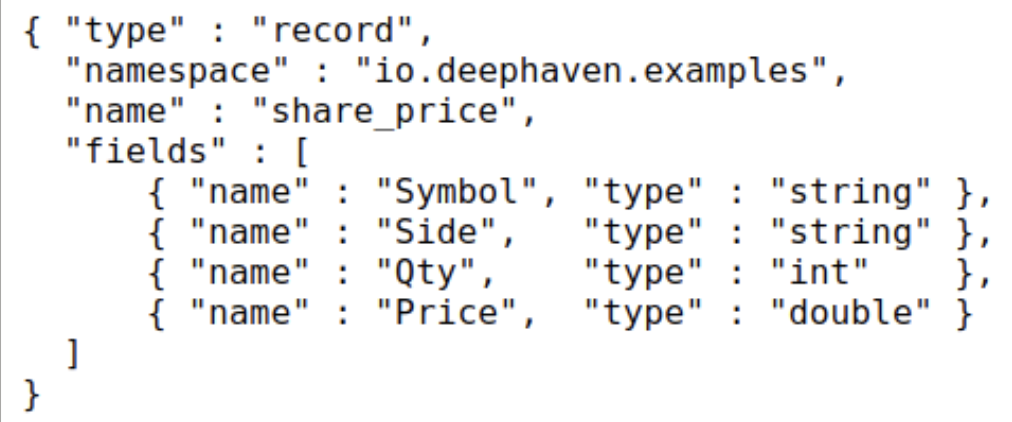
The Avro file that the above example reads from The above result table