Ingest binary log data into system tables
Deephaven provides a Persistent Query (PQ) type for ingesting binary log files directly into intraday Deephaven tables. Binary logs are normally processed by a tailer in real time and ingested by a Data Import Server. The typical use for this tool would be the (re)ingestion of old logs if an error occurred during the initial ingestion or if the original table data is lost.
The following assumes that a schema matching the binary log file has already been deployed.
Binary log import Persistent Query
Binary log files may be ingested to an intraday table using a Persistent Query (PQ) configured for binary log ingest. This method allows you to schedule and manage imports directly from the Deephaven UI.
To create a Binary Log Import Persistent Query (PQ), click the +New button above the Query List in the Query Monitor and fill in the options.
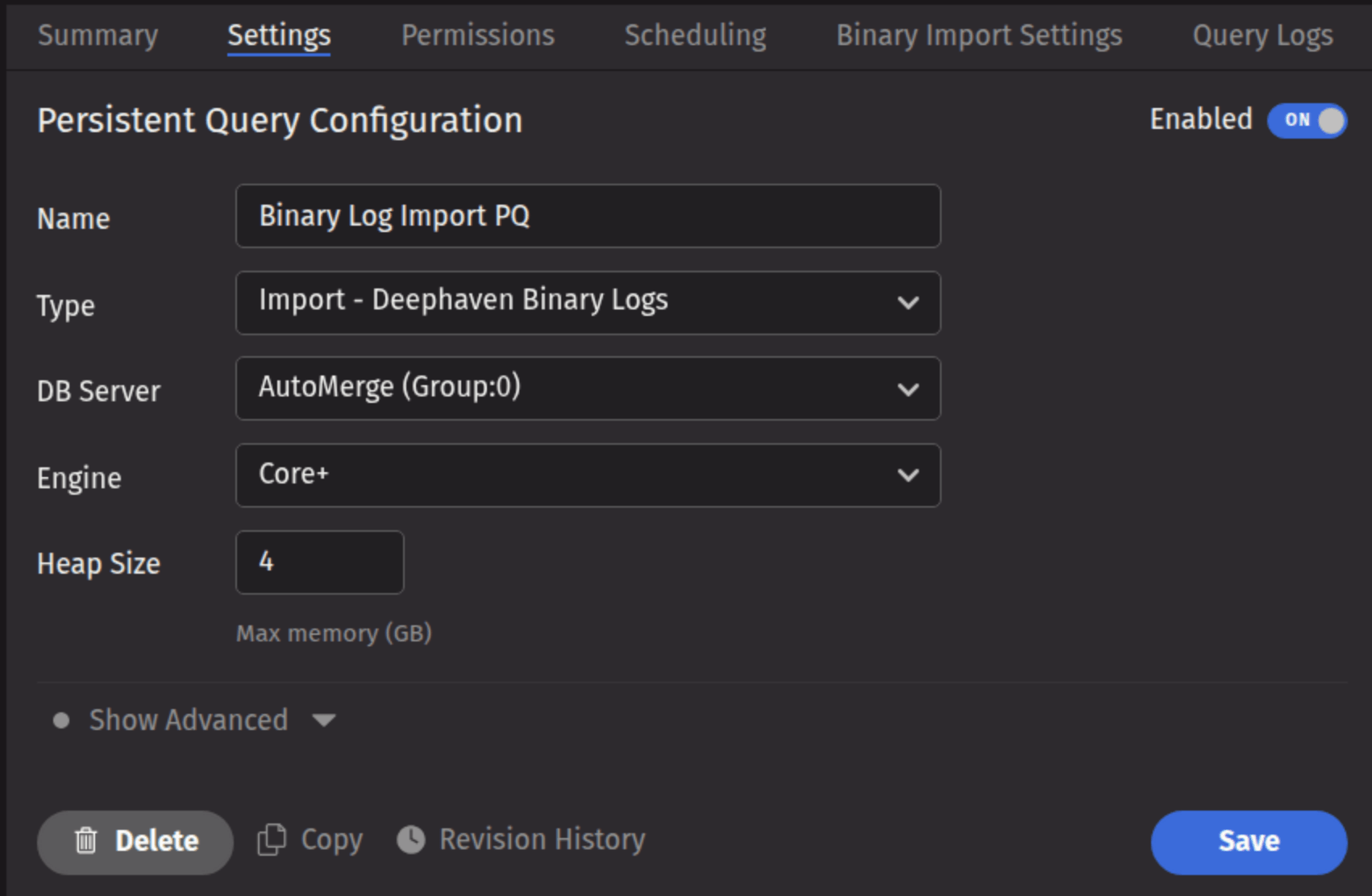
- Name your query appropriately, as it will appear in the Query List.
- Select the type Import - Deephaven Binary Logs.
- Select an appropriate DB Server (import PQs must use a merge server).
- Choose the Engine (Core+ or Legacy).
- Select an appropriate value for Heap Size.
- Options available in the Show Advanced Options section of the panel are typically not used when importing or merging data.
This screenshot shows a binary log import PQ called Binary Log Import PQ using the Core+ engine.
- The Permissions tab gives the query owner the ability to authorize Admin and Viewer Groups for this query.
- The Scheduling tab provides options on when the PQ should run.
Click the Binary Import Settings tab to choose the options pertaining to importing a Binary Log file.
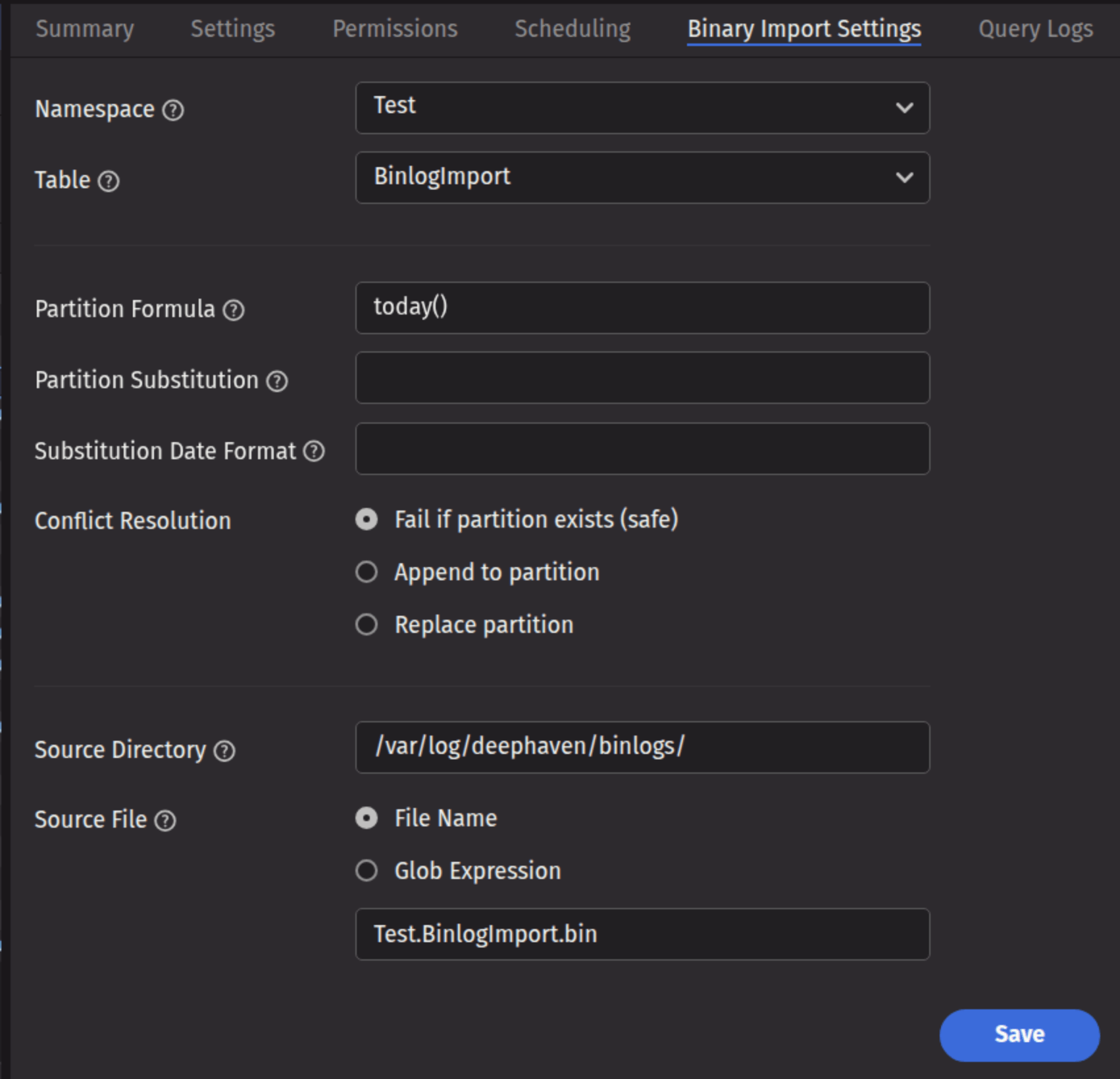
This screenshot shows the panel for a table called BinlogImport in the namespace Test.
Binary import settings
- Namespace: The namespace into which you want to import the data.
- Table: The table into which you want to import the data.
- Partition Formula: A formula that specifies the partition into which the data is imported. If a literal partition value is used it will need to be surrounded by quotes. For example:
today()or"2017-01-01" - Partition Substitution: A token that is substituted with the result of the partition formula wherever specified in the source directory, source file, or source glob, to allow the dynamic determination of these fields. For example, if the partition substitution is "PARTITION_SUB", and the source directory includes "PARTITION_SUB" in its value, that PARTITION_SUB will be replaced with the partition value determined from the partition formula.
- Substitution Date Format: The date format that will be used when a Partition Substitution is used. The standard Deephaven date partition format is
yyyy-MM-dd(e.g., 2018-05-30), but this allows substitution in another format. For example, if the filename includes the date inyyyyddMMformat instead (e.g., 20183005), that could be used in the Substitution Date Format field. All the patterns from the JavaDateTimeFormatterclass are allowed. - Conflict Resolution: Determines what happens if data is found in the fully-specified partition for the data. The fully-specified partition includes both the internal partition (unique for the import job) and the column partition (usually the date), as identified by the Partition Formula field.
- Fail (safe) - The import job will fail if existing data is found in the fully-specified partition.
- Append - Data will be appended to it if existing data is found in the fully-specified partition.
- Replace - Data will be replaced if existing data is found in the fully-specified partition. This does not replace all data for a column partition value, just the data in the fully-specified partition(s).
- Source Directory: The path to where the binary log file is stored on the server on which the query will run.
- Source File: The specifics of which file or files to import.
- File Name: The input field identifies the name of the single binary log file to import.
- Glob Expression: The input field identifies an expression to match multiple binary file names.
Command-line import
Warning
Command-line binary log imports with iris_exec are deprecated and will be removed in the release after Grizzly Plus.
Binary Log files may be imported from the command line using the Legacy engine.