How to use Deephaven in a local development environment
This guide shows how to create Java or Groovy projects that use Deephaven libraries for local development and unit testing.
Prerequisites
- Java 17 or later
- Gradle 7.3+ or Maven 3.6+
- An IDE such as IntelliJ IDEA (recommended), Eclipse, or VS Code
Two common scenarios:
- Deephaven Community only — For standalone applications, utilities, or projects that use the open-source Deephaven engine. All artifacts are available on Maven Central with no special credentials.
- Core+ worker projects — For code that runs inside a Core+ worker, such as custom query utilities or Persistent Query scripts. These require access to the Deephaven artifact repository.
Note
Download example projects:
- Example Gradle project files (Core+)
- Example Maven project files (Core+)
Set up your IDE
This guide uses IntelliJ IDEA with the Gradle build tool. Start by creating a new Java project:
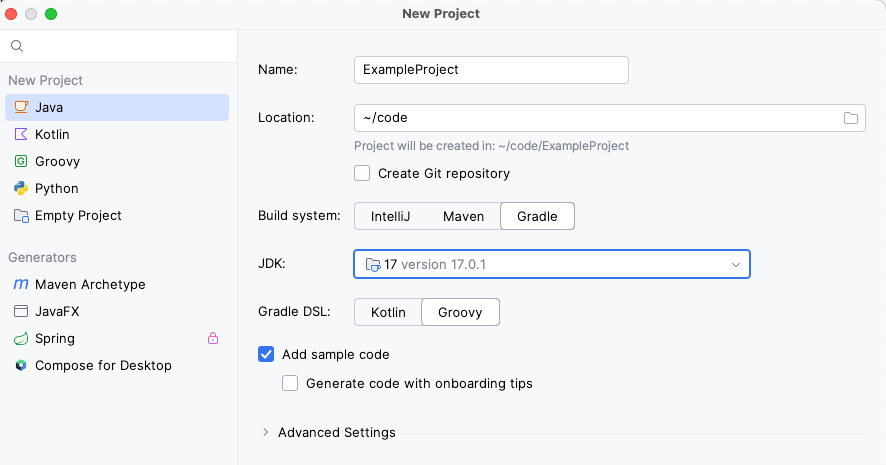
Your new project will include a build.gradle file that looks something like this:
Tip
The dependency versions shown are examples. Update them as appropriate for your project.
Deephaven Community projects
For standalone projects using only the open-source Deephaven engine, add the dependencies you need from Maven Central. No special repository or credentials are required.
Gradle
Maven
Common Deephaven Community modules
| Module | Description |
|---|---|
deephaven-engine-api | Core Table API interfaces. |
deephaven-engine-table | Table implementations and operations. |
deephaven-extensions-csv | CSV file reading and writing. |
deephaven-extensions-parquet-table | Parquet file reading and writing. |
deephaven-Configuration | Property and configuration utilities. |
deephaven-log-factory | Logging infrastructure. |
deephaven-engine-test-utils | Test utilities and execution context setup. |
Core+ worker projects
For code that runs inside a Core+ Enterprise worker — such as custom utilities for Persistent Queries — you need access to the Deephaven artifact repository in addition to Maven Central.
Gradle
Add the Deephaven and Confluent Maven repositories. Set repoUser and repoPassword in your gradle.properties file:
Add the Core+ Database module along with the Deephaven Community dependencies:
Maven
Add the repositories to your pom.xml:
Add the dependencies:
Configure Maven credentials in your ~/.m2/settings.xml:
JVM arguments
Deephaven logs JVM internal stats that require the following JVM argument: --add-exports=java.management/sun.management=ALL-UNNAMED
Gradle:
Maven:
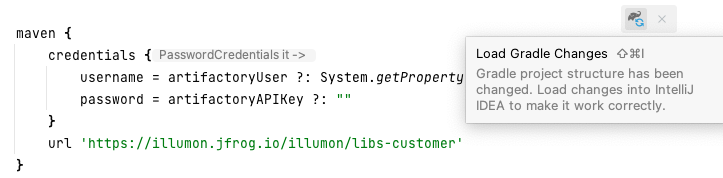
Refresh the project
After configuring dependencies, refresh the project to download the specified modules.
Local unit testing
The execution context setup described below works for both Deephaven Community and Core+ projects. The example that follows uses a mocked Core+ Database, but you can adapt the pattern for standalone Deephaven Community projects by loading test data directly with CsvTools or ParquetTools.
It may be helpful to have some local test data you can use to test your query's correctness.
The following simple query calculates the average and mid prices of stocks for a given day:
It uses helper methods written in Java for unit testing:
We need some test data. The file src/test/resources/StockTrades.csv contains ten rows from the LearnDeephaven.StockTrades dataset, and src/test/resources/StockQuotes.parquet contains ten rows from LearnDeephaven.StockQuotes.
Note
The CSV file contains AAPL and GOOG data, while the Parquet file contains additional symbols including PFE. Both files use the same date (2017-08-25) for filtering.
The following snippets are part of a complete test class shown at the end of this section.
- The first step is to open an
ExecutionContextso that we can use table operations likewhereandupdateView. It is best practice to close theExecutionContextafter you are done with it. The@BeforeAlland@AfterAlltags are used so that we only need to do this once for all tests.
- Mocking the
Databaseto read test data in the form of CSVs or Parquet files is easier than creating a real Database instance. This example uses Mockito:
- Use the methods described in the Core Extract table values guide document to test your queries:
The full test class:
Connect to a remote DB
Client applications can connect to Deephaven server installations to run queries on a remote database. See the Core+ Java Client for more information.
Related documentation
- Core+ Java Client — connect to Deephaven server installations to run queries on a remote database
- Execution Context
- Extract table values