Merging data
Both batch and streaming data are generally put into intraday tables when imported. Once imported, merge functionality is used on a day-to-day basis to move data from the intraday database to the historical database. See the Deephaven Data Lifecycle for further details. Merge functionality is provided by several scripts, classes, and the Data Merge Persistent Query type.
Merging is normally performed for persistent data on a nightly basis. Similar to imports, merges may be performed by Persistent Query jobs ("Data Merge Job") or scripted for maximum flexibility. If the intraday source data is from an in-worker DIS (such as a Kafka ingester), the DIS must be running for the merge to be successful.
Merging is closely related to Validation. After each merge operation, it is useful to verify the data quality and, optionally, delete the intraday source data.
Data Merge Query in the Web UI
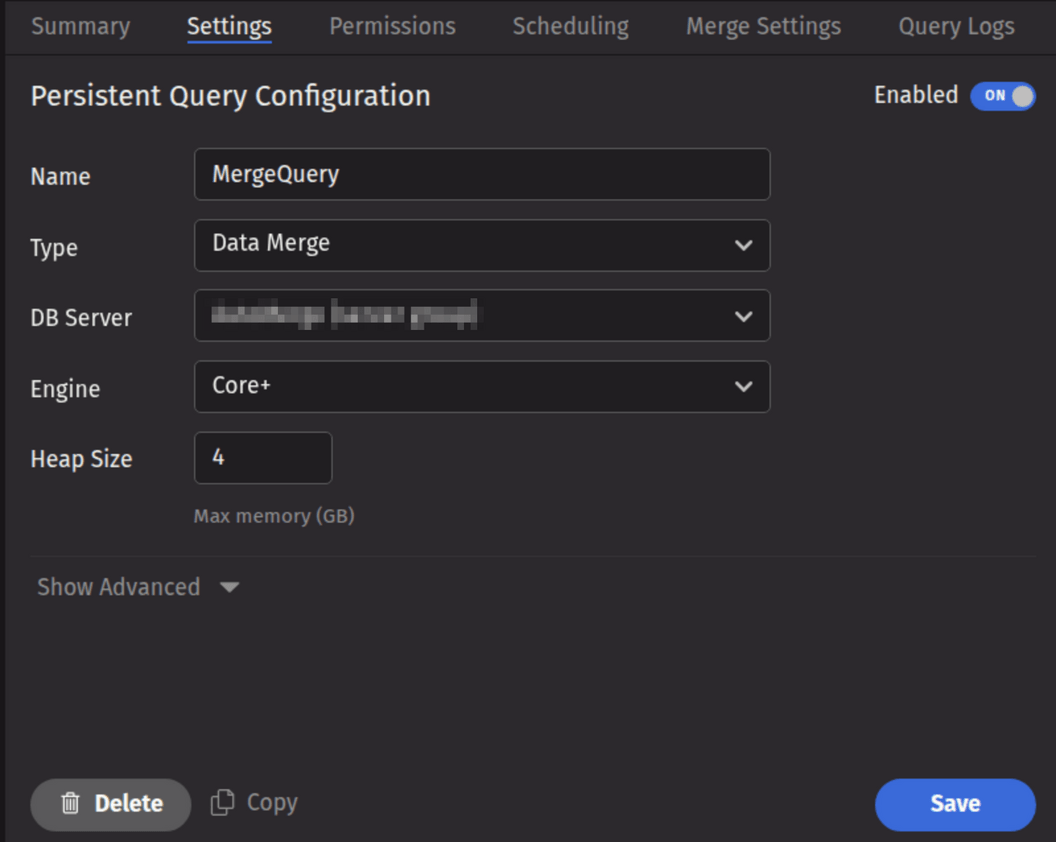
A Data Merge Query may be created and configured in the Deephaven Web UI. To create a Data Merge Query, click the +New button above the Query List in the Query Monitor and select the type Data Merge.
Note
Data Merges for multi-partition imports cannot be run from a standard Merge Persistent Query. This must be done from a bulk-copied Merge query, or from a custom script in a Batch Query - Import Server Persistent Query.
- To proceed with creating a merge query, select a DB Server and enter the desired value (in GB) for Heap Size.
- Options available in the Show Advanced section of the panel are typically not used when importing or merging data. To learn more about this section, please refer to Show Advanced Options.
- The Permissions tab presents a panel with the same options as all other configuration types, and gives the query owner the ability to authorize Admin and Viewer Groups for this query. For more information, please refer to Access Control.
- Clicking the Scheduling tab presents a panel with the same scheduling options as all other configuration types. For more information, please refer to Scheduling.
- The Merge Settings tab presents a panel with merge-specific options, described in the Merge Settings section below.
Merge settings
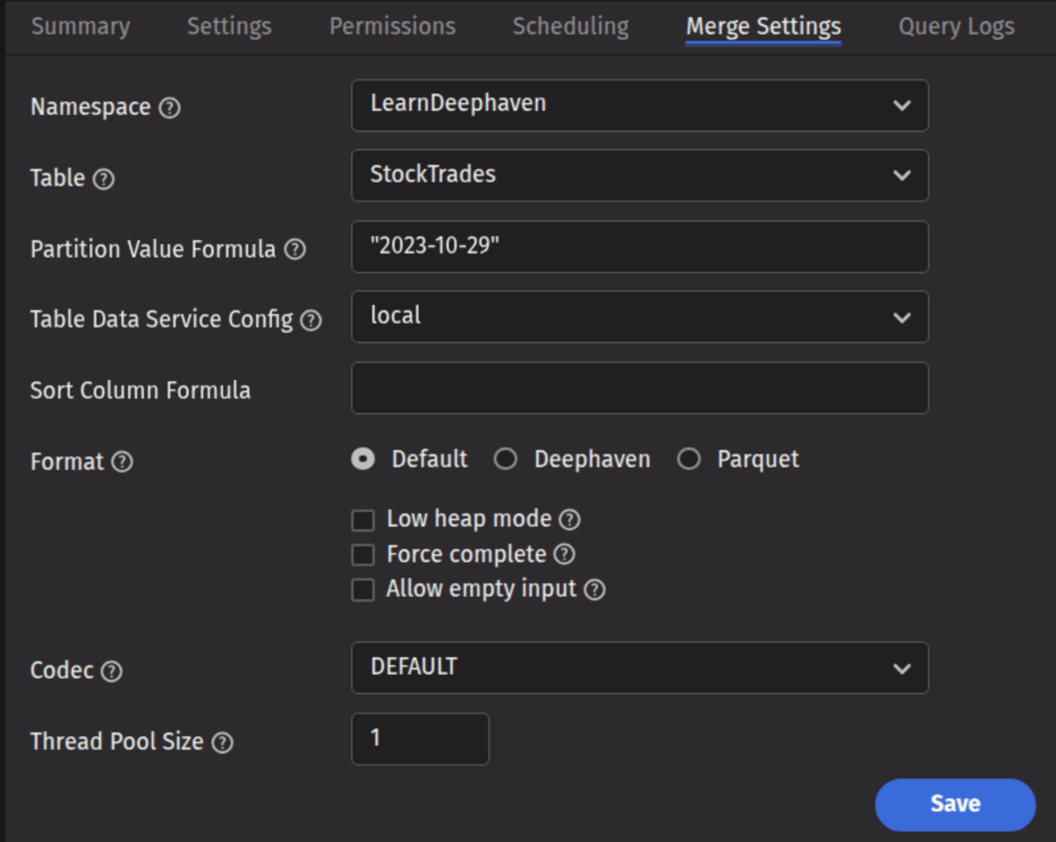
- Namespace: This is the namespace for the data being merged.
- Table: This is the table for the data being merged.
- Partition Value Formula: This is the formula needed to partition the data being merged. If a specific partition value is used, it will need to be surrounded by quotes. In most cases, the previous day's data will be merged.
- For example:
io.deephaven.time.calendar.Calendars.calendar().minusDays(today(), 1)- This merges the previous day's data based on the calendar defined by the configuration value ofCalendar.default. "2023-10-29"- This merges the data for the date "2023-10-29" (the quotes are required).
- For example:
- Partition Value Formula: This is the formula needed to partition the data being merged. If a specific partition value is used, it will need to be surrounded by quotes. In most cases, the previous day's data will be merged.
- Table Data Service Configuration: Specifies how input data to merge should be found and read. The drop-down menu is populated according to the Data Routing Configuration.
- Sort Column Formula: An optional formula to sort on after applying column groupings. The formula can be a simple column name (e.g.,
Timestamp) or a formula that could be passed toupdateView()(e.g., to sort onTimestamp, binned by second:upperBin(Timestamp, 1000000000L)). If no formula is supplied, data will be in source order except where reordered by grouping. - Format: Specifies the format in which the data should be written.
- Default: Use the default merge format from the schema. If none is defined, use Deephaven.
- Deephaven: Write the data in Deephaven format.
- Parquet: Write the data in Parquet format.
- Codec: For a Parquet merge, it specifies the compression codec to be used.
DEFAULT: Use the default codec (either from the schema, or if none is defined there, SNAPPY).<Other values>: Use the chosen codec. See Parquet Codecs for further details.
- Low Heap Mode: Whether to run in low heap usage mode, which makes trade-offs to minimize the RAM required for the merge JVM's heap, rather than maximizing throughput. The two modes are referred to as "low heap" and "maximum throughput" throughout this document.
- Force: Whether to allow overwrite of existing merged data.
- Allow empty input: Whether to allow merge process to run when the source data is empty.
- Thread Pool Size: The number of concurrent threads to use when computing output order (i.e., grouping and sorting) or transferring data from input partitions to output partitions. More threads are not always better, especially if there is significant reordering of input data which may degrade read cache efficiency.
For batch data, a Data Merge query will typically have a dependency on an import query configured in the Scheduling tab. For streamed data a merge query may simply run at a specified time.
Data Merge queries can also be created from an import query. After creating an import query with the Schema Editor, you will be prompted to create the corresponding merge. If you have an import query without a corresponding merge, an option to Create Merge Query will be available in the Query Config panel's context (right-click) menu.
Parquet Codecs
Parquet allows the use of various compression codecs. Supported codecs include UNCOMPRESSED and SNAPPY.
Merge from Script (Merge Builder)
The most flexible method for merging data into Deephaven is via Groovy/Python scripting. Data Merge scripts may be deployed through a Batch Query - Import Server Persistent Query. Merge tasks are executed from a script using a "builder" class. The underlying logic is identical to that accessible from a Data Merge Persistent Query.
Note
There is currently no ability to execute a Merge Script from the command line. If this functionality is required, please see the Legacy Merge documentation.
Merge API Reference
The Merge API exposes all the options available to the Data Merge Query, along with a number of additional abilities such as providing a source table and multi-level sorting. Options are specified to a builder-instance, and the compiled options are used to construct a MergeData instance by way of the MergeDataFactory, and executed by calling the merge() method of the instance.
The general pattern for performing a merge into a Deephaven format table is:
Primarily, the following options are available:
BaseMergeOptions, which consists of the common options for all merge types.DeephavenMergeOptions, which consists of options specific to Deephaven format tables.IcebergMergeOptions, which consists of options specific to Iceberg tables.
BaseMergeOptions.Builder options
| Syntax | Argument Type(s) | Req? | Default | Description |
|---|---|---|---|---|
namespace | String | Yes | Target namespace to merge into. | |
tableName | String | Yes | Target table name to merge into. | |
sourceTable | Table | Exactly one of sourceFromNamed | Provide the source table to merge. Must not be refreshing. | |
sourceFromDb | Database | Exactly one of sourceFromNamed | Resolve the source table from db using the target namespace + tableName. Example: builder.sourceFromDb(db). | |
sourceFromNamed | Database, String, String | Exactly one of sourceFromNamed | Resolve from db using an explicit source namespace and tablename. Example: builder.sourceFromNamed(db, "raw_ns", "raw_tbl"). | |
partitionValue | String | Conditionally (required when using sourceFromDb/sourceFromNamed if partitionFormula not provided) | Column-partition value used to filter the resolved source table (also used as the write partition for Deephaven Layout tables). Mutually exclusive with partitionFormula. Example: "2018-05-01". | |
partitionFormula | String (Java expression returning String) | Conditionally (required when using sourceFromDb/sourceFromNamed if partitionValue not provided) | Compiled at runtime to produce the partition value; expression is wrapped as return <expr>; with DateTimeUtils available. Mutually exclusive with partitionValue. Example (literal): partitionFormula("today()"). | |
addSortOrder | String... | No | — | Defines sort-ordering for each destination internal partition. Each column included in this call will be appended as an ascending-order sort. Examples: addSortOrder("date","region"). |
addAllSortOrder | Iterable<String> | No | — | Bulk-append sort by column names. Same rules as addSortOrder. Example: addAllSortOrder(List.of("date","region")). |
addSortColumns | SortColumn... | No | — | Defines sort-ordering for each destination internal partition. Example: addSortColumns(SortColumn.desc(ColumnName.of("ts")), SortColumn.asc(ColumnName.of("userId"))). |
addAllSortColumns | Iterable<? extends SortColumn> | No | — | Bulk-append sort by typed sort columns. Example: addAllSortColumns(List.of(SortColumn.asc(ColumnName.of("date")), SortColumn.desc(ColumnName.of("ts")))). |
addSortDirectives | SortDirective... | No | — | Append pre-parsed sort directives (advanced). Useful if you already have SortDirective objects. Example: addSortDirectives(SortDirective.of("userId")). |
addAllSortDirectives | Iterable<? extends SortDirective> | No | — | Bulk-append pre-parsed sort directives. Example: addAllSortDirectives(directivesList). |
codecName | String | No | "SNAPPY" | Optional compression codec name. Used when writing Parquet or to an Iceberg table. Examples: "ZSTD", "SNAPPY". |
allowEmptyInput | boolean | No | false | Permit the merge to execute even if the source resolves to zero rows. Example: builder.allowEmptyInput(true). |
Quick usage patterns
DeephavenMergeOptions.Builder options
| Syntax | Argument Type(s) | Req? | Default | Description |
|---|---|---|---|---|
baseOptions | BaseMergeOptions | Yes | — | The base merge configuration as explained earlier. |
storageFormat | DeephavenMergeOptions.StorageFormat | No | null which means use schema-defined format | Output format override. Allowed values:DeephavenV1Parquet. Example: builder.storageFormat(StorageFormat.Parquet). |
mergeRoot | String | No | Value of OnDiskDatabase.rootDirectory property | Alternate destination root for the merge output (useful for testing or non-default export paths). Example: builder.mergeRoot("/tmp/merge_out"). |
metadataIndexType | DeephavenMergeOptions.IndexOptions | No | IndexOptions.ADDITIVE | Index update policy for metadata. Allowed values:ADDITIVE (default)VALIDATEIGNORE. Example: builder.metadataIndexType(IndexOptions.VALIDATE). |
writablePartitionFilter | WritablePartitionFilter | No | (null) | Optionally exclude some target internal partitions from being written. Example: builder.writablePartitionFilter(myFilter). |
lowHeapMode | boolean | No | false | Attempt to reduce heap usage at the cost of throughput. Example: builder.lowHeapMode(true). |
writeThreadPoolSize | int | No | -1 (one thread per destination) | Max concurrent write threads. Example: builder.writeThreadPoolSize(8). |
force | boolean | No | false | Permit overwriting pre-existing partitions on disk. Example: builder.force(true). |
Quick usage patterns
IcebergMergeOptions.Builder options
| Syntax | Argument Type(s) | Req? | Default | Description |
|---|---|---|---|---|
baseOptions | BaseMergeOptions | Yes | — | Base merge configuration as explained earlier. |
catalogOptions | BuildCatalogOptions | No | null — derive from target table schema | (Advanced) Override the Iceberg catalog used to access the table (instead of schema-implied). Example: builder.catalogOptions(myCatalogOpts). |
tableOptions | LoadTableOptions | No | null — derive from target table schema | (Advanced)Override the Iceberg table load options (e.g., explicit TableIdentifier, custom resolver). Example: builder.tableOptions(LoadTableOptions.builder().id(id).build()). |
addPartitionValues | String... | Yes (at least one of addPartitionValues / addAllPartitionValues) | — | Add partition path elements used for writing. Each value should be in Key=Value form and must match the Iceberg table’s partition spec order and arity. Example (single key): addPartitionValues("Date=2024-01-01"). Example (two keys): addPartitionValues("Date=2024-01-01", "IntCol=1"). |
addAllPartitionValues | Iterable<String> | Yes (at least one of addPartitionValues / addAllPartitionValues) | — | Bulk add partition path elements. Same rules as above. Example: addAllPartitionValues(List.of("Date=2024-01-01", "IntCol=1")). |
Quick usage patterns
Merge heap calculations and merge throughput optimizations
For merge optimization, the following considerations matter:
- Total available heap.
- Data buffer cache.
- Number of concurrent threads.
- Low heap usage mode (or, alternatively, maximum throughput mode).
- Number of output partitions, and their relative performance.
A good rule of thumb for determining the best value for your merge heap size is to double the value of the data buffer pool size.
buffer pool size = max_over_all_columns(column file data size) * nWritingThreads / nOutputPartitions / 0.85
heap size = 2 * buffer pool size
You will need to give your process enough heap to accommodate the requisite data buffer pool, which must be able to accommodate the number of columns you will write concurrently.
Non-POSIX filesystem considerations
Some non-POSIX filesystems will fail to merge with a Failed to rename exception. The configuration property of MergeData.forceCloseHandles = true may be added to a properties file within an appropriate scoping or added to individual PQs with the Extra JVM Argument of -DMergeData.forceCloseHandles=true to force all cached filehandles to be closed. This will allow the subsequent rename to succeed, but may cause unnecessary open/close churn in an interactive worker.