Data validation
Before performing research and analyses, it is imperative to ensure you have quality data. Deephaven has built-in methods to validate the data in your tables: validation on intraday data, and validation after intraday data is merged into the historical data. In either case, validation is optional.
The following validation modes are available:
SIMPLE_TABLEvalidates a simple leaf-node table.FULL_INTRADAYvalidates all intraday data for a specific column partition value (usually a date).FULL_DATABASEvalidates all historical data for a specific column partition value.
Data Validation Query
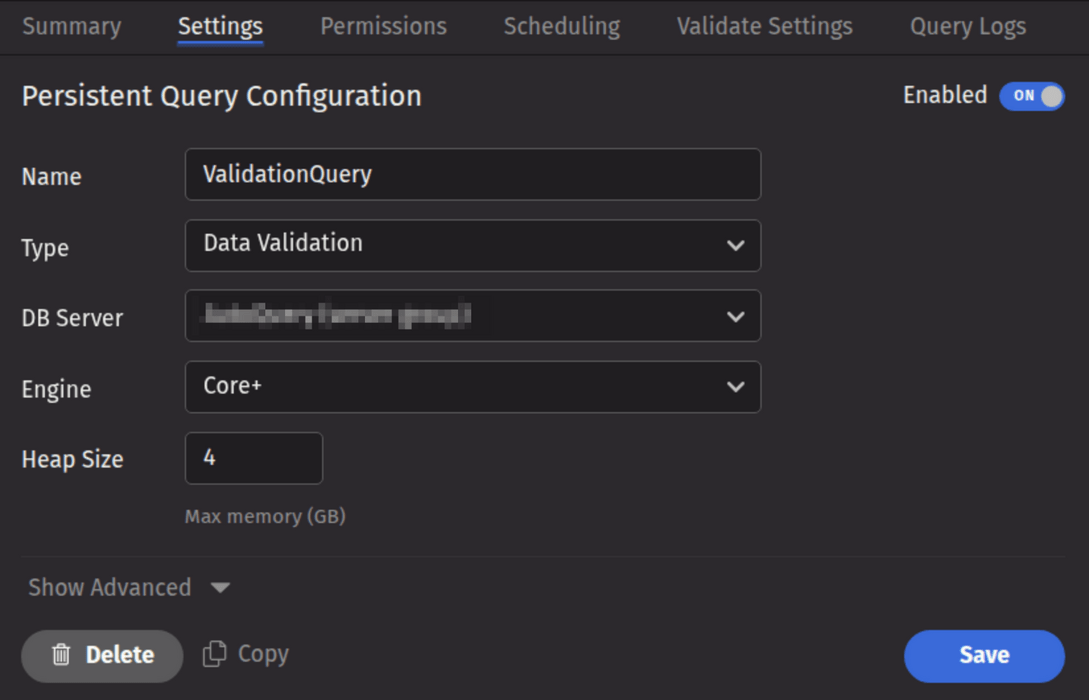
Data Validation queries are used to validate data that has been loaded into Deephaven, and to delete intraday data (usually after it has been merged into the historical database). To create a Data Validation query, click the +New button above the Query List in the Query Monitor and select the type Data Validation.
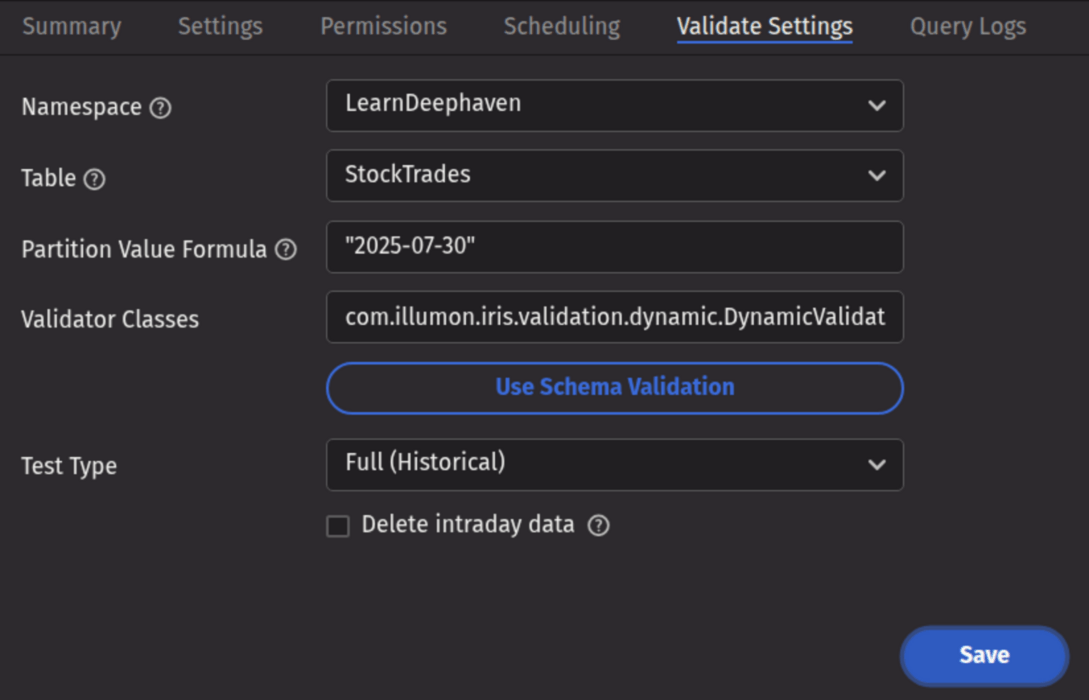
Validate Settings
- Namespace: The namespace for the data being validated.
- Table: The table for the data being merged.
- Partition Value Formula: The formula needed to partition the data being validated. If a specific partition value is used, it will need to be surrounded by quotes. In most cases, the previous day's data will be merged.
- For example:
io.deephaven.time.calendar.Calendars.calendar().minusDays(today(), 1)- This validates the previous day's data based on the calendar defined by the configuration value ofCalendar.default. "2025-07-30"- This merges the data for the date "2025-07-30" (the quotes are required).
- For example:
- Partition Value Formula: The formula needed to partition the data being validated. If a specific partition value is used, it will need to be surrounded by quotes. In most cases, the previous day's data will be merged.
- Validator Classes: The list of classes to be run to validate the data. Multiple validator classes can be specified as comma-separated values. If Schema Validation is selected, the default schema-based validation class (
com.illumon.iris.validation.dynamic.DynamicValidator) will be selected, in which case the validation from the table's schema will be used. An additional built-in validator,io.deephaven.enterprise.validators.generic.RowCountValidator, may be used to validate that intraday and historical row-counts match. If no classes are chosen, no validation will be performed (this may be useful if the query is only being used to delete intraday data, butRowCountValidatoris recommended before deletion if the data has been merged to historical). - Test Type: Determines the type of test being run. Options include the following:
- Simple (Intraday) - runs a simple test against intraday data.
- Full (Intraday) - runs the full test suite against intraday data.
- Full (Historical) - runs the full test suite against historical data.
- Both (Intraday and Historical) - runs the full test suite against both intraday and historical data.
- Delete Intraday Data?: When selected, the corresponding intraday data will be deleted. If a validator is selected, the intraday data will be deleted only if all validation succeeds. If no validator is selected, the intraday data will be deleted when the query runs.
Note
If the validation query is running without intraday deletion, the DB Server can be a query server or a merge server. If intraday deletion is selected, the DB Server must be a merge server.
When a Data Validation query fails, the first validation failure exception is shown in the query panel's "ExceptionDetails" column, along with the total number of failures. Additional failures are not shown in the query panel, but must be retrieved from the text log, or from the Process Event Log for the worker that ran the query.
The Process Event Log for the most recent worker is available in the Event Logs section of the Query Logs tab for the Persistent Query.
The following example query retrieves the failed test case details from the Process Event Log for a specific worker. The process info ID should be visible in the query panel:
Note
A Data Validation query will delete intraday data by sending command messages to the Data Import Server's tailer service. If the import server is configured with a disabled tailer port, the alternate method described below is required.
The data deletion commands will be sent to all import servers that handle the table specified in the query. This behavior can be changed by using the alternate deletion method described below, or by changing the data routing.
- Create a Table Data Service in the data routing configuration that omits one or more import servers.
- Specify that TDS with
-DDataRoutingService.tableDataService=tds_name(wheretds_nameis the TDS you created) in the Extra JVM Arguments field on the Settings tab.
If the Java property -DvalidatePQ.delete.legacy=true is specified in the Extra JVM Arguments field on the Settings tab of the validation query, then data is deleted directly from disk. This is only possible when the data on disk is accessible to the validation query.
Validation Approaches
Deephaven validation methods are available in both schema-based validation and through custom-written validator classes. Schema-based validation examines a table's schema file and runs the validation options specified therein. Custom-written validators use a specified class with specific validation functions for a given table. Further details for each option are provided below.
Schema-Based Validation
Validation can be placed directly into a table's schema file by adding a <Validator> element, which contains the desired methods to be applied.
The following is the schema for the AuditEventLog (with logging information removed):
Note
The authenticated user is the user that authenticated to the system to initiate the operation. The effective user is the user that Deephaven enforces permission checks for.
A simple example is the "Operate as" login, where the user who logs in (via password, SAML, etc.) is the Authenticated User, and the user they are operating as is the Effective User.
To add validation to a schema, add a <Validator> element as a child of the <Table> element in the .schema file.
Each element in the validator section represents one method from the DynamicValidator class to be run. The name of the element is the method name. Parameters to that method are passed in as attributes in the XML attribute. For example, to validate that the column Timestamp is of DBDateTime type, use:
<assertColumnType column= "Timestamp" type="java.time.Instant"/>
It is necessary to include the fully qualified class names.
To specify which validation mode should be run, use the TableValidationMode attribute:
<assertColumnGrouped TableValidationMode="FULL_DATABASE" column="SerialNumber"/>
Tip
The arguments to the parameters are in quotes; e.g., TableValidationMode="FULL_DATABASE" rather than TableValidationMode=FULL_DATABASE, or removeNull="false" rather than removeNull=false.
The validator element looks like:
The validation schema for this table tests that:
- Column data types are as listed in the schema.
ServerHostis a grouping column.ServerHostandProcesscolumns have no null entries.Detailshas no more than 25% null values.- The number of rows is between 1 and 999999999.
- The table is not five times smaller or larger than expected.
Base Validators
Base validators are useful when the same validation tests are to be run against multiple tables. To avoid unnecessary duplication, these tests should be placed into their own validation file and included in each table's schema validation section.
Let's say there are 10 time-series tables in the database. For all of these tables, we need to validate that each Timestamp column is ascending, and that each Date column has no more than 5% null values. To avoid duplicating this validation check in all 10 schemas, create a XML file called "timeseries.validator" (a regular XML file with a .validator extension) to use a base validator.
As in a schema, Base validators are a <Validator></Validator> element with methods as components, just as in the schema validation explained above. The timeseries.validator XML file would look like the following:
To use a base validator, specify the "base" attribute of the <Validator> tag in the .schema file. Set the base attribute equal to the validator's name. For example, the timeseries.validator above is used as follows:
Validators can specify more than one base validation file. These are delimited with commas:
Note
This means that base validators cannot use commas in their name.
Base validators themselves can specify other base validators. In the above example, suppose seven of the 10 tables have a grouping column named Sym. We want to use the same checks as in the timeseries.validator, and we want to add an additional check that Sym is a grouping column. We create a new base validator symgrouping.validator, which includes timeseries.validator:
We then use symgrouping.validator as the base for the seven tables with the Sym grouping column:
The BaseValidators.resourcePath configuration parameter defines the base validator file locations. This parameter typically specifies a semicolon-delimited list of directories, but the delimiter can be changed with the SchemaConfig.resourceDelimiter property.
Running Schema Validation and Evaluating Results
Schema-based validation can be run by creating a Data Validation persistent query. It is designed to run quickly and return a one-size-fits-all result. For the examples above, the results look like this:
2020-04-30 16:55:50.723 WARN PASS: DataQualityTestCase: FracWhere(isNull(Date); 0.0 ;0.0)(table:StockTrades, column:isNull(Date), actual:0.0, min:0.0, max:0.0)
2020-04-30 16:55:54.042 WARN PASS: DataQualityTestCase: AllValuesInDistinctSet(table:StockTrades, column:Exchange, actual:0, min:0, max:0)
A failing test result might look like this:
2020-04-30 16:58:08.493 ERROR FAIL: DataQualityTestCase: AllValuesInDistinctSet(table:StockTrades, column:Exchange, actual:1, min:0, max:0)
This indicates that there is a problem, but there is not much detail about what exactly is wrong. In fact, this result will be mixed in with a full stack trace and results from other validation rules, which may themselves have passed or also failed and generated stack traces.
To get more details about the results, it is necessary to query the ProcessEventLog and retrieve details to see more WARN and ERROR output.
In the Query Config panel or Query Monitor, a successful validation run will show as Completed, and one that failed to validate the data will show Error or Failed status. In either case, the worker will have a ProcessInfoId that can be used to query additional data from the system logs.

The above query allows the validation run output to be seen in a somewhat easier-to-view format.

Finding more about data that caused individual tests to fail will generally require writing a specific query. For instance, if assertNotNull had failed for the Exchange column, it would simply report that there were one or more null values in this column. A query like this would be needed to show the actual rows that have unexpected null values for Exchange:
Some of these investigative queries can be more complex. For example, this is the form to show violations of assertStrictlyAscending:
This query uses column array access to compare values to next and previous values and to retrieve rows that are out of order for the TradeID column. It does this both for rows where the TradeID is less than or equal to the one of the previous row and those where it is greater than or equal to the value in the next row. By merging these two sets of rows, it becomes easier to see which pairs of rows are causing the validation to fail. Note that, unlike the other examples, this example is not based on demo data. The LearnDeephaven namespace does not contain any datasets appropriate for validation by assertStrictlyAscending.
Writing Custom Validation Classes
Validation methods can also be run through Java by writing custom validator classes. A custom validation class is a Java class that extends io.deephaven.enterprise.validation.DataQualityTestCase and implements test methods. These test methods should be public void methods, which will be discovered and run by the validation logic. The validator class has access to all the test methods described earlier.
If a test method should only be run for a particular mode, the following annotations can be used:
@TableValidationMode_FullDatabase@TableValidationMode_SimpleTable
For example:
Custom Validation Class Example
A DataQualityTestCase takes a ValidationTableDescription in its constructor. A ValidationTableDescription gives all information needed for validation.
Converting Custom Legacy Validation to Core+ Validation
Several steps are required to convert a Legacy Validation class to a Core+ Validation class.
- A number of supporting classes have changed package-path from
com.illumon.iris.validationtoio.deephaven.enterprise.validation, including:DataQualityTestCaseValidationTableDescriptionImportDetailsUtils- ... The following Deephaven classes have changed from Legacy to Core+, which may require several changes each. For a more in-depth analysis, see Converting Legacy scripts to Core+ Scripts Cheat Sheet.
Databasedb.i(...)->db.liveTable(...)db.t(...)->db.historicalTable(...)
Table- Numerous changes
TableDefinition- Please note that the Core+
TableDefinitiondoes not include grouping information. Grouping information may still be accessed from theSchemaor from the shadowedTableDefinitionprovided by theSchema.
- Please note that the Core+
com.fishlib.io.logger.DelegatingLoggerImplmay be replaced withio.deephaven.internal.log.LoggerFactory.getLogger()- The
ValidationTableDescriptionhas been modified to removeFullTableLocationKeyimplementation details. ThegetLocation()method has been replaced with a self-reference to theValidationTableDescriptioninstance to simplify the porting process. The following new methods have been added to theValidationTableDescriptioninterface:String getTableName()- the Table Name for the associatedTableString getNamespace()- the Namespace for the associatedTableString getColumnPartition()- the Partition Value (for the Partition Column) for the associatedTableString getInternalPartition()- the Internal Partition, if applicable, for the associatedTable
Validation Methods
The following is a complete list of the available validation methods in the Deephaven validation framework.
| Method | Description |
|---|---|
assertSize(final long min, final long max) | Asserts the number of rows in the table is in the inclusive range [min,max]. |
assertColumnType(final String column, final Class type) | Asserts that a column is of the expected type. |
assertColumnTypes() | Asserts that all the column types in the data match the schema. |
assertColumnGrouped(final String column) | Asserts that a column is grouped. |
assertAllValuesEqual(final boolean removeNull, final boolean removeNaN, final boolean removeInf, final String column) | Asserts that a column only contains a single value. |
assertAllValuesNotEqual(final boolean removeNull, final boolean removeNaN, final boolean removeInf, final String column) | Asserts that a column does not contain repeated values. |
assertAllValuesEqual(final boolean removeNull, final boolean removeNaN, final boolean removeInf, final String column, final Object value) | Asserts that a column only contains a single value. |
assertAllValuesNotEqual(final boolean removeNull, final boolean removeNaN, final boolean removeInf, final String column, final Object value) | Asserts that a column does not contain the specified value. |
assertEqual(final boolean removeNull, final boolean removeNaN, final boolean removeInf, final String column1, final String column2) | Asserts that all values in column1 are equal to all values in column2. |
assertNotEqual(final boolean removeNull, final boolean removeNaN, final boolean removeInf, final String column1, final String column2 | Asserts that all values in column1 are not equal to all values in column2. |
assertLess(final boolean removeNull, final boolean removeNaN, final boolean removeInf, final String column1, final String column2) | Asserts that all values in column1 are less than all values in column2. |
assertLessEqual(final boolean removeNull, final boolean removeNaN, final boolean removeInf, final String column1, final String column2) | Asserts that all values in column1 are less than or equal to all values in column2. |
assertGreater(final boolean removeNull, final boolean removeNaN, final boolean removeInf, final String column1, final String column2) | Asserts that all values in column1 are greater than all values in column2. |
assertGreaterEqual(final boolean removeNull, final boolean removeNaN, final boolean removeInf, final String column1, final String column2) | Asserts that all values in column1 are greater than or equal to all values in column2. |
assertNumberDistinctValues(final boolean removeNull, final boolean removeNaN, final boolean removeInf, final String columns, final long min, final long max) | Asserts the number of distinct values is in the inclusive range [min,max]. |
assertAllValuesInDistinctSet(final boolean removeNull, final boolean removeNaN, final boolean removeInf, final String column, final Object... expectedValues) | Asserts that all values in a column are present in a set of expected values. |
assertAllValuesInArrayInDistinctSet(final boolean removeNull, final boolean removeNaN, final boolean removeInf, final String column, final Object... expectedValues) | Asserts that all values contained in arrays in a column are present in a set of expected values. |
assertAllValuesInStringSetInDistinctSet(final boolean removeNull, final boolean removeNaN, final boolean removeInf, final String column, final Object... expectedValues) | Asserts that all values contained in string sets in a column are present in a set of expected values. |
assertAllValuesNotInDistinctSet(final boolean removeNull, final boolean removeNaN, final boolean removeInf, final String column, final Object... values) | Asserts that all values in a column are not present in a set of values. |
assertAllValuesInArrayNotInDistinctSet(final boolean removeNull, final boolean removeNaN, final boolean removeInf, final String column, final Object... values) | Asserts that all values contained in arrays in a column are not present in a set of values. |
assertAllValuesInStringSetNotInDistinctSet(final boolean removeNull, final boolean removeNaN, final boolean removeInf, final String column, final Object... values) | Asserts that all values contained in string sets in a column are not present in a set of values. |
assertFracWhere(final String filter, final double min, final double max) | Asserts the fraction of a table's rows matching the provided filter falls within a defined range. |
assertFracNull(final boolean removeNull, final boolean removeNaN, final boolean removeInf, final String column, final double min, final double max) | Asserts that the fraction of NULL values is in the inclusive range [min,max]. |
assertNotNull(final String... columns) | Asserts that the list of columns contains no null values. To use in schema-based validation, place the column list in comma-delimited quotes (e.g., <assertNotNull columns="Owner,Name,Timestamp" />). |
assertFracNan(final boolean removeNull, final boolean removeInf, final String column, final double min, final double max) | Asserts that the fraction of NaN values is in the inclusive range [min,max]. |
assertFracInf(final boolean removeNull, final boolean removeNaN, final String column, final double min, final double max) | Asserts that the fraction of infinite values is in the inclusive range [min,max]. |
assertFracZero(final boolean removeNull, final boolean removeNaN, final boolean removeInf, final String column, final double min, final double max) | Asserts that the fraction of zero values is in the inclusive range [min,max]. |
assertFracValuesBetween(final boolean removeNull, final boolean removeNaN, final boolean removeInf, final String column,final Comparable minValue, final Comparable maxValue,final double min, final double max) | Asserts that the fraction of values between [minValue,maxValue] is in the inclusive range [min,max]. |
assertAllValuesBetween(final boolean removeNull, final boolean removeNaN, final boolean removeInf, final String column, final Comparable minValue, final Comparable maxValue) | Asserts that all values in the column are between [minValue,maxValue]. |
assertMin(final boolean removeNull, final boolean removeNaN, final boolean removeInf, final String column, final Comparable min, final Comparable max, final String... groupByColumns) | Asserts that the minimum value of the column is in the inclusive range [min,max]. To use this rule on the whole data set, use the partitioning column as the sole value for groupByColumns. |
assertMax(final boolean removeNull, final boolean removeNaN, final boolean removeInf, final String column, final Comparable min, final Comparable max, final String... groupByColumns) | Asserts that the maximum value of the column is in the inclusive range [min,max]. To use this rule on the whole data set, use the partitioning column as the sole value for groupByColumns. |
assertAvg(final boolean removeNull, final boolean removeNaN, final boolean removeInf, final String column, final double min, final double max, final String... groupByColumns) | Asserts that the average of the column is in the inclusive range [min,max]. To use this rule on the whole data set, use the partitioning column as the sole value for groupByColumns. |
assertStd(final boolean removeNull, final boolean removeNaN, final boolean removeInf, final String column, final double min, final double max, final String... groupByColumns) | Asserts that the standard deviation of the column is in the inclusive range [min,max]. To use this rule on the whole data set, use the partitioning column as the sole value for groupByColumns. |
assertPercentile(final boolean removeNull, final boolean removeNaN, final boolean removeInf, final String column, final double percentile, final double min, final double max, final String... groupByColumns) | Asserts that the defined percentile of the column is in the inclusive range [min,max]. To use this rule on the whole data set, use the partitioning column as the sole value for groupByColumns. |
assertAscending(final boolean removeNull, final boolean removeNaN, final boolean removeInf, final String column, final String... groupByColumns) | Asserts that sub-groups of a column have monotonically increasing values. Consecutive values within a group must be equal or increasing. To use this rule on the whole data set, use the partitioning column as the sole value for groupByColumns. |
assertStrictlyAscending(final boolean removeNull, final boolean removeNaN, final boolean removeInf, final String column, final String... groupByColumns) | Asserts that sub-groups of a column have monotonically strictly increasing values. Consecutive values within a group must be increasing. To use this rule on the whole data set, use the partitioning column as the sole value for groupByColumns. |
assertDescending(final boolean removeNull, final boolean removeNaN, final boolean removeInf, final String column, final String... groupByColumns) | Asserts that sub-groups of a column have monotonically decreasing values. Consecutive values within a group must be equal or decreasing. To use this rule on the whole data set, use the partitioning column as the sole value for groupByColumns. |
assertStrictlyDescending(final boolean removeNull, final boolean removeNaN, final boolean removeInf, final String column, final String... groupByColumns) | Asserts that sub-groups of a column have monotonically strictly decreasing values. Consecutive values within a group must be decreasing. To use this rule on the whole data set, use the partitioning column as the sole value for groupByColumns. |
assertExpectedTableSize(final int partitionsBefore, final int partitionsAfter, final double min, final double max) | Asserts the number of rows in the table is within a specified fraction of the expected size, determined by looking at the other tables in the database. For example, min=0.8 and max=1.2 would assert the table size is within 80% and 120% of the typical table size. |
assertCountEqual(final boolean removeNull, final boolean removeNaN, final boolean removeInf, final String column, final Object value1, final Object value2) | Asserts that a column contains the same number of rows for two given values. |