Extend Deephaven with custom plugins
What is a plugin?
Plugins are packages that allow you to extend the functionality of your Deephaven installation. In addition to code, plugins may include Deephaven schema and property files, as well as custom monit processes. For example, the Solace integration is a plugin. This guide shows you how to create and deploy your own plugin.
Configure your plugin with Gradle
Refer to the local query development guide for details about how to use Deephaven jars in your development environment. This example also uses IntelliJ IDEA and the Gradle build tool.
Note
Plugin tools support Gradle 7.X.
This is an example build.gradle for a Deephaven plugin. In the following code, we reference the Deephaven Artifact Registry repository, but your organization may not permit directly connecting to external repositories or have an internal mirror.
Note
Legacy JFrog Artifactory URLs (illumon.jfrog.io) are deprecated. Use Google Artifact Registry URLs as shown below.
The buildscript above must be at the top of the file. The Gradle plugin tools provide tasks that enable you to build your plugin.
Apply the Gradle plugin io.deephaven.plugins and give your plugin a name:
Add Maven repositories that allow the Gradle build to import Deephaven jars:
| Repository | Description |
|---|---|
dh-ent-release | Deephaven release artifacts. |
dh-ent-common | Common dependencies. |
After defining pluginName, add:
You must add this after your pluginName and before you define any dependencies.
Edit your gradle.properties to specify the irisVersion and libSource of your project. There are other optional properties available.
| Configuration Property | Description |
|---|---|
pluginVersion | The deployed version of the plugin. |
irisVersion | The version of Deephaven to use. |
fishlibVersion | The version of fishlib to use. |
libSource | The artifact registry repo name to use for Deephaven artifact downloads (e.g., dh-ent-release). Either libSource or snapshotSource must be set. |
snapshotSource | Alternative to libSource. Behaves the same but appends -ro suffix automatically. Either libSource or snapshotSource must be set. |
libPluginSource | The repo name for plugin-only artifact downloads. Defaults to dh-ent-release. |
Finally, we define our plugin's dependencies. The Deps.iris closure will use the above configuration to resolve your dependencies. This example will only use the DB module.
Building your plugin
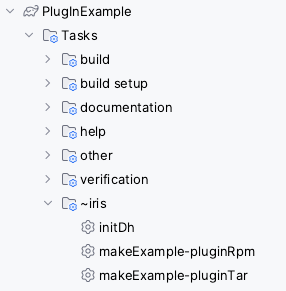
Refresh the Gradle project, and you should see the tasks to package the project as an RPM or a tar file.
Deploying your plugin
Extract the RPM:
or tar package:
Your files will be placed in /etc/sysconfig/deephaven/plugins/<plugin-name>/.
Plugin layout
A few directories are created within the directory /etc/sysconfig/deephaven/plugins/<plugin-name>/.
/bin
The scripts for activating your plugin. Run the included /etc/sysconfig/deephaven/plugins/<plugin-name>/bin/activate.sh script to activate your plugin.
/global
Every jar and directory in /etc/sysconfig/deephaven/plugins/<name>/global will be added to all Deephaven classpaths, except Core+ workers. You should not put files directly in the root global folder, and if you do put class files here, make sure the root package (such as com) is inside a directory (such as classes), and not placed directly into global.
Note
Additional directories are available for more targeted classpath inclusion:
/global— Added to all Deephaven classpaths, except Core+ workers./local— Added only to classpaths of processes defined by the plugin./auth— Added to the authentication server classpath./worker— Added to server-side worker classpaths./client— Distributed to desktop clients via the Client Update Service (CUS)./schema— Schemas deployed to the running system./processes— Process definition files (monit conf, hostconfig, startup script, process type).
By default, this location will include:
- Any jar produced by the Gradle project where you add
apply plugin: 'io.deephaven.plugins'. - Any jar produced by any Gradle project included in
Deephaven { projects = [ ':my', ':plugin', ':projects' ] }. - Any archive added to dependencies
{ global 'some:artifact:id' }of the above Gradle projects. - Everything found in
src/main/global.
/local
The local directory has the exact same semantics as the global directory, except that entries here will only appear in plugin processes' classpaths.
By default, this location will include:
- Any archive added to dependencies
{ local 'some:artifact:id@tar.gz' }(@tar.gzis not required). - Everything found in
src/main/local(this location is configurable).
Note
By default, the extra jars and files will not be available to Core+ workers.
/auth
Every jar and directory in auth will be added to the authentication server classpath.
Use this directory when your plugin provides a custom ClientAuthMethod, AuthModule, or AuthHookModule implementation or other classes that must be visible to the authentication server but not on general worker or client classpaths.
By default, this location will include:
- Any archive added to dependencies
{ auth 'some:artifact:id' }of any bundled Gradle project. - Everything found in
src/main/auth(this location is configurable).
/worker
Every jar and directory in worker will be added to server-side worker process classpaths, loaded alongside global when setting up production classpaths. Items here appear on worker processes but not on the authentication server or desktop client classpaths.
Use this directory for jars or resources that are only needed by Deephaven worker processes (e.g., custom table operations, query-library helpers) and that should not pollute other process types.
By default, this location will include:
- Any archive added to dependencies
{ worker 'some:artifact:id' }of any bundled Gradle project. - Everything found in
src/main/worker(this location is configurable).
/client
Every jar and directory in client will be picked up by the Client Update Service (CUS) and distributed to desktop clients.
Use this directory for jars or resources that must be present on the desktop client classpath (e.g., custom UI panels, client-side authentication modules) but are not needed on the server.
By default, this location will include:
- Any archive added to dependencies
{ client 'some:artifact:id' }of any bundled Gradle project. - Everything found in
src/main/client(this location is configurable).
Note
All non-local classpath types (global, auth, worker, client) are subject to ownership and permission checks at install time. Files must be owned by DH_ADMIN_USER (typically irisadmin), and group/world write permissions are removed automatically.
/schema
Contains all schemas that were included in the plugin at src/main/schema. Use the activate.sh script to deploy these schemas to your cluster.
/processes
The processes directory is used like a filesystem map; each directory in processes is treated as the process name, and inside each of those directories, there are four files. By default, all of these files are generated for you, but you can override them by putting exact-named files in src/main/processes:
For a plugin named myplugin:
| Configuration Property | Description |
|---|---|
myplugin.conf | A monit conf file. By default, delegates to /etc/init.d/iris start myplugin. |
myplugin.sh | A script that will be linked into /usr/illumon/latest/bin/start_myplugin. Necessary only if using /etc/init.d/iris to start your process. |
myplugin.hostconfig | A hostconfig file. Necessary only if using /etc/init.d/iris to start your process. |
type | A file with a value matching an enum name in ProcessType class. The default type is LONG_RUNNING, and is configured in Gradle. |
Example plugin
This example calculates the average prices of stocks for a given day and logs these averages to the Deephaven table MarketData.AvgStockPrice.
We place MarketData.AvgStockPrice.schema at src/main/schema so that it will be included in our plugin. Notice that we specify the logger's package and interface.
The AvgStockPriceLoggerInterface interface extends IntradayLogger. It must use the same package and class name as specified in the schema.
Here is the Java code which does the average price calculations and uses the AvgStockPriceLoggerInterface to log the results.
After this plugin is extracted:
We activate it to place the Java code in the Deephaven classpath, deploy the schema, and generate the AvgStockPriceLogger.
The plugin's jar is placed on the classpath inside <plugin-name>/global. Reload the client update service in order to sync a client with the latest jar files.
We can now use the generated logger and our plugin jar in a Deephaven console: