What is Barrage?
Barrage is Deephaven's streaming data protocol for efficient, real-time table transport between servers and clients. Barrage extends Apache Arrow Flight to support Deephaven's incremental update model, so subscribers receive only the data that has changed rather than the entire table on every update.
Why Barrage?
Two common ways to move real-time data between a server and a client have limitations:
- Polling: Repeatedly fetching entire tables wastes bandwidth and CPU cycles, especially for large tables with small changes.
- Arrow Flight alone: Apache Arrow Flight provides efficient data transport, but lacks native support for incrementally updating datasets. See Barrage vs. Arrow Flight for a feature-by-feature comparison.
Barrage solves these problems by:
- Streaming only the rows that have been added, removed, or modified.
- Supporting viewports so clients can subscribe to just the visible portion of a table.
- Batching updates to balance latency against network efficiency.
When to use Barrage
The following table matches common use cases to the Barrage feature that serves each one. Key concepts explains each feature.
| Use case | Barrage feature |
|---|---|
| Real-time dashboards: Display live-updating tables in a UI | Subscribe to streaming updates |
| Server-to-server data sharing: Move tables between Deephaven instances | Subscribe or snapshot via shared tickets |
| Point-in-time analysis: Work with a fixed copy of a table's current state | Snapshot to get a static copy |
| Large table visualization: Display a scrollable view of a million-row table | Viewports (via the web UI, the JavaScript client, the Java client, or BarrageTableResolver) |
Architecture overview
In the most common setup, one Deephaven server (the local server) captures a table that lives on another (the remote server):
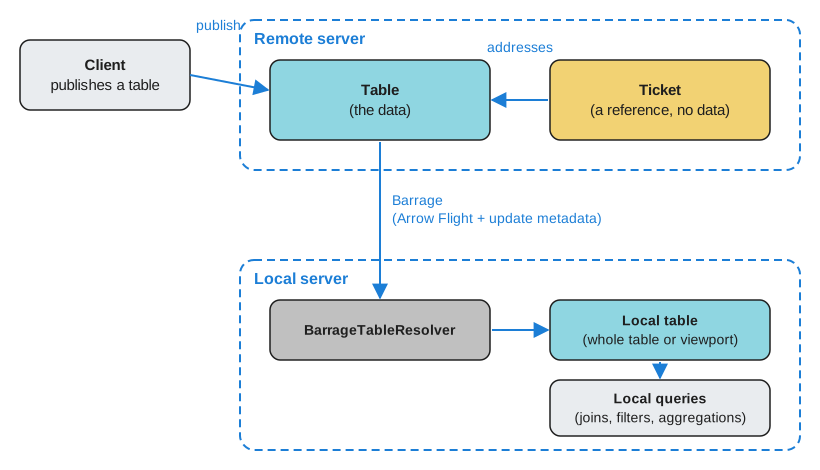
- Remote server hosts a table that a ticket refers to.
- Barrage protocol transports the actual data using Arrow Flight with incremental update metadata.
- Local server subscribes to or snapshots the table and receives a local copy of the data: the whole table, or only a viewport of it. It connects through
BarrageTableResolver, which opens a Barrage session to the remote server. A subscription's copy stays synchronized with the source.
The local copy is an ordinary Deephaven table. Queries on the local server can join, filter, or aggregate it.
Note
Clients that run the full Deephaven engine can perform downstream computation locally. These include the Java client and any Deephaven server, Python or Groovy, that captures tables over Barrage. Other clients, such as the Python client pydeephaven, the JavaScript client, and the C++ client, receive data but rely on the server for query execution.
Key concepts
Shared tickets
A ticket is a reference to a table on a server. It points to the table but does not contain its data. Deephaven has several kinds of ticket, including:
- A scope ticket, which names a variable in the remote server's global scope. Any session, including the local server's Barrage session, can use it.
- An application ticket, which names a field that an Application Mode application exports on the remote server. Any session, including the local server's Barrage session, can use it.
- A shared ticket, which names a table that one session publishes for other sessions to use.
- An export ticket, which refers to a table that a session created and exported to its own client. An export ticket belongs to the client session that created it, so the local server's Barrage session can't use it.
To capture a scope variable or an application field, you can also resolve its URI with ResolveTools.resolve. URI resolution works only against a remote server that allows anonymous authentication.
Other clients or servers can subscribe to or snapshot a shared ticket, which lets a session share a table that isn't in the global scope. The shared ticket stays valid only while the publishing session is open and the published table is alive.
In the following example, the Python client, pydeephaven, publishes the table. The client runs in its own Python process, not in your Groovy server. Your Groovy server is the local server from the architecture overview. The code connects to a remote Deephaven server, creates a ticking table there, and publishes the table to a shared ticket. It then prints the ticket's bytes as a hex string for you to paste into the local server:
table_ref is a reference to the table on the remote server, not a Deephaven table on the local server. Keep the Python process running and client open while the local server captures the table, because the ticket stops working when the publishing session closes. To get the data onto the local server, capture it through the shared ticket, as the next section shows.
Subscriptions vs. snapshots
Barrage supports two primary modes of retrieving data:
-
Subscription: Opens a persistent connection that streams updates as the source table changes. The client receives an initial snapshot followed by incremental updates. Use this for ticking tables you want to monitor in real time.
-
Snapshot: Retrieves a one-time, static copy of the table that doesn't update after Barrage delivers it. Use this for static tables or when you need a point-in-time capture.
This example continues the shared ticket example, which printed the shared ticket as a hex string. To capture the table on the local server:
- Build a
TableSpecfrom the hex string. - Write the remote server's address as a Deephaven URI target, such as
dh+plain://remote-server:10000. - Pass both to the
subscribeorsnapshotmethod ofBarrageTableResolver.
Each method returns a Future. Its get method returns a Deephaven table on the local server:
BarrageTableResolver keeps its connection to the remote server open for later requests.
Note
BarrageTableResolver does not send credentials, so this example works only against a remote server that allows anonymous authentication. A server that allows only the default pre-shared key authentication rejects the connection. The Python publishing code in the shared ticket example also connects anonymously, the default for Session. It can instead pass auth_type and auth_token to use another method that the remote server accepts.
See Capture Python client tables with Barrage for a complete walkthrough that publishes a table from the Python client and captures it on a Groovy server.
Viewports
A viewport defines a window over a table: a set of row positions, typically a contiguous range, and a subset of columns. Viewports are essential for interactive applications where users scroll through large tables. Rather than streaming millions of rows, the server sends only the data visible in the current view.
Deephaven's web UI manages viewports for you. When a user scrolls or resizes a table view, the UI updates its viewport subscription. Applications built on the JavaScript client set the viewport themselves with setViewport.
Viewports are also available from:
- Groovy, through the
BarrageTableResolversubscribeandsnapshotoverloads that take a viewportRowSetand a columnBitSet. - The Java client, through
BarrageSubscription.partialTable.
The following example continues the subscription example. It builds the viewport with RowSetFactory and subscribes to the first 100 row positions of the X column, which is column 1 of the published table:
Note
ResolveTools.resolve subscribes to entire tables only. To limit the rows or columns you receive through it, create a table on the remote server that is already filtered with where or narrowed with view, and resolve that table instead. You can also use the viewport overloads of BarrageTableResolver shown above.
Update intervals and batching
Barrage batches table updates before sending them to subscribers. This batching reduces network overhead when tables update frequently. The update interval is configurable:
-
Server default: The server applies one default interval to every subscription that doesn't request its own. This includes
ResolveTools.resolveandBarrageTableResolversubscribecalls made without options. The update interval section of the Barrage performance guide names the property that sets this default and gives its value. -
Per-subscription: A client can request its own interval for each subscription. From Groovy:
- Build a
BarrageSubscriptionOptionswithminUpdateIntervalMsset to the interval you want. Also setuseDeephavenNulls(true), which the resolver's default options set. - Pass the options to a
BarrageTableResolversubscribeoverload that takes them. These overloads take aDeephavenTarget, not a URI string.
The JavaScript client and the Java client also accept a per-subscription interval.
- Build a
The interval is fixed for the life of the subscription. To use a different interval, create a new subscription.
The following example continues the subscription example. It subscribes to the same table with a five-second interval:
A shorter interval reduces latency but increases network traffic. A longer interval reduces traffic but introduces delay.
Barrage vs. Arrow Flight
Barrage uses the same columnar data format as Arrow Flight and adds the features this page has described for ticking tables:
| Feature | Arrow Flight | Barrage |
|---|---|---|
| Data format | Arrow columnar format | Arrow columnar format |
| Static table transfer | ✅ Supported | ✅ Supported |
| Incremental updates | ❌ Not supported | ✅ Native support |
| Viewports | ❌ Not supported | ✅ Supported |
| Update batching | ❌ N/A | ✅ Configurable |
| Row shifts and modifications | ❌ N/A | ✅ Efficient encoding |
Barrage builds on Arrow Flight, so a plain Arrow Flight client can fetch a static snapshot of a table with the Flight DoGet call, which downloads a stream of data for a ticket. The incremental update features require a Barrage-aware client.
Performance considerations
-
Large initial snapshots: When a client subscribes to a large table, the initial snapshot can be memory-intensive. By default, the server breaks a large initial snapshot into smaller chunks and sends them over several update cycles. Use the subscription growth controls to tune the chunk size or turn off chunking.
-
High-frequency updates: Tables that tick rapidly can generate significant network traffic. Consider requesting a longer interval for that subscription (see Update intervals and batching), increasing the server's default update interval, or filtering the table before you subscribe to it.
-
Wide tables: Subscribe only to the columns you need. Either share a table that contains only those columns, for example one made with
view, or pass a columnBitSetto aBarrageTableResolverviewport overload. To keep every row, passnullas the viewport. Fewer columns means less data to transfer. -
Unknown bottlenecks: Use the Barrage performance tables to track subscription health and identify bottlenecks.
Related documentation
- Interpret Barrage metrics
- Incremental update model
- Deephaven's table types
- Aggregations in Deephaven
- Designing the Deephaven Core API
- Capture Python client tables with Barrage
- Barrage metrics for performance monitoring
- Barrage schema annotation
- Arrow Flight and Deephaven
- Use URIs to share tables
- Application Mode
- Use the JS API
- Extract data with a Java client
- Filter table data
- Exact and relational joins
- Enable anonymous authentication
- Configure and use pre-shared key authentication
- URI
viewwhere- Barrage protocol documentation
BarrageTableResolverJavadocTableSpecJavadocBarrageSubscriptionOptionsJavadocBarrageSubscriptionJavadocDeephavenTargetJavadocRowSetJavadocRowSetFactoryJavadoc