Get version information
Deephaven's web UI and server have separate version numbers. When you report an issue, include both.
The server version also tells you whether your build includes a particular Core feature or fix. Find the Core release that added it, then check that your server version is the same or later.
In the web UI
Click the gear icon at the top right of the web UI to open the Settings menu. Near the bottom of the menu, the Version entry shows the server version: the version of the Deephaven engine that the server runs.
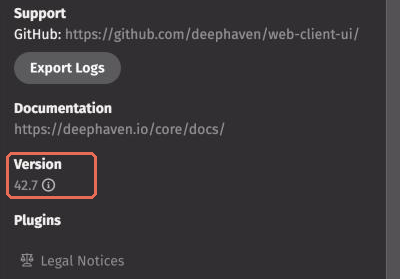
Click the info icon next to the version number to open Version Info. It lists:
- The engine and web UI versions.
- The Java, Groovy, and Barrage versions.
- The browser and operating system.
In Version Info, the Copy Versions button copies this information to your clipboard so you can paste it into an issue. It also copies the version of each web UI plugin that reports one.
To see a plugin's version without copying anything, look at the Plugins list below the Version entry in the Settings menu.
From code
To get the server version from code, print the implementation version of the package that contains the engine's Table interface:
This prints the same value that the Version entry in the Settings menu shows.