Simple table constructors
This cheat sheet shows the basic ways to create a table:
- From column data
- With a set number of rows
- As a time table, which adds rows on a timer
- As a ring table, which keeps the latest rows of another table
- As an input table, which accepts new rows
It ends with how to add formula columns to a new table.
newTable
newTable creates a table from supplied column data.
Create columns with the following methods:
Array columns
Of the methods in the list above, only col can create array columns, where each cell holds an array. Methods such as intCol and stringCol cannot. To create one, pass col an array of arrays, with one inner array per row.
emptyTable
emptyTable creates a table with a given number of rows and no columns. Add columns to it with update, as shown in Add formula columns.
timeTable
timeTable creates a table that adds a new row at a regular interval.
RingTableTools.of
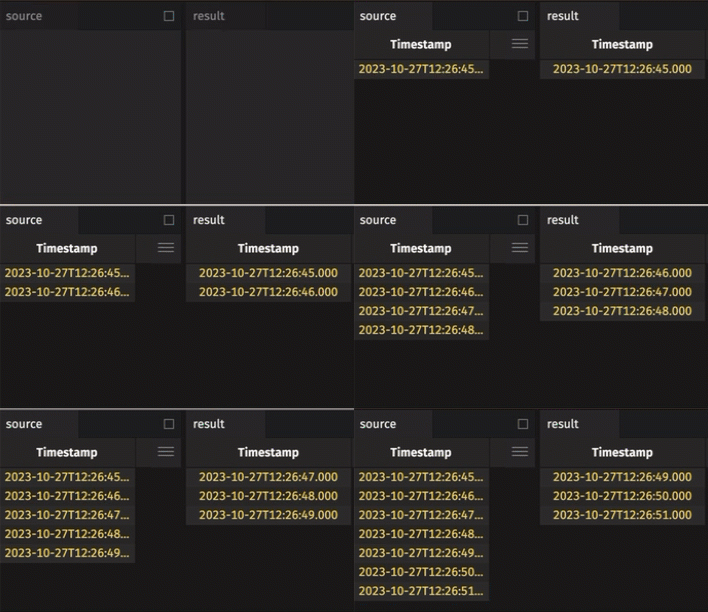
RingTableTools.of creates a table that keeps only the latest rows added to a parent table, up to a given capacity. Ring tables are most useful with blink tables, which keep only the rows from the latest update cycle.
AppendOnlyArrayBackedInputTable.make
An input table is an in-memory table that users can add rows to. AppendOnlyArrayBackedInputTable.make creates an append-only one: new rows go to the end, and rows cannot be edited or deleted. It starts from either an existing table or a TableDefinition, which lists each column's name and type. Create each column entry with a ColumnDefinition factory such as ColumnDefinition.ofInt.
To create a keyed input table, which adds, replaces, or deletes rows by key, use KeyedArrayBackedInputTable.make with the key column names.
Add formula columns
After creating a table, add columns calculated from its existing columns by passing a formula to update. A formula can combine columns, built-in functions such as sqrt, variables, and Groovy closures. A closure called in a formula returns Object, whatever types it declares, so cast its result to the type you need, as (int)f(A, B) does below.
Related documentation
- Create static tables
- Select and create columns
- Formulas
- Work with arrays
- Built-in functions
- Query scope
- Groovy closures
- Casting
- Create a time table
- Create a ring table
- Create and use input tables
colemptyTable- Input table
intColnewTableRingTableTools.ofsqrtstringColtimeTableupdateAppendOnlyArrayBackedInputTableJavadocKeyedArrayBackedInputTableJavadocColumnDefinitionJavadocTableDefinitionJavadoc