How to dial down the update frequency of ticking tables
This guide shows two ways to make the tables that depend on a ticking table recompute less often. You can sample the table at a regular interval with snapshotWhen, or take a static copy of it with snapshot.
When a table updates, Deephaven must also update every downstream table — each table that depends on it for data. For fast-changing data, keeping them all up to date can use significant CPU time, which matters most on limited hardware.
Neither method slows down the source table. Each returns a new table. The snapshotWhen result updates only when a second table, called the trigger table, ticks. The snapshot result never updates. Build downstream queries on the returned table instead of on the source table, so they recompute only when the returned table changes.
Sample at a regular interval
snapshotWhen copies a table (source) into an in-memory result each time another table (trigger) ticks. To sample a ticking table at a fixed interval, pass a time table as the trigger.
Note
The trigger table is often a time table, a special type of table that adds new rows at a regular, user-defined interval. The sole column of a time table is Timestamp.
In this example, the source table updates every second with new data. The trigger table updates every 5 seconds, and each tick takes a new snapshot of source into the result table. The example renames the trigger table's Timestamp column to TriggerTimestamp with renameColumns so that it doesn't conflict with the Timestamp column of source.
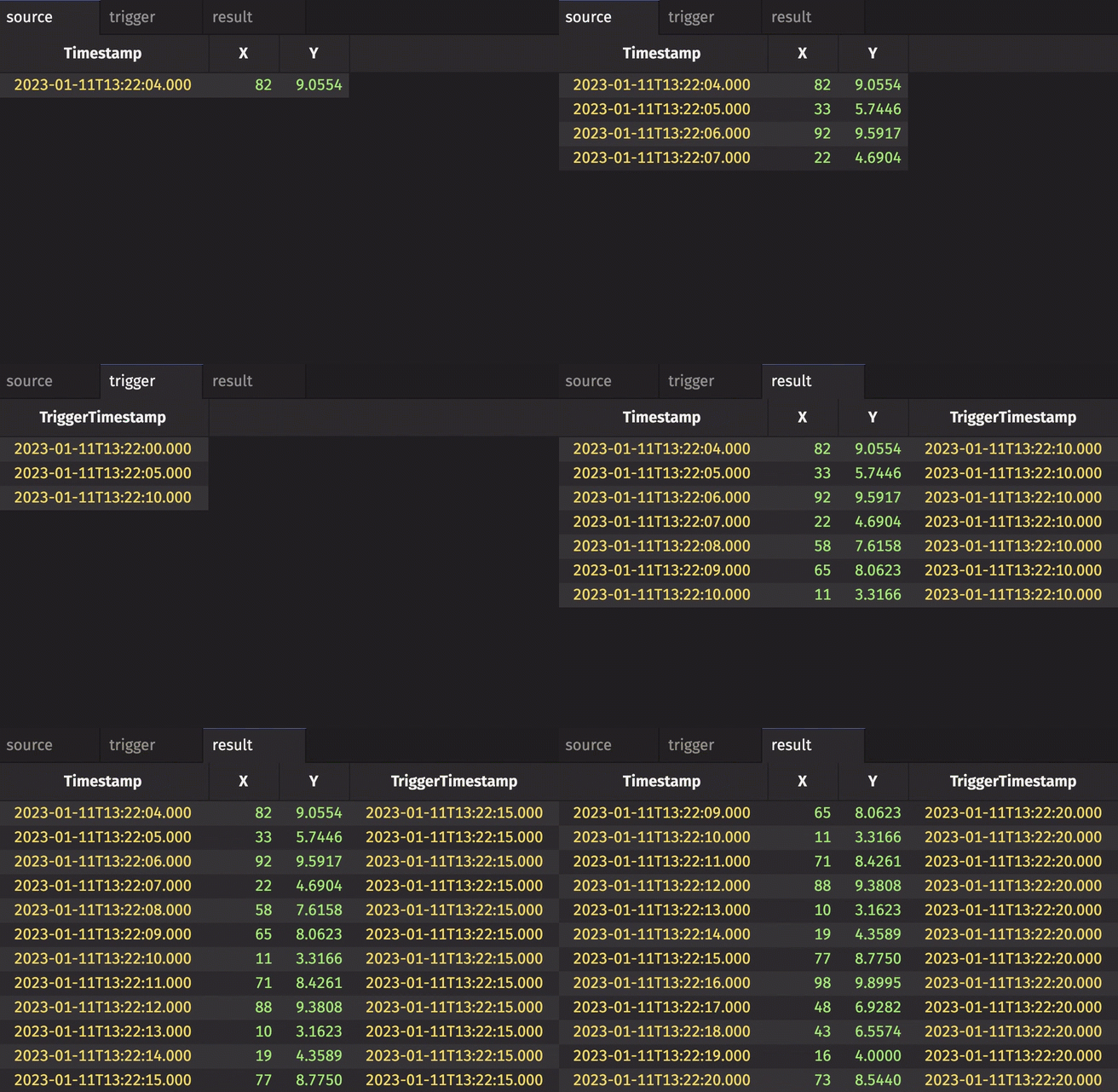
The trigger time table adds its first row right away, so the first snapshot appears almost immediately. After that, result and its downstream tables change once every 5 seconds instead of every second. This design pattern is useful for reducing the amount of data that must be processed.
Each snapshot replaces the entire result, so every update sends all rows of source downstream. To pass along only the rows that changed since the previous snapshot, pass the INCREMENTAL flag. The flag needs import io.deephaven.api.snapshot.SnapshotWhenOptions at the top of your script:
Each trigger tick now passes along only the rows that source added since the previous snapshot, not every row. Control what each snapshot does covers this flag and the others.
Control what each snapshot does
The SnapshotWhenOptions.Flag values and the stampColumns argument of snapshotWhen control how each snapshot changes the result and which trigger columns the result gets:
INITIAL: by default, the result stays empty until the trigger table first ticks. PassSnapshotWhenOptions.Flag.INITIALto take a snapshot as soon as the result is created.INCREMENTAL: by default, each snapshot replaces the entire result. PassSnapshotWhenOptions.Flag.INCREMENTALto apply only the rows ofsourcethat were added, modified, or removed since the previous snapshot, so downstream tables receive only those changes.HISTORY: by default, each snapshot replaces the result. PassSnapshotWhenOptions.Flag.HISTORYto append a full copy ofsourcefor each trigger-table row, including the rows the trigger table already has when you create the result. See Capture the history of ticking tables.- The trigger table must be append-only. If it modifies or removes a row, the result fails and stops updating.
- You can't combine
HISTORYwithINITIALorINCREMENTAL.
stampColumns: by default, the result gets every column of the trigger table. PassstampColumnsto choose which trigger columns to add. Each entry can rename the column, such as"TriggerTimestamp = Timestamp".
Each snapshot fills the trigger columns with values from the trigger table's last row. With INCREMENTAL, only the added and modified rows get the new values. With HISTORY, each appended copy gets the values of the trigger row that produced it.
You can call snapshotWhen in four ways:
The last three forms differ in how they take the flags and stamp columns:
snapshotWhen(trigger, features...): one or moreSnapshotWhenOptions.Flagvalues.snapshotWhen(trigger, features, stampColumns...): a collection of flags, such as[SnapshotWhenOptions.Flag.INCREMENTAL], followed by the stamp columns.snapshotWhen(trigger, options): aSnapshotWhenOptionsobject that holds both the flags and the stamp columns. Create it withSnapshotWhenOptions.of.
The following calls use the source and renamed trigger tables from the example above. They import SnapshotWhenOptions and its Flag enum, then pass concrete flags and stamp columns:
Caution
The result gets every trigger-table column by default, so a column name that both tables share throws an exception. To avoid this, rename the column in one table with renameColumns, or use stampColumns to leave out or rename the trigger column.
Take a static copy
When downstream tables need the data only as of one moment, such as for a one-off report, take a static copy. Creating a static snapshot of a ticking table is as easy as calling snapshot on the table. It returns a static copy of the table as of the moment you call it. The copy, and any table built only from it, never updates.
This example creates a ticking table and, after it has ticked for a while, calls snapshot to capture its rows at that moment. First, create the ticking table:
After the table has ticked for some time, call snapshot. The result table holds the rows of source at that moment and never updates: