Set table density
You can change how densely the Deephaven web UI displays tables to see more or less data in a single view. The Default table density setting applies to every table in the web UI, including tables that are already open. It has three options: Regular (the default), Compact, and Spacious.
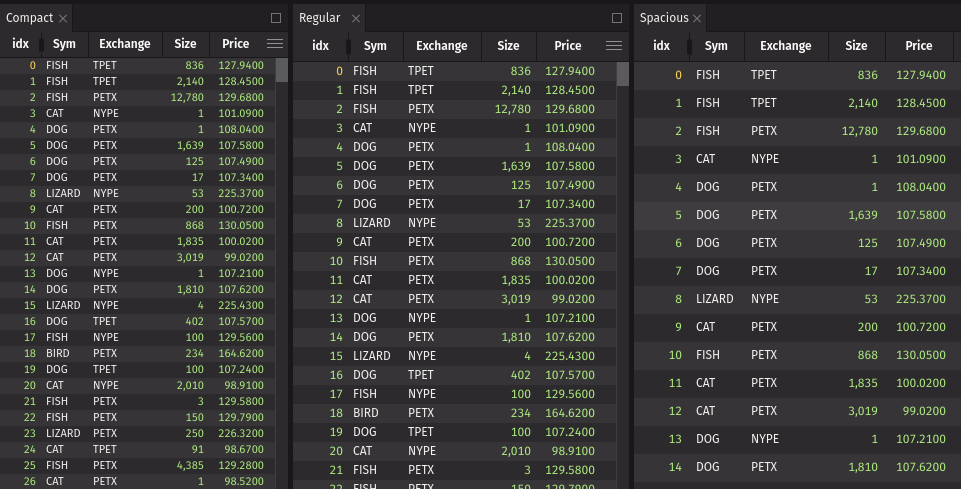
The image below shows the three table densities side by side. The Compact density uses shorter rows and column headers, smaller cell text, and less header padding, so it shows more rows and columns in the same space. The Spacious density uses taller rows and more padding, so it shows fewer rows and columns in the same space.
Set the default table density
To change the default:
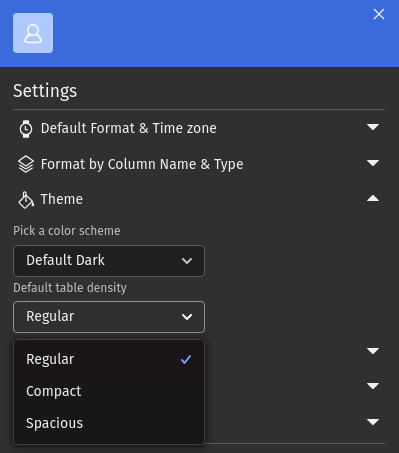
- Open the Settings menu. See Navigate the GUI for where to find it.
- Expand the Theme section.
- Choose Regular, Compact, or Spacious from the Default table density dropdown.