Architecture Overview
Deephaven is a modern data platform built for real-time analytics and live data applications. It enables users to ingest, analyze, and visualize both streaming and batch data efficiently, supporting composable workflows and scalable deployments.
This overview explains Deephaven’s central capabilities, how its components interact, and how data flows through the system.
Core capabilities
- Live Data Ingestion: Seamlessly connect to real-time and batch sources, bringing data into the platform as it arrives.
- Real-Time Analytics: Instantly analyze, transform, and enrich data as it streams in.
- Interactive Exploration: Visualize and interact with live data using a modern web UI.
- Secure Access & Collaboration: Control who can view and manipulate data, and collaborate across teams.
- Scalability & High Availability: Grow from a single server to a resilient, distributed cluster.
- Extensibility: Integrate custom scripts, third-party libraries, and external systems.
Enterprise vs Community
Deephaven Community Core is comprised of 4 main components:
- The Engine
- APIs and clients (Java, Python, etc.)
- The Web UI
- Data integrations (Kafka, Parquet, CSVs, etc.)
Enterprise includes everything from Community, plus:
- Run and schedule multiple processes and jobs across the cluster.
- Control access with authentication and permissions (ACLs) for secure data sharing.
- Share hardware, data, code, and dashboards across users and teams.
- Save large data sets to disk as they are created, so you don’t lose information.
- Organize and find data easily with a searchable index of available datasets.
- Maintain high availability with automatic failover and redundancy for most components.
The diagram above illustrates a Deephaven Enterprise installation. Regardless of whether you have Deephaven running on one machine or a hundred machines, each Enterprise cluster consists of the same fundamental components. The primary difference lies in the number of copies you have and the locations where you choose to run them. The Deephaven system offers a high degree of flexibility in this respect.
How it works: Data flow & interaction
- Data enters Deephaven via the Data Import Server (DIS) or directly through Query Workers.
- The Configuration Server ensures all components have the latest settings and metadata.
- Query Dispatchers process and analyze the data, supporting both streaming and batch workflows.
- Query Workers (or workers) are Deephaven Java processes that perform tasks for a Persistent Query or Code Studio (also known as a console). When a Persistent Query starts, one or more Query Workers are created based on the number of configured replicas and spares, while a Code Studio always creates one Query Worker.
- The Controller schedules jobs and orchestrates distributed workloads.
- The Authentication Server manages secure access for users and services.
- Users interact with live data through the Web UI or APIs, enabling real-time dashboards and analytics.
Deployment models & flexibility
- Deploy Deephaven as a single server or as a distributed cluster.
- Scale horizontally to meet increasing data and user demands.
- Run on-premises, in the cloud, or in hybrid environments.
Extensibility & integration points
- Write custom analytics and automation in Python, Java, or any other supported languages.
- Integrate with third-party libraries and external systems.
- Embed live data widgets and dashboards into other applications.
System components
Deephaven’s architecture includes the following core components:
- Servers:
- Configuration Server: Stores and distributes configuration and cluster metadata.
- Data Import Server (DIS): Handles ingestion of streaming and batch data.
- Authentication Server: Manages user authentication and access control.
- Table Data Cache Proxies (TDCPs): Caches table data locally so all worker processes on a system can share access, reducing load on data sources.
- Tailers: Monitor files produced by applications or Deephaven and send the data to the Data Import Server (DIS) for intraday storage.
- Controller: Orchestrates job scheduling and persistent queries, directing Query Dispatchers to create or stop workers (Java processes) as needed.
- Query Dispatchers: Processes that create and manage workers (Java processes) to execute queries and jobs across the cluster.
Deephaven can also use Envoy as a front proxy: Acts as the entry point for incoming requests, providing load balancing, SSL termination, and routing.
Configuration Server
The Configuration Server is the central source of configuration and metadata for all Deephaven components. It enables dynamic cluster management and ensures consistent operation across deployments. All other components connect to the Configuration Server to retrieve their settings and stay in sync as the system scales or changes.
Data Import Server
The Data Import Server (DIS) ingests both streaming and batch data, converting it into Deephaven’s columnar format for analytics and storage. The DIS supports a variety of sources and ensures data is persisted and made available cluster-wide.
Authentication Server
The Authentication Server manages secure access for all users and services in Deephaven. It issues authentication tokens, supports multiple authentication methods (such as passwords, private keys, LDAP, and SAML), and integrates with enterprise identity systems. This ensures only authorized users and processes can access sensitive data and operations.
Table Data Cache Proxies
Table Data Cache Proxies (TDCPs) cache table data locally on each host, allowing all worker processes on that system to share cached data. They act as intermediaries between workers and data sources using the specialized Table Data Protocol (TDP), reducing load on data sources (such as DIS instances). See the TDCP documentation for comprehensive details on architecture, configuration, and troubleshooting.
Tailer
Tailers monitor files produced by applications or Deephaven itself, and sends the data in those files to the Data Import Server (DIS) for intraday storage. This process, called “tailing,” is similar to the Unix tail command. Tailers can be configured to watch specific files and send their data to the appropriate destinations in the cluster. They support both Deephaven binary log files and CSV files, helping ensure that new data is efficiently and reliably ingested into the system.
Controller
The Controller orchestrates job scheduling, persistent queries, and distributed workload management. It manages job lifecycles, monitors worker health, and directs Query Dispatchers to create or stop workers (Java processes) as needed. The Controller also integrates with Git, allowing scripts to be sourced from a path rather than embedded directly, and provides job replication for redundancy.
Query Monitor
The Query Monitor provides a view into the controller's activity, showing everything that's happening.
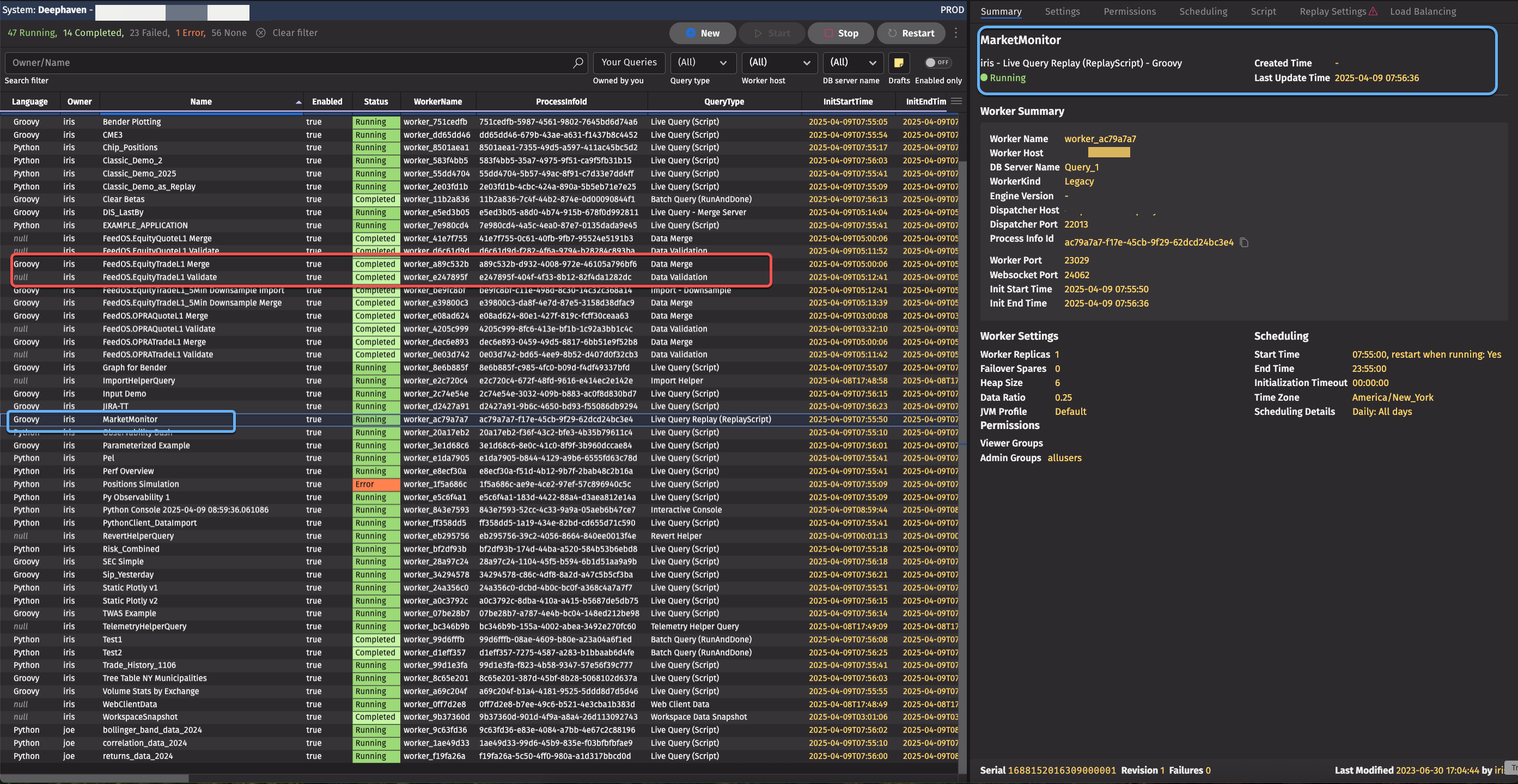
The example Query Monitor above lists various jobs, with different names and statuses (Running, Completed, Error, etc.). The worker’s ID and query types are also displayed. Clicking on specific entries in the query monitor expand the view to include detailed information about settings, staus, and more.
Workers
A Query Worker (sometimes called a worker) is a Deephaven Java process that performs tasks for a Persistent Query or Code Studio (also known as a console). When a Persistent Query starts, one or more Query Workers are created based on the number of configured replicas and spares, while a Code Studio always creates one Query Worker.
A Deephaven Worker instance is the primary place within a Deephaven system where "work" is done. A Worker process may be interactive, where a user or downstream process sends individual commands, or a Persistent Query (PQ), which is pre-defined and may be set to execute on a schedule. A Worker may be used to manipulate and display data to users, ingest data into the system, or perform any number of tasks.
Query Dispatchers
A Query Dispatcher is a Deephaven process that creates and manages workers (Java processes) as directed by the controller or other clients. Dispatchers are responsible for launching workers to execute queries, batch jobs, or persistent queries. In large installations, multiple dispatchers may be used for scalability and fault tolerance. Workers themselves run the actual computations—query servers handle most read/query workloads, while merge servers run privileged workers that can write or delete historical data.
Envoy Front Proxy
Envoy serves as a secure front proxy for Deephaven, exposing a single external port and routing incoming traffic to the appropriate internal services (such as the Web UI, APIs, and workers). It provides SSL/TLS termination, enforces security policies, and enables load balancing and high availability. By centralizing network access, Envoy streamlines security and network management for the entire Deephaven platform.
Data ingestion
Live data ingestion
Deephaven supports multiple methods for ingesting live data, including binary log ingestion and direct data ingestion. These approaches allow organizations to connect a wide variety of data sources to the platform in real time.
Binary Log ingestion
Binary log ingestion uses an embedded logger within the source application to write data in an efficient, on-disk binary format. A Tailer process monitors these files and streams data to the DIS, which transforms and stores it in a columnar format for analytics and querying. This approach is highly efficient for high-volume, low-latency applications.
Deephaven schema include a section dedicated to listeners, or possibly a combined logger-listener section, which outlines how these components work together. Loggers are typically generated for Java, where a Jar file is automatically created from the schema for the table. The same process applies to C#. For C++, it involves the use of a library. Embedded loggers can be seamlessly integrated into an application, and they are generated dynamically—essentially, it's a bit of C++ magic.
Once the DIS receives records from the listener, it stores them on disk and provides these records to any queries requesting the data. As illustrated in the diagram, an intraday table grows over time. Rows are added in real time, similar to what you would expect from any streaming data source connected using basic Deephaven Core, such as subscribing to a Kafka feed.
Latency & duplication
Latency can be introduced at different stages of the data processing pipeline, and the amount of latency at each step can be configured. To enhance efficiency, batching is implemented at several points. For example, a logger batches rows before writing them to disk, and the Tailer checks for new data in files at specific intervals. While data is sent immediately after it has been read, the DIS introduces batching because of its flush interval.
Once the write call is made, data becomes accessible to downstream consumers. The 32-second checkpoint interval can introduce further latency. Although this and other latencies can be tuned, some factors (like disk read/write latency) remain outside Deephaven's control.
Situations may arise where, for instance, writing to numerous tables simultaneously necessitates ensuring that the DIS can manage sufficient open files to avoid extra latency caused by file opening and closing due to file handle limits.
Regarding duplicate data, Deephaven doesn't inherently deduplicate data if it is resent. Handling duplicates typically falls on the user, either at the application level or another stage in the process. While options like deleting and re-logging binary log files exist, they are contingent upon data matching what was previously ingested. Resending records, as in a Kafka feed scenario, lacks built-in keying within the DIS, necessitating handling elsewhere.
Currently, Arrow record batch support is not built-in, but there has been discussion about processing such batches from a Kafka feed into the DIS. The binary format used differs from Arrow's record batch format because it prioritizes efficient random access to columnar data without necessitating reads of other columns. This facilitates efficient, low-latency data reads by numerous workers once ingested by the DIS.
Now that we've covered binary log ingestion, we'll cover direct ingestion.
Direct ingestion
We've now covered binary log data ingestion. With direct ingestion, you bypass the customer application, the binary log files, the tailer, and the listener, and instead present data directly to the DIS. This can involve using technologies like Kafka, Solace, WebSockets, or Arrow Record batches sent through Kafka. Alternatively, it may involve sending data into an empty table via the Deephaven APIs and then directly passing that data to the DIS.
The basics:
- You have a subscriber (we are agnostic about what it is that parses data).
- Send that to the DIS.
- Then, it persists as columnar data the same way as data we get from binary logs.
The key aspect of the DIS is its ability to process data in a specific format, persist it to disk, and send it out to queries. Our setup consists of a single DIS responsible for handling all binary log files, regardless of their source. This includes performance logs generated internally, as well as market data feeds from our customers. For other types of data being ingested directly, such as Kafka streams, we utilize a separate dedicated DIS that operates within a Deephaven worker.
Deephaven Core and Deephaven Enterprise share a similar startup process. Both can be initiated in Docker and connect to a Kafka feed. However, Deephaven Enterprise includes an additional code snippet to link the Kafka feed to a DIS and publicize the data's availability to the cluster.
The data distribution process involves an external source like Kafka sending data to a DIS. A Table Data Cache Proxy (TDCP) usually manages the subsequent steps within the Deephaven cluster.
Historical data
Historical data is traditionally stored on a file system, such as NFS or S3 adapters like Goofy. This data is typically formatted the same way as intraday data, with one file per column and additional files in some instances. Parquet and Iceberg files are also supported and can be included in the Deephaven catalog.
Merge jobs create historical data from streaming data by reading the streaming data and writing it into the historical data store. For instance, after the stock market closes, a merge job can convert all the data written by the DIS (possibly across multiple partitions) into the historical data store. This natural break in the feed is common in capital markets, where most of our customers are.
The typical steps performed in a merge job are as follows:
- Data is ingested in Parquet or Deephaven format.
- Data is cleaned and validated.
- Data can be reformatted and regrouped for efficiency.
- Data indexes can be calculated for faster filtering.
- Data can be re-sorted if needed.
- Configurations are done in the schema files.
- Processes are usually run daily from the controller.
Conclusion
Deephaven’s architecture unifies powerful components to deliver real-time, high-throughput analytics for both streaming and historical data. Its flexible engine, robust orchestration, and secure, scalable infrastructure enable organizations to manage complex data pipelines, automate workflows, and support advanced analytics. The modular design allows seamless integration with modern data formats and external systems. Features such as authentication, access control, and high availability ensure enterprise-grade reliability and security. As data needs evolve, Deephaven is well-positioned to adapt, empowering users to build innovative applications and unlock the full potential of their data.