Scaling to multiple servers
Deephaven is designed with horizontal scaling in mind. Adding capacity for services typically involves adding compute resources in the form of additional servers or virtual machines.
This guide explains when and why to scale, and describes the multi-server architecture. For step-by-step deployment instructions, see Multiple server deployment. For hardware sizing, see Resource considerations.
When to scale
Consider scaling to multiple servers when:
- Query capacity limits are reached — Workers consume large amounts of memory and CPU; a single server may not support all concurrent users and Persistent Queries (PQs).
- Data ingestion volume increases — High-throughput real-time data streams may require dedicated Data Import Servers.
- Availability requirements grow — Multiple servers enable redundancy through Persistent Query replicas and spares. When a PQ is configured with replicas, the Controller distributes them across different query servers so that the failure of one server doesn't take down all instances of a critical query.
Single server architecture
The Deephaven Installation guide illustrates the provisioning of a server with a network interface and the loopback interface (network layer), local disk storage (storage layer), and the Deephaven software (application layer) to create a single server Deephaven deployment. The guide uses this single server to perform basic operations by connecting to Deephaven from a remote client.
With that in mind, this single-server installation looks like the following:
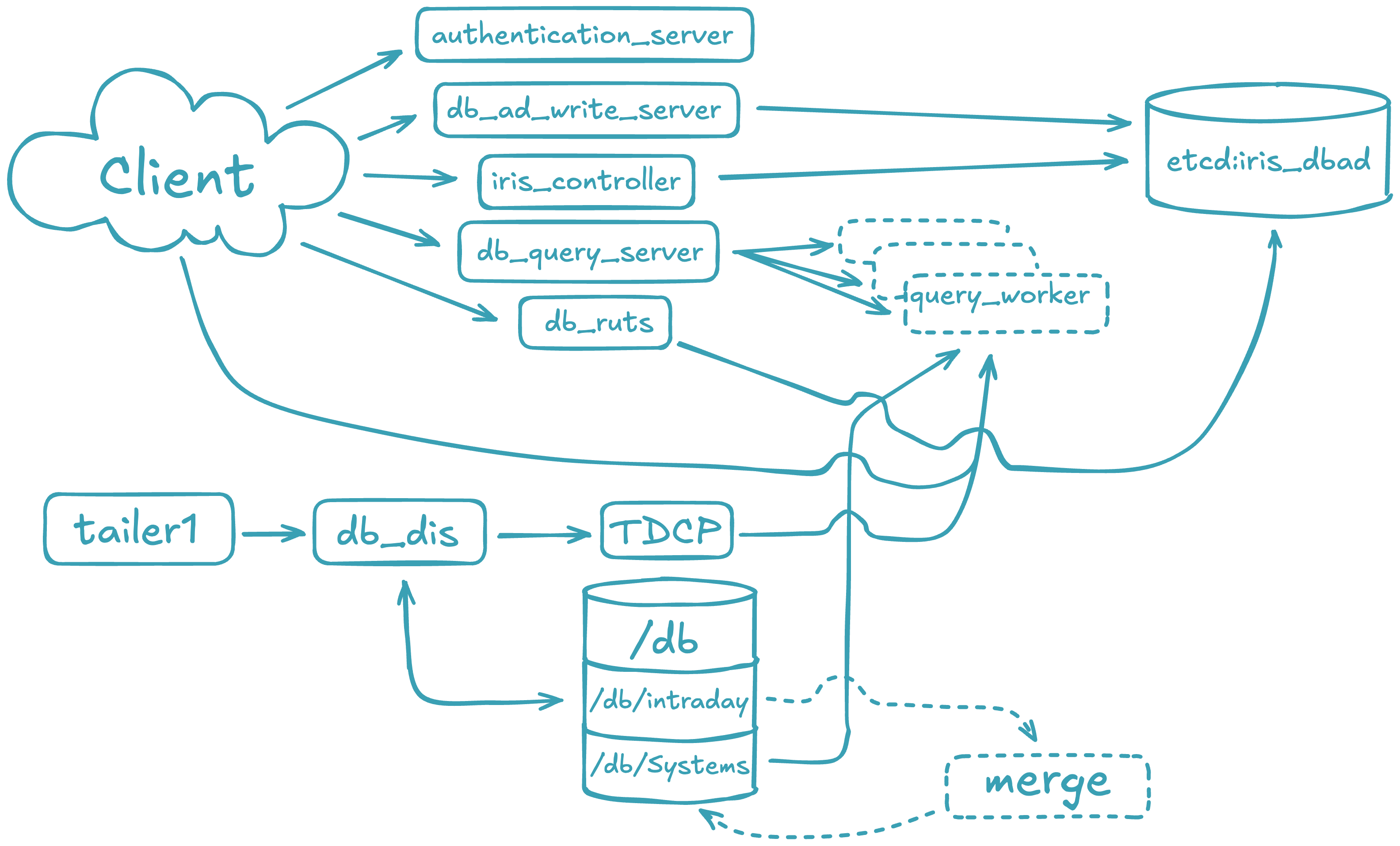
This fully functional installation of Deephaven is limited to the compute resources of the underlying server. As the data import or query capacity requirements of the system grow beyond the server's capabilities, it is necessary to distribute the Deephaven processes across several servers, converting to a multiple server architecture.
Multiple server architecture
The multiple server architecture is built by moving the network and storage layers outside the server, and by adding hardware to run additional data loading or querying processes. The network layer moves to subnets or vlans. The storage layer becomes a shared filesystem that is mounted across all servers. The application layer becomes a set of servers with the Deephaven software installed and configured to perform certain tasks.
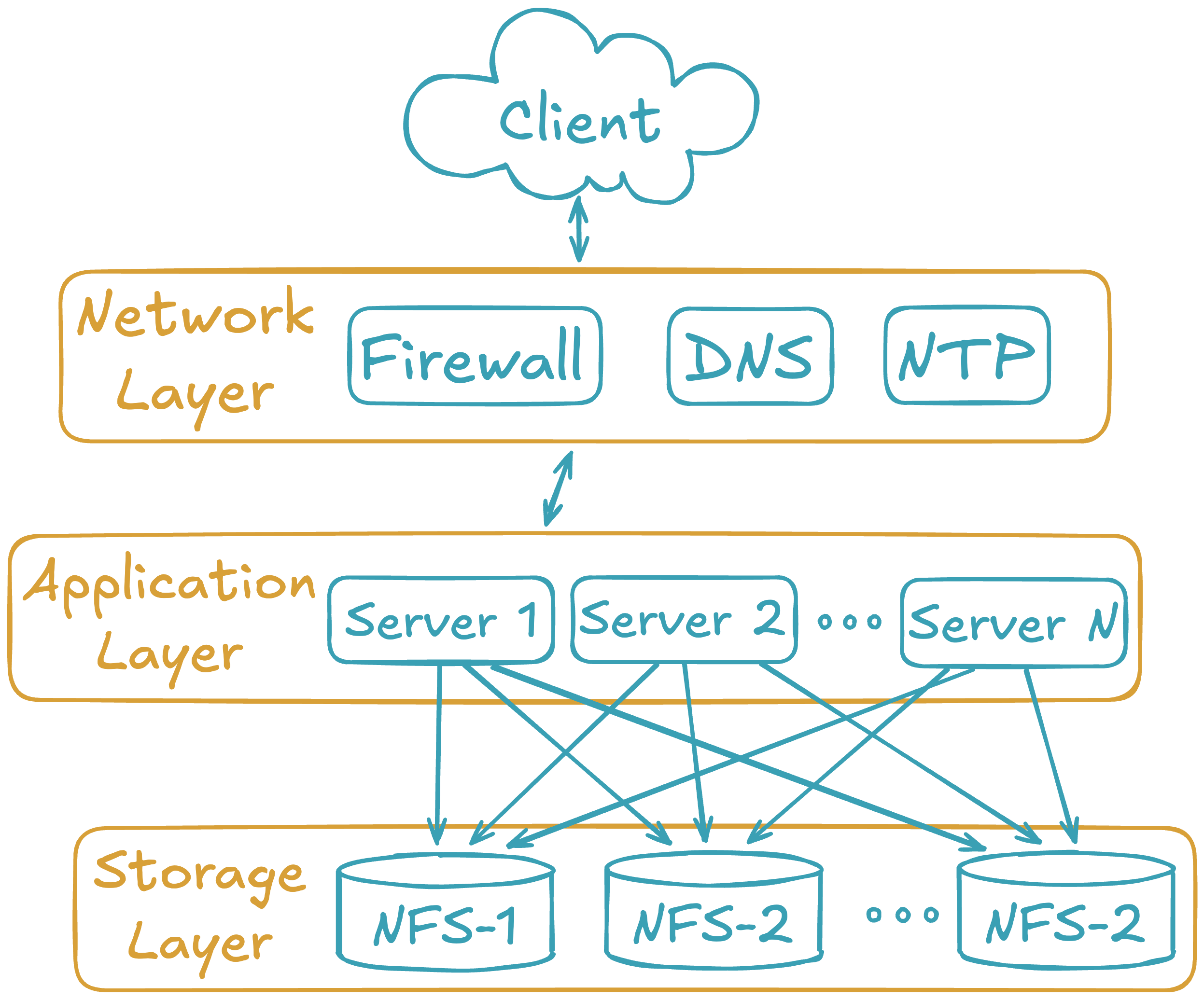
Deploying Deephaven on multiple servers has the following requirements:
- Modification of each layer in the three-layer model.
- Modification and management of the Deephaven configuration.
- Modification and management of the
dh_monitDeephaven configuration.
The network layer
The customer supplies the network and necessary services (DNS, NTP, etc.). This document does not cover configuration or implementation of the network, except to specify the network services on which Deephaven depends.
Deephaven requires a subnet or VLAN for the servers to communicate. Like all big data deployments, fast network access to the data improves query and analysis performance. If using FQDNs in the Deephaven configuration, a robust DNS service is also recommended.
The network layer should provide the fastest possible access to the storage layer.
The storage layer
The storage layer has the most changes in a multiple server installation. Deephaven requires access to a shared filesystem for historical and intraday data that can be mounted by each server in the Deephaven cluster.
Typically, these disk mounts are provided via the NFS protocol exported from a highly available storage system. Other types of distributed or clustered filesystems such as GlusterFS or HDFS should work but Deephaven has not extensively tested them.
As mentioned, Deephaven relies on a shared filesystem architecture for access to its data. Currently, the larger installations use ZFS filers to manage the storage mounts that are exported to the query and data import servers via NFS over 10g network interfaces.
Deephaven divides data into two categories:
- Intraday data is any data that hasn't been merged to historical storage partitions, including near real-time as well as batch-imported data. Depending on the data size and rate, the underlying storage should typically be high-throughput (SSD) or contain sufficient caching layers to allow fast writes.
Intraday data is written to the database via the Data Import Server or other import processes onto disks mounted on
/db/Intraday/<namespace>/. - Historical data is populated by performing a merge of the Intraday data to the historical file systems. As storage needs grow, further storage is easy to add in the form of writable partitions without the need to reorganize existing directory or file structures, as Deephaven queries automatically search additional historical partitions as they are added.
Intraday data is typically merged to Historical data on the Data Import Servers during off hours by scheduled processes.
The historical disk volumes are mounted into two locations on the servers:
- For writing:
/db/Systems/<databaseNamespace>/WritablePartitions/[0..N] - For reading:
/db/Systems/<databaseNamespace>/Partitions/[0..N]
- For writing:
The Deephaven application layer
The software installation procedure for each server is documented in the Deephaven Installation guide. Once the server is deployed, the network storage should be mounted on all the servers. You must then manage the main Deephaven configuration and modify the dh_monit configuration to run only the processes appropriate for each server type.
Users and groups
Deephaven requires three Unix users and five Unix groups that are created at install time by the installer. See Appendix B: Users and groups in the installation guide for details.
Server types
A single host may run multiple server types. Administrative processes require fewer resources and can be co-located with other services.
| Server type | Purpose | Key processes |
|---|---|---|
| Query server | Run user queries and Persistent Queries | Dispatcher, workers, TDCP |
| Real-time import server | Ingest streaming data, merge to historical | DIS, merge server, Tailer |
| Administrative server | Orchestration and authentication | Controller, Authentication Service, Configuration Server, ACL Write Server |
For sizing guidelines and hardware requirements, see Resource considerations.
Example: 3-server deployment
A common starting configuration combines administrative and data import roles on one server, with two dedicated query servers:
| Server | Roles | Key processes |
|---|---|---|
| Server 1 | Admin + DIS | Controller, Authentication Service, DIS, merge server, Tailer |
| Server 2 | Query | Dispatcher, TDCP, workers |
| Server 3 | Query | Dispatcher, TDCP, workers |
This layout supports multiple concurrent users while providing shared historical data access via NFS. For step-by-step setup, see Multiple server deployment.
Configuring processes per server
Each server type above is defined by the Deephaven processes it runs and the hardware resources required. You can combine server types on a single server given sufficient hardware resources. For instance, it is common to combine the administrative server with a Data Import Server. For detailed information about each process, see the Architecture overview and Process runbooks.
Administrative server
authentication_server— Authenticates users securely on login.configuration_server— Serves configuration data to Deephaven processes.db_acl_write_server— Serves as a single writer for ACL information stored in etcd.iris_controller— Controller that manages Persistent Query lifecycles and provides discovery services to other clients for Persistent Queries.web_api_service— Provides the REST API for administrative operations.
Real-time Data Import Server
- DIS — Receives binary table data from user processes and writes it to user namespaces, simultaneously serving read requests for the same data.
db_merge_server— Merges intraday data to historical partitions.tailer1— Reads data from binary log files written by Deephaven processes and sends them to a DIS process for ingestion. Tailer configuration is covered in Deephaven Data Tailer.
Query server
db_query_server— Manages query requests from clients and forks query worker processes to do the actual work of queries.db_tdcp— Table Data Cache Proxy that caches table data locally and provides efficient data access between workers and data sources.
How load balancing works
When running multiple query servers, the Controller uses a Server Selection Provider (SSP) to distribute workers across available dispatchers. The SSP abstracts individual servers into server groups — logical pools of dispatchers where workers can start.
Common server groups include:
- AutoQuery — All query server dispatchers
- AutoMerge — All merge server dispatchers
When a user starts a Persistent Query or console on a server group, the SSP selects the best dispatcher based on:
- Replica distribution — When a PQ's configured replicas and spares together number more than one, eligible servers are first ranked by how many workers for that PQ they already run, favoring the server with the fewest. This makes it more likely - though not guaranteed - that replicas end up spread across servers rather than concentrated on one.
- Available heap — Among the remaining candidates, servers with the lowest heap utilization are preferred.
- Worker count — In case of a tie, servers with fewer workers are chosen.
The default SimpleServerSelectionProvider implements this algorithm. Custom providers can implement different strategies by implementing IServerSelectionProvider.
Dynamic scaling operations
You can add or remove servers from the cluster without restarting the Controller:
- Add a server — Install Deephaven on the new server, configure it with the appropriate processes, and start the dispatcher. Update the Controller's server selection properties to include the new server in the appropriate group, then reload the configuration. The new server becomes available immediately.
- Remove a server gracefully — First, mark the server administratively down to prevent new workers from starting on it. Wait for existing workers to complete or migrate them manually, then stop the dispatcher and update the configuration.
- Handle server failures — If a server fails unexpectedly, the Controller detects the loss and marks affected workers as failed. PQs with replicas continue running on surviving servers. Restart failed PQs manually or configure them to restart automatically.
Note
The administratively down state is not persisted. On Controller restart, all configured servers are marked as available.