Table ACLs
Table ACLs allow you to configure users' access to specific namespaces and tables. You can be as broad as to give all users unrestricted access to a whole namespace, or as narrow as to only allow a user to view a single row of a single column in a single table. Before returning a table to a user, Deephaven applies all of the ACLs for that user.
By default, regular users (i.e., not part of the iris-superusers group) have very limited table access. They can access some data in DbInternal tables, such as log entries for workers that they started and for Persistent Queries that they own, and (if it is installed), they can view data from the LearnDeephaven sample namespace. All other table permissions must be explicitly granted to regular users.
Important
By default, regular users do not have access to read from any user tables.
Caution
The syntax of row and column ACL filters is not validated when added or updated via the Web ACL Editor. Therefore, administrators should validate these ACLs by operating as an affected user and confirming expected results.
User tables
To configure the system so that users are automatically granted read access to user tables created in a namespace that matches their user name, add a table ACL that uses the OwnNamespaceFilterGenerator. Typically this ACL is added for the allusers group, with * for namespace and * for table, but more restrictive ACLs can be used. One such possibility would be setting an OwnNamespaceFilterGenerator ACL for a UserTablesUsers group so that only members of that group automatically have access to user tables in a namespace that matches their user name.
Note
The namespace to user name match from the OwnNamespaceFilterGenerator is a case-sensitive match, so, User1 would not get read access to tables in the user1 namespace.
Row ACLs
Row ACLs determine the rows that a user can see in the table, but cannot change the columns that a user can see. Row ACLs are implemented with where operations automatically applied to the table.
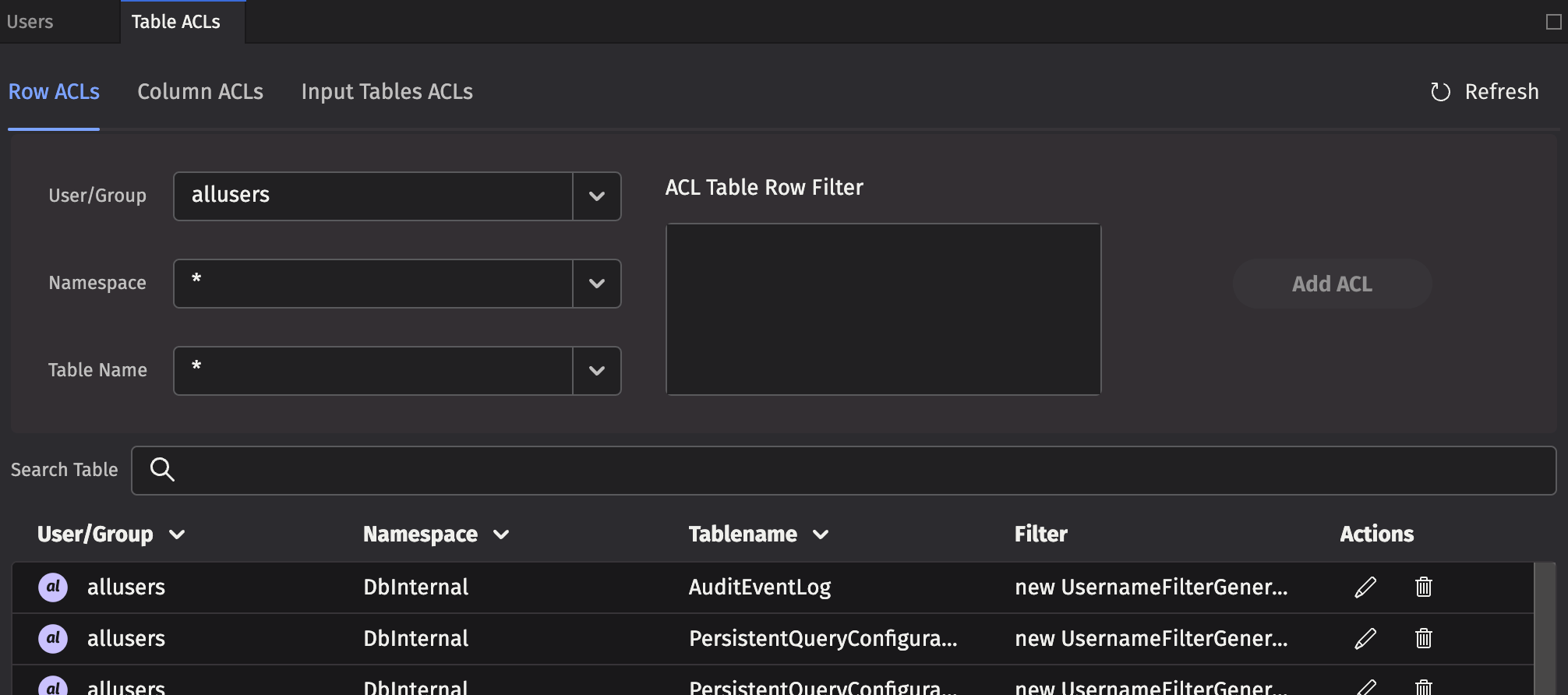
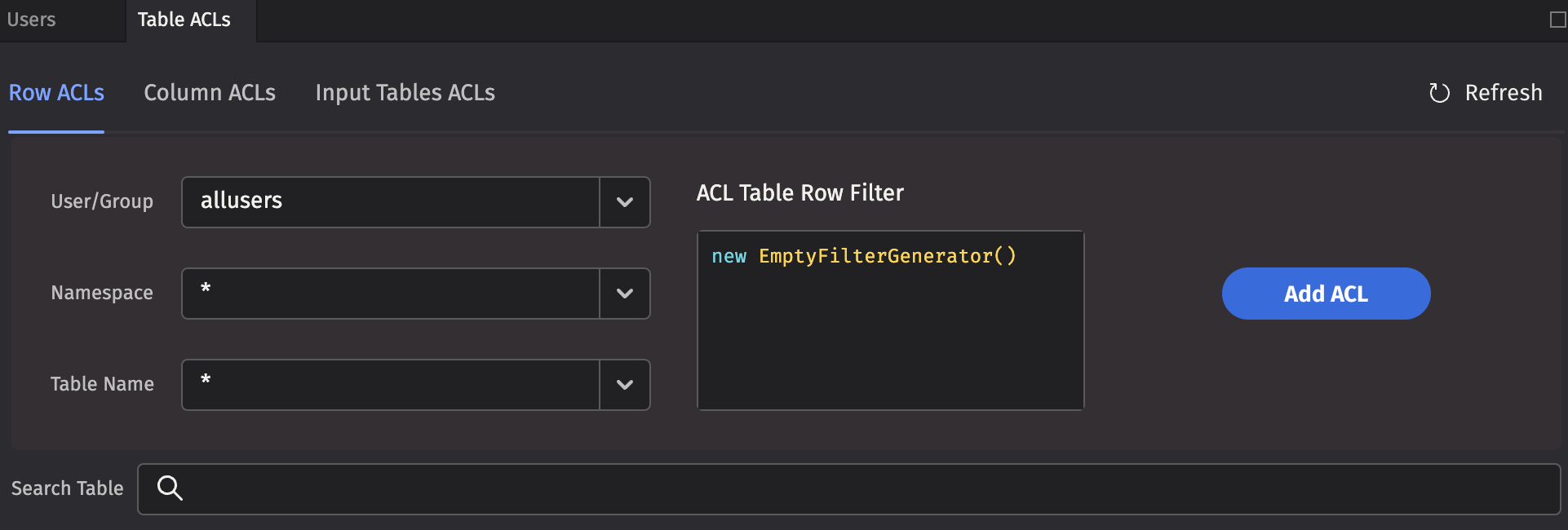
Each Row ACL consists of four components:
- User/Group: The name of the user or group to which this ACL is associated.
- Namespace: The namespace associated with this ACL, to apply to all tables. This may be the wild card
*, which means all namespaces are included. Note: If the namespace is*, the table must also be*. - Table Name: The table with which this ACL is associated. The wild card,
*, applies this entry to all tables within the namespace. - ACL Table Row Filter: A string that represents Java code to create a
FilterGeneratorfor this table. See the syntax below for more details.
Column ACLs
Column ACLs provide administrators with a way to restrict access to data on a columnar level. Column ACL data restriction manifests as actual values being replaced by null, in contrast to Row ACLs which restrict access by explicitly filtering rows out of the table. This can be useful when all users must have access to some subset of the data in all rows of a particular table. For example, a manager may need to be able to monitor the current execution of all orders within a system, but may not be allowed access to pricing data for some or all of the symbols.
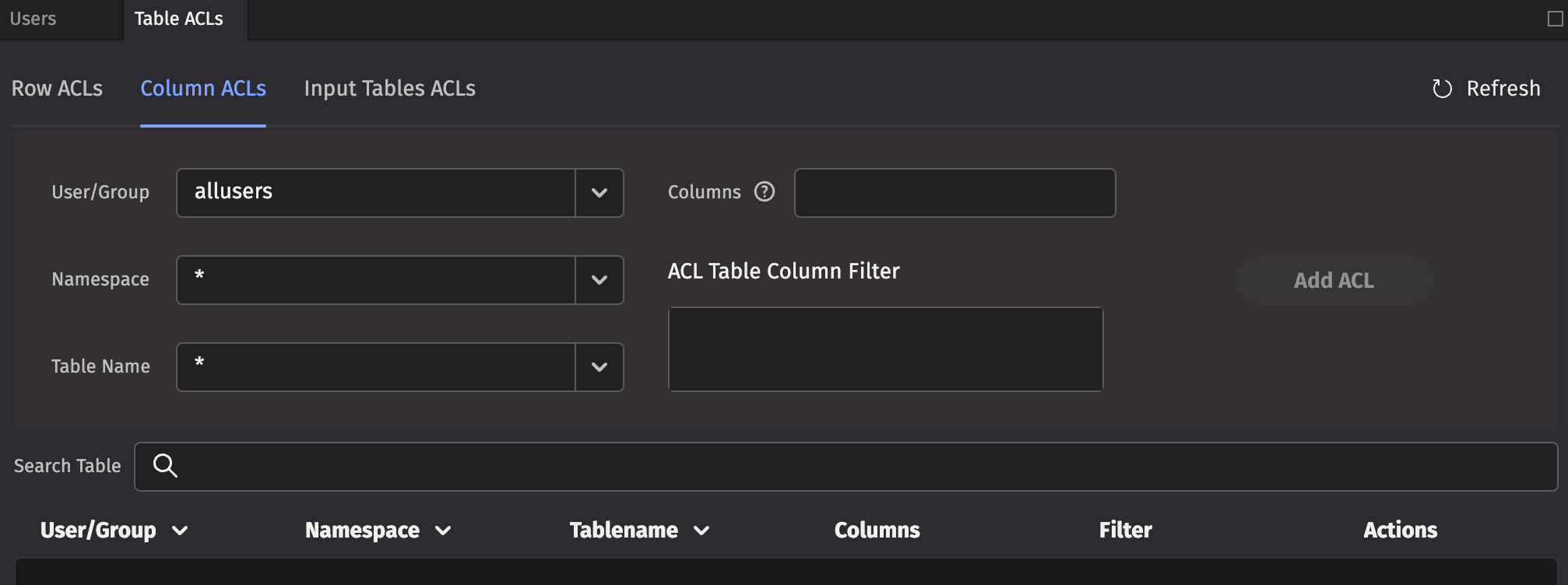
The rules for Column ACL application follow the same rules as for Table (Row) ACLs. The most specific ACL for each group is the one applied. Additionally, Column ACLs are defined with a comma-separated list of column names to which the ACL applies.
Each Column ACL consists of five components:
- User/Group: The name of the user or group to which this ACL is associated.
- Namespace: The namespace associated with this ACL, or
*for all namespaces. - Table Name: The table with which this ACL is associated, or
*for all tables. - Columns: The set of columns in the table for which this ACL applies, or
*for all columns. Note that the columns must exist for the table or tables denoted by the above parameters. - ACL Table Column Filter: A string that represents Java code to create a
FilterGeneratorfor this table. Instead of filtering rows out like a Row ACL, matched rows permit viewing the specified Columns. Unmatched rows have their actual column values replaced withnull. See the syntax below for more details.
Input Table ACLs
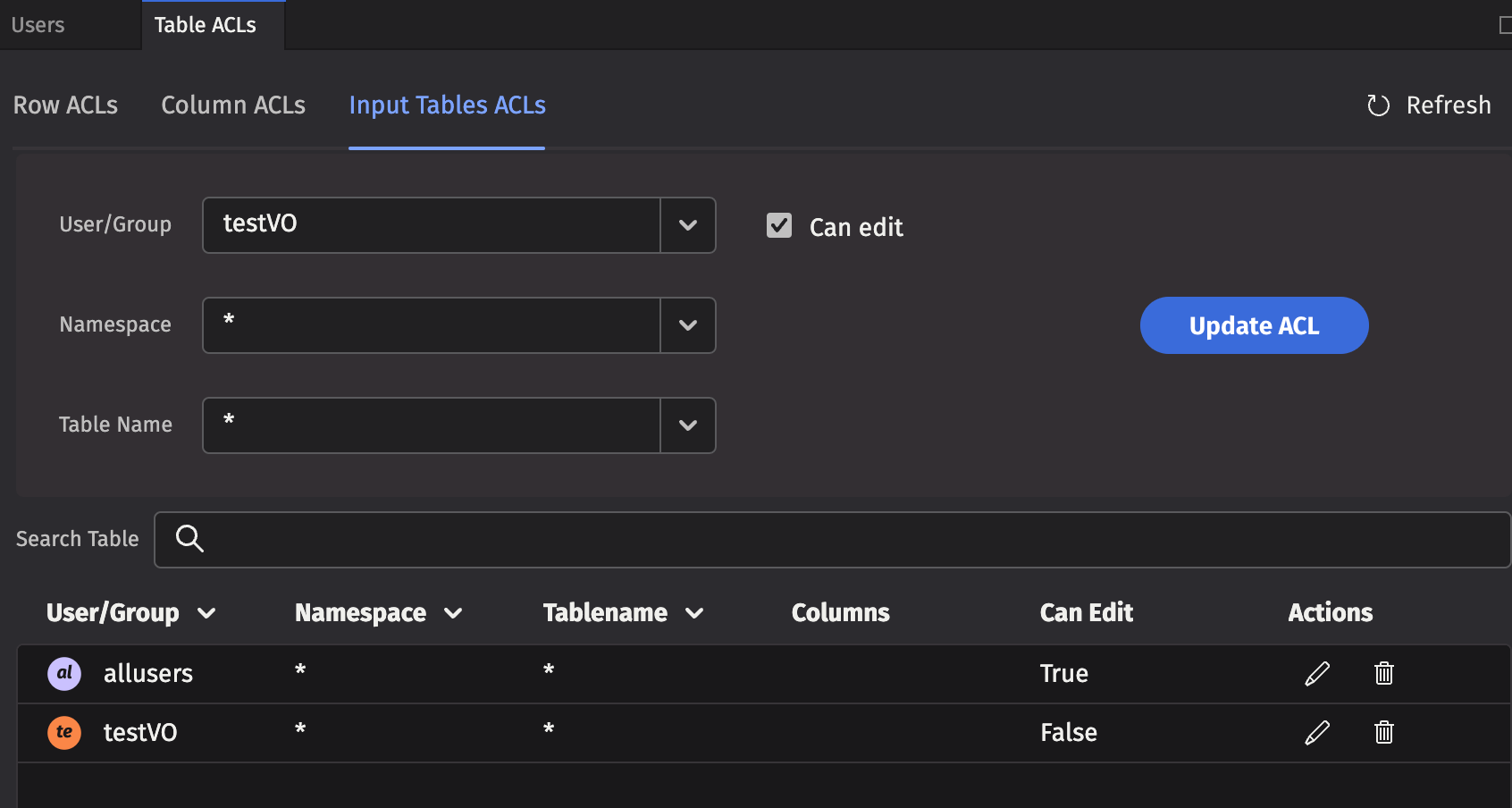
Use the Table ACLs tab to set read authorization for individuals or groups. Use the Input Tables tab to set edit authorization.
Note
When a user or group is authorized to edit a table, the entire table may be edited. Setting authorization for editing only a portion of the table is not supported.
ACL table filters
Using Java code to generate the filters provides additional flexibility. For example, a filter generator could be new AccountFilterGenerator(), which would filter the Account column based on the accounts for which the current user is authorized.
However, writing Java code to generate the filters can be a bit tedious, so there are two shorthand notations available:
*means that all rows in the table should be presented to the user, and- if a filter generator is of the form
whereClause(A, B), whereClause(C, D), then the rows that match(A && B) || (C && D)are available to the user.
To compute the ACLs that should be used for a given user, the following steps are taken:
- All of the user's groups are collected into a list.
- For each group, get the ACL generator for the table, namespace, or default (in that order).
- If no ACL generator was found, then deny permission.
- Run all of the ACL generators (unless one returns the empty set of filters, which means permit everything).
- If all generators returned null, deny permission (Note: If a generator returns null, that means deny; if it returns an empty list, that means permit everything).
- Apply a
.whereOneOf()operation to the table with all the returned filters.
When computing the list of ACLs for a table, the most specific ACL for a particular group is used. For example, if "UserXYZ" belongs to the groups "groupABC", "groupXYZ", and "allusers", and if the following ACLs exist:
| Group | Namespace | Table | Filter |
|---|---|---|---|
allusers | * | * | new OwnNamespaceFilterGenerator() |
groupABC | SystemEQ | PositionCache | new AccountFilterGenerator() |
groupABC | SystemEQ | * | * |
groupXYZ | SystemEQ | * | whereClause(`false`) |
Then, the ACL generators that would be used for the SystemEQ.PositionCache table are:
new OwnNamespaceFilterGenerator()forallusers, because no more specific ACL exists for that group.new AccountFilterGenerator()forgroupABC, becauseSystemEQ.PositionCacheis more specific thanSystemEQ.*(the*filter would be unused in this case).whereClause(`false`)forgroupXYZ
The OwnNamespaceFilterGenerator would return null because the SystemEQ namespace is not equal to the username UserXYZ, thus contributing no filters. The AccountFilterGenerator would return a match filter for the account column. Finally, the whereClause(`false`) produces a match filter with no results. This has the effect of allowing the user to see an empty table, but without denying permission. When taken together, groupABC could see rows in SystemEQ.PositionCache that have the appropriate accounts configured.
If any other table from the SystemEQ namespace were requested, then the SystemEQ.* ACL would be the most specific ACL for group ABC, resulting in an ACL of *, which would short-circuit further evaluation; and all rows would be visible.
Note
Adding a user to a group can only increase the permissions enabled for that user. Users cannot lose any existing permissions by being added to another group (e.g., if a group has the NullFilterGenerator() applied, any pre-existing user permissions would not be impacted.)
To add a new table filter, type the Java code into the ACL Table * Filter field and click Add ACL.
Built-in filter generators
Here are Deephaven's built-in filter generators:
EmptyFilterGenerator()- Provides full access; you can abbreviate it as*.SimpleFilterGenerator()- Passes through a simplewhereclause; you can abbreviate it by using a filter generator string beginning withwhereClause.AccountFilterGenerator()- Creates a match filter for accounts for which this user is authorized; suitable for restricting position logs, trade logs, etc. to just the accounts a user should see. By default, this filters theAccountcolumn, but you can pass an optional column name into the generator.StrategyFilterGenerator()- Creates a match filter for strategies for which this user is authorized. By default, this filters theStrategycolumn, but you can pass an optional column name in to the generator.OwnNamespaceFilterGenerator()- Produces an empty filter (i.e., allow everything) when the namespace matches the effective user name; otherwise producesnull(i.e., no filter). This allows users to have full access to their own user tables.UsernameFilterGenerator()- Creates a match filter for this user's username. By default, this filters theUsernamecolumn, but you can pass an optional column name in to the generator.UserCollectionFilterGenerator()- Creates a filter for this user's username within a collection. By default, this filters theUsernamecolumn, but you can pass an optional column name in to the generator. For example, this is useful if a table column contains a list of authorized users for each row.GroupFilterGenerator()- Creates a match filter for groups to which this user belongs. By default, this filters theGroupcolumn, but you can pass an optional column name in to the generator.WorkerNameFilterGenerator()- Produces a filter that matches only this worker. By default, this filters theWorkerNamecolumn, but you can pass an optional column name in to the generator. This is useful for filtering query logs.- Note: the
QueryPerformanceLogCoreV2,UpdatePerformanceLogCoreV2, andQueryOperationPerformanceLogCoreV2contain several user name columns which you can use for filtering in the latest version of Deephaven, so thisFilterGeneratoris no longer commonly used.
- Note: the
RequestIdFromWorkerNameFilterGenerator()- Produces a dynamic where filter based on theDbInternal.QueryPerformanceLogCoreV2table (we know the worker of a database, and this log lets us correlate a worker with a request ID). By default, this filters theRequestIdcolumn, but you can pass an optional column name in to the generator.- Note: the
QueryPerformanceLogCoreV2,UpdatePerformanceLogCoreV2, andQueryOperationPerformanceLogCoreV2contain several user name columns which you can use for filtering in the latest version of Deephaven, so thisFilterGeneratoris no longer commonly used.
- Note: the
NullFilterGenerator()- Provides no access to a table; only useful to override a less-specific ACL for a group.ConjunctiveFilterGenerator(fg1, fg2, ...)- Runs filter generators fg1, fg2, etc., and returns a filter that is the conjunction of the filters returned by the passed-in filter generators. You can use this to further restrict the output of another filter generator.CopyFilterGenerator(Namespace, Table)- Copies the ACLs from another table to this table.CombiningFilterGenerator(Type)- ACLs are normally applied disjunctively. In some cases, users may want to override this behavior and combine some group filters conjunctively instead. This generator is initialized with the operation type desired (Type.ConjunctiveorType.Disjunctive) and as a single methodaddFilter(group, generator)to which specific filter generators can be added. Note that this generator is intended for programmatic ACLs.TimeSeriesFilterGenerator(Period, Column, ExcludeRecent)- The TimeSeriesFilterGenerator is used to include or exclude recent rows as defined by the Period and Column. The Period is expressed as a String duration. To exclude recent rows (e.g., market data within the last 15 minutes), setexcludeRecenttotrue(e.g.,new io.deephaven.enterprise.acl.generator.TimeSeriesFilterGenerator("PT15m", "ExchangeTimestamp", true)). For convenience, you can use theio.deephaven.enterprise.acl.AclFilterGenerator.outOfWindowandio.deephaven.enterprise.acl.AclFilterGenerator.inWindowstatic methods. Note that theTimeSeriesFilterGeneratoris only available in Core+ workers. If you include aTimeSeriesFilterGeneratorin a table's ACLs, then the table may not be accessible in Legacy (depending on ACLs defined for other users the group is a member of).
Custom filter generators
To implement a custom filter generator, you must implement the FilterGenerator interface for the table to be accessible from both Legacy and Core+ workers. If only Core+ workers are needed, then you can implement the AclFilterGenerator interface. After making sure the filter generator is available on your worker's classpath, you can then reference it from your row or column ACLs table.
In Core+ workers, most Legacy FilterGenerators are adapted to an AclFilterGenerator or the resulting Legacy filters are adapted to Core engine filters. In some cases, this is not possible, and the Legacy FilterGenerator must explicitly provide a Core AclFilterGenerator. If a Legacy FilterGenerator's getCommunityFilterGenerator method returns a non-null AclFilterGenerator, then the Core+ AclFilterGenerator object is used in Core+ workers.
Warning
When executing in the context of a Core+ worker, Legacy classes are relocated (shadowed). Instead of being available as com.illumon.iris.db.v2.permissions.FilterGenerator, the FilterGenerator class is only available as io.deephaven.shadow.enterprise.com.illumon.iris.db.v2.permissions.FilterGenerator. You must either recompile your custom filter generator for Core+ workers with suitably relocated classes, or use a build plugin to relocate the dependencies in com.illumon to io.deephaven.shadow.enterprise.com.illumon.
If a Core AclFilterGenerator is included in your ACL database, access is provided to Core+ workers but not Legacy workers. If a Legacy worker attempts to produce a Core AclFilterGenerator, then the table access fails.
Check permissions
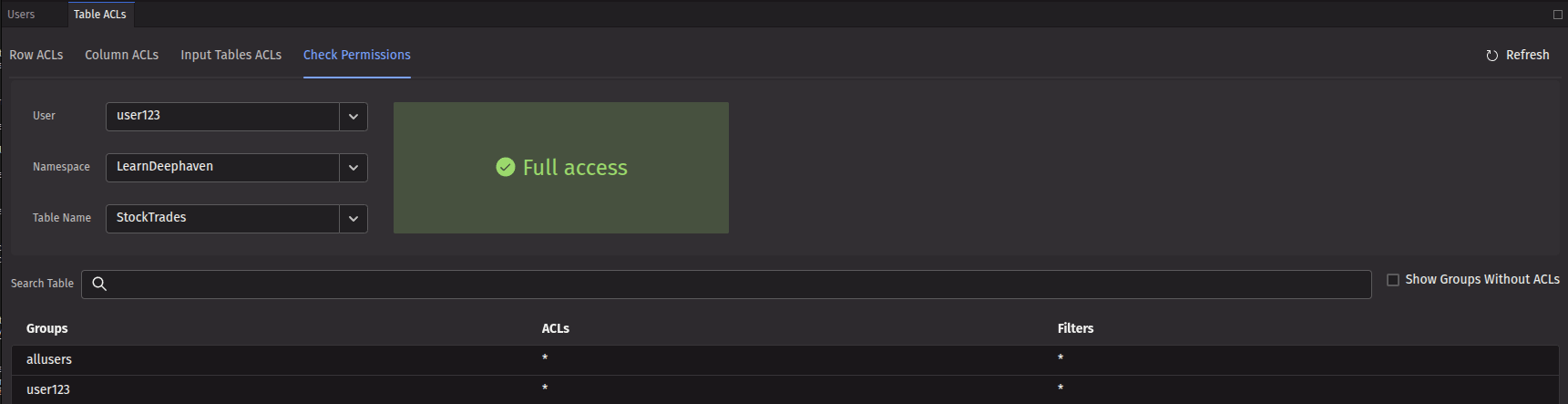
The Check Permissions tab provides administrators a way to verify what access a particular user has to a given table. This is useful for validating that ACLs are working as expected. Select the appropriate user, namespace, and table in the dropdown menus, and the UI will display the resulting permission level for the user on that table, along with a full list of all the ACLs that apply to that user for that table. The example below shows the permissions for user123 in regard to the LearnDeephaven namespace and the StockTrades table. The large "Full access" text indicates that the user has full access to the table. The bottom part of the panel shows the ACLs that were used to compute this permission level, and indeed that full read permission is allowed for that user (as noted by the *).
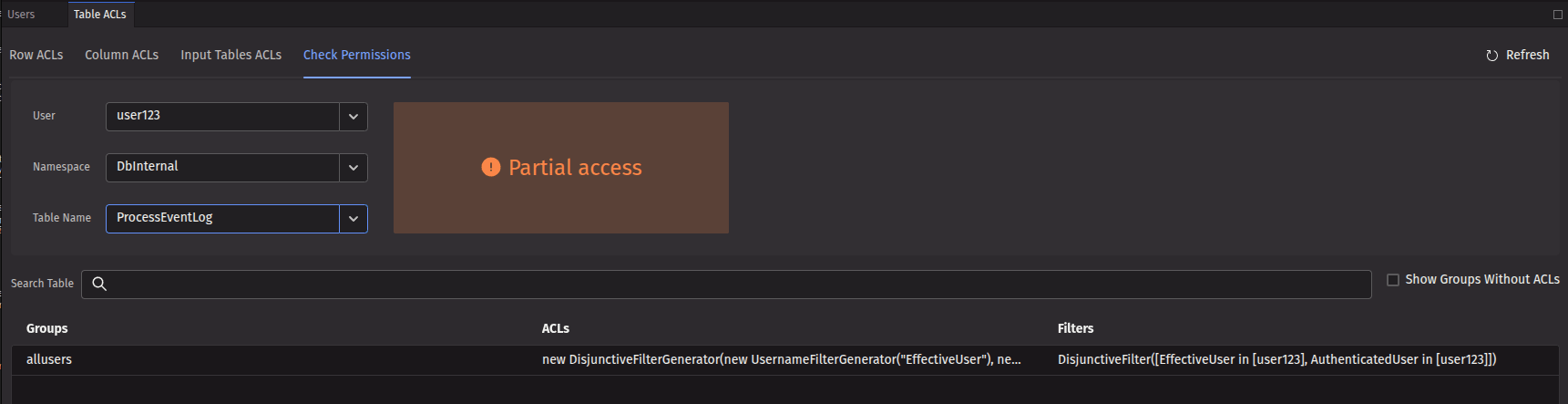
If you select a combination that only applies partial access, the resulting permission level will be shown as "Partial access", along with the specific row and column filters that apply to that user for that table. The example below shows again user123, but this time for the namespace DbInternal and the ProcessEventLog table. The user has partial access, with a filter that only allows viewing rows where EffectiveUser and AuthenticatedUser match user123.
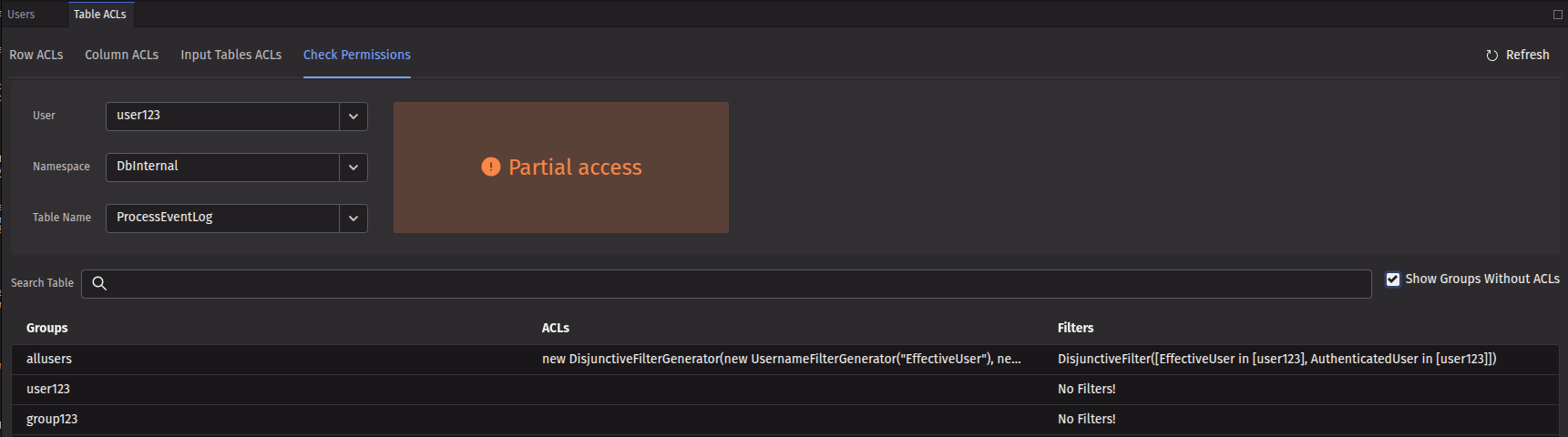
Selecting the Show groups without ACLs checkbox adds the names of the groups associated with that user and each group's respective permission levels.
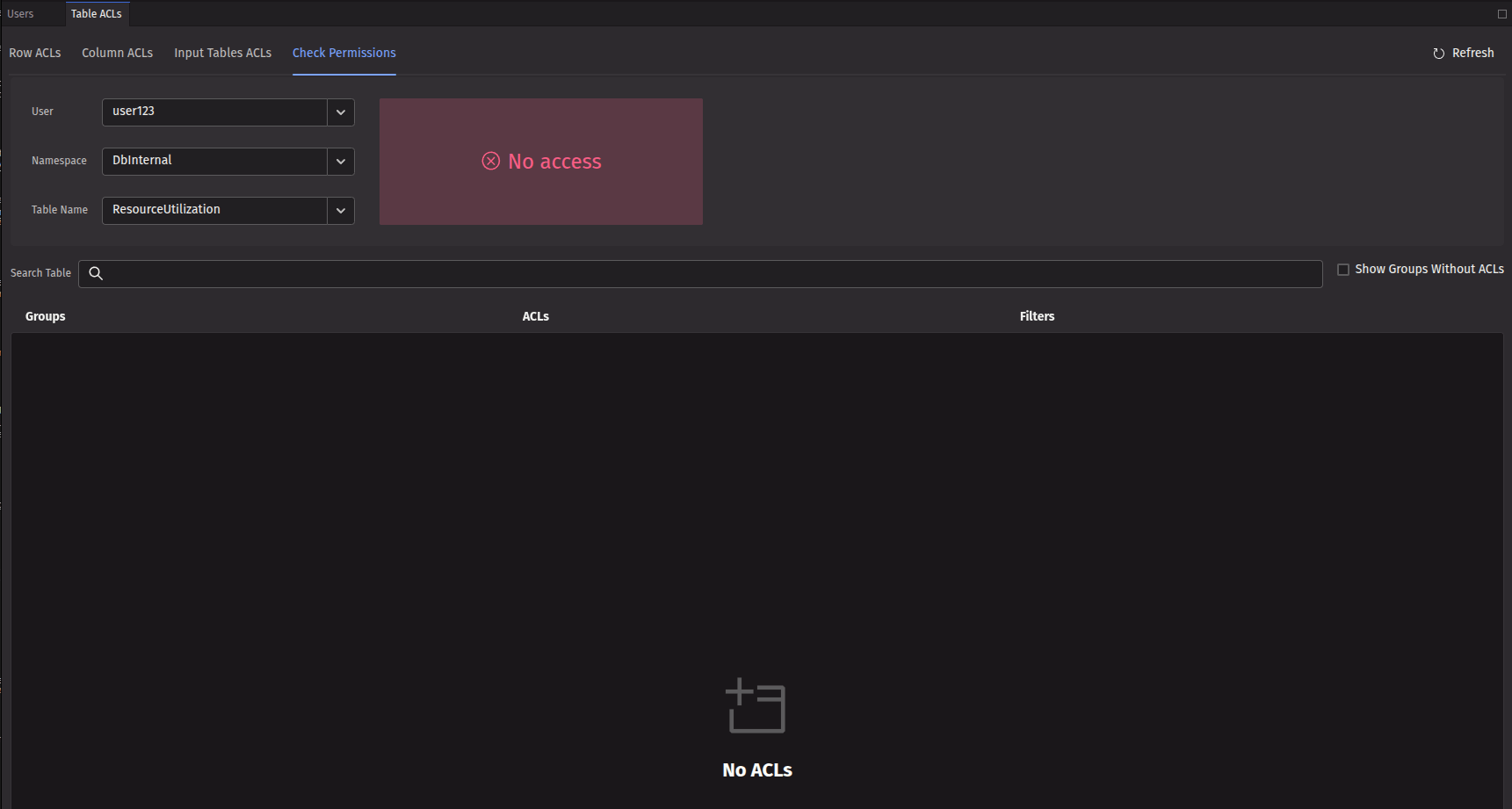
Checking a table that the user has no access to will show "No access" as the permission level.