rollup
The deephaven rollup method creates a rollup table from a source table given zero or more aggregations and zero or more grouping columns to create a hierarchy from.
Syntax
Parameters
| Parameter | Type | Description |
|---|---|---|
| aggregations | Collection<? extends Aggregation> | One or more aggregations. The following aggregations are supported: |
| includeConstituents optional | boolean | Whether or not to include constituent rows at the leaf level. The default value is |
| groupByColumns | String... | One or more columns to group on and create hierarchy from. |
Methods
Instance
getAggregations- Get the aggregations performed in therollupoperation.getGroupByColumns- Get thegroupByColumnsused for therollupoperation.getLeafNodeType- Get theNodeTypeat the leaf level.getNodeDefinition(nodeType)- Get theTableDefinitionthat should be exposed to node table consumers.includesConstituents- Returns a boolean indicating whether or not the constituent rows at the lowest level are included.makeNodeOperationsRecorder(nodeType)- Get arecorderfor per-node operations to apply during snapshots of the requestedNodeType.translateAggregatedNodeOperationsForConstituentNodes(aggregatedNodeOperationsToTranslate)- Translate node operations for aggregated nodes to the closest equivalent for a constituent node.withFilter(filter)- Create a new rollup table that will apply a filter to the Group By or Constituent columns of the rollup table.withNodeOperations(nodeOperations...)- Create a new rollup table that will apply therecordedoperations to nodes when gathering snapshots.withUpdateView(columns...)- Create a new rollup table that applies a set ofupdateViewoperations to thegroupByColumnsof the rollup table.withNodeOperations(nodeOperations...)- Create a new rollup table that applies therecordedoperations to nodes when gathering snapshots.
Returns
A rollup table.
Examples
The following example creates a rollup table from a source table of insurance expense data. The aggregated average of the bmi and expenses columns are calculated, then the table is rolled up by the region and age column.
Similar to the previous example, this example creates a rollup table from a source table of insurance expense data. However, this time we are filtering on the source table before applying the rollup using withFilter. Both group and constituent columns can be used in the filter, while aggregation columns cannot.
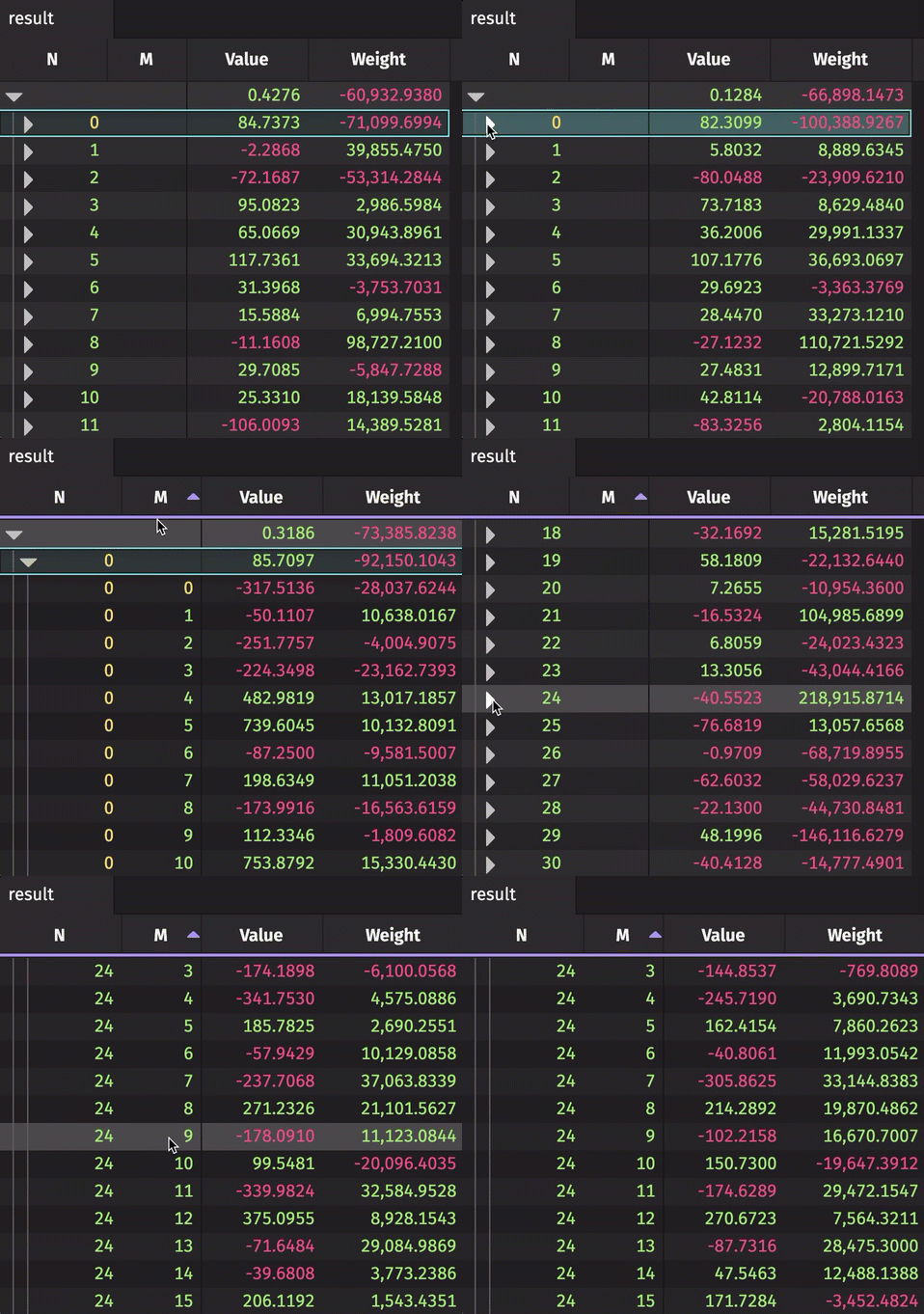
The following example creates a rollup table from real-time source data. The source data updates 10,000 times per second. The result rollup table can be expanded by the N column to show unique values of M for each N. The aggregated average and sum are calculated for the Value and Weight, respectively.
Formula Aggregations in Rollups
When a rollup includes a formula aggregation, care should be taken with the function being applied. On each tick, the formula is evaluated for every changed row in the output table. Since the aggregated rows include numerous source rows, the input vectors for a formula aggregation can become very large — encompassing the entire source table at the root level. If the formula is inefficient when handling large input vectors, it may negatively impact the rollup's performance.
By default, the formula aggregation operates on a group of all the values as they appeared in the source table. In this example, the Value column contains the same vector that is used as input to the formula:
To calculate the sum for the root row, every row in the source table is read. The Deephaven engine provides detailed update information for rows in the table (i.e., which rows are added, removed, modified, or shifted). Even though a vector contains many values, it is contained within a single row; therefore, the Deephaven engine does not provide detailed update information for a vector. Every time the table ticks, the formula is completely re-evaluated.
Formula Reaggregation
Formula reaggregation can be used to limit the size of input vectors while evaluating changes to a rollup. When writing your query, be mindful of the requirement that your formula must be applicable to each level of the rollup and produce the same output type.
reaggregatedSum and simpleSum produce the same results but operate differently. simpleSum reads the source table twice: first to calculate individual sums and then to compute the overall total. In contrast, reaggregatedSum reads the source table only once to gather the individual sums and then uses those intermediate sums to get the total.
If a new row with the key Delta is added to the source, simpleSum will read all eight rows again to recalculate the sums. However, reaggregatedSum will only recalculate the sum for Delta and then read the intermediate sums for Alpha, Bravo, Charlie, and Delta, not all rows. As the number of keys and the size of the data grow, this difference can significantly impact performance.
In the previous example, the Sum column evaluated the sum(IntVector) function at the first level of the rollup and produced a long. Since the original table contains an int column, the lowest-level rollup provides an IntVector to sum, while subsequent levels use a LongVector.
Similarly, the original table has a column called Value, but after aggregation, the result is labeled as Sum. To resolve this discrepancy, the updateView method is used before the rollup to rename the Value column to Sum. If the rename was omitted and the original data was used directly, it would lead to inconsistent results across different rollup levels.
If we ran the same example without the rename:
We instead get an Exception message indicating that the formula cannot be applied properly, because the Value column does not exist in the second level of the rollup:
Formula Depth and Keys
Formula aggregations may include the constant __FORMULA_DEPTH__ or __FORMULA_KEYS__ columns. The __FORMULA_DEPTH__ column is the depth of the formula aggregation in the rollup tree. The root node of the rollup has a depth of 0, the next level is 1, and so on. The __FORMULA_KEYS__ column is an ObjectVector containing the keys of the rows at the current level of the rollup. The following formulas demonstrate the values of depth and keys:
These variables can be used to implement distinct aggregations at each level of the rollup. For example:
In this case, for each value of Key, the aggregation returns the first value. For the root level, the aggregation returns the sum of all values. When combined with a reaggregating formula, even more interesting semantics are possible. For example, rather than summing all of the values, we can sum the values from the prior level:
Another simple example of reaggregation is a capped sum. In this example, the sums below the root level are capped at 40:
In this example, the __FORMULA_KEYS__ column is similarly used to cap at the Key column (using __FORMULA_DEPTH__ == 1 would be equivalent in this case):