Triage errors in queries
Everyone makes mistakes when writing queries in the Deephaven Query Language (DQL), as in any programming language. Mistakes often cause queries to fail to start properly or to crash during runtime. This guide shows you how to:
- Read a stack trace to find the root cause.
- Recognize and fix common mistakes, including problems that produce wrong results or pauses instead of an exception.
- Check your query strings for errors.
- Get help, including what to put in a bug report, when you can't find the cause.
Read a stack trace
At this point, you have written some Deephaven queries that should produce some interesting tables and visualizations, but when you attempt to run the query, it fails.
The first step is to find the error (an exception) and isolate its root cause. When you run code in the IDE console, the error appears in the console output. The Log panel shows the same error with its log header.
The log displays a large block of text that describes the exception and a chain of further exceptions that leads to the root of the problem.
Tip
Identify the root cause by looking at the Caused by lines. Start from the last exception in the chain and work backwards.
For example, the following code creates a function that throws an error and a table that calls it, passing the row index special variable i:
The query fails with the following error:
Deephaven stack traces tend to be very large, but they open with a summary of the failing operation. The block below is the trace above with the at ... frames removed. Its first line names the operation that failed. The remaining lines are the Caused by: lines:
Following the tip above, read the chain from the last exception up:
- The last exception is the innermost error, an
IllegalStateExceptionthat ourthrowFuncfunction creates. The error occurs when the table tries to compute a value for theXcolumn and invokes our function. - Just above,
RuntimeExceptionappears as anotherCaused byline becausethrowFuncpasses theIllegalStateExceptionto theRuntimeExceptionconstructor. - Above that, the engine wraps the error in a
FormulaEvaluationException. The engine adds this wrapper whenever a formula throws an exception, and its message names the formula that failed:In formula: X = throwFunc(i).
This is a very simple example of triaging an equally simple query with a deliberate error. In practice, queries are much more sophisticated and contain many interdependencies between tables. The recipe for triage, however, is the same.
The Console in the Deephaven IDE is a critical tool during triage. After the stack trace isolates the failing operation, use it to execute parts of the query bit by bit, analyze the inputs to the failing method, and experiment with changes to solve the problem.
For a fuller walkthrough of Groovy error output, see Decipher Groovy errors.
Common mistakes
Once you've fixed the problems that stop a query from starting, it starts serving up tables and plots. The following sections show common mistakes, how to recognize them, and how to fix them.
Some queries fail as soon as they run. Others fail later, when new data brings an unexpected value. These runtime failures can be trickier to triage because they often depend on unexpected patterns in streaming data.
To triage either kind, follow the same steps as in Read a stack trace:
- Find the exception.
- List its
Caused bylines. - Start at the last one and work backwards.
Two of the problems below, Non-deterministic formulas and Garbage collection (GC) pauses, show up as wrong results or pauses rather than an exception. Those sections describe what to look for instead.
Unexpected null values
It's easy to forget that columns can contain null values. Calling a Java method on a null value, such as Items.charAt(0) when Items is null, fails with a NullPointerException.
The following query creates a table with a string column that contains a null value. It then uses the charAt method to keep strings that start with B.
In this example, the last Caused by line of the stack trace contains the cause:
<local7> is the JVM's name for a variable in the filter code that Deephaven generates. The number can differ.
To fix the filter, check whether the value is null before you call a method on it:
Note
Adding !isNull(Items) to the start of the filter works because of short-circuit evaluation. When !isNull(Items) is false, the engine skips the rest of the where clause, so Items.charAt(0) == 'B' never runs on a null value.
String and array access
Reading past the end of a string, a vector, or a Java array behaves differently for each type:
- Strings: reading a character at a position that does not exist throws an exception.
- Vectors: reading an element past the end of a vector cell, such as one that
groupByproduces, returns null. The failure shows up later as an unexpected null value rather than as an exception. - Java arrays: reading an element past the end of a Java array cell, such as one holding
int[]values, throws anArrayIndexOutOfBoundsException.
The following query creates a table with a string column that holds strings of varying length. It then keeps the strings whose second character is i.
As with the null-value error in Unexpected null values, the last Caused by line contains the cause:
As in Read a stack trace, the first line of the stack trace names the TableInitializationException. It also shows the query string that failed, where([Items.charAt(1) == 'i']). The filter tried to read index 1 of a string that has only one character.
We can inspect the table by adding a new column ItemsLength = Items.length():
To see the rows where the string is less than two characters long, right-click the ItemsLength column header, open the Advanced Filters panel, and filter to values less than 2:
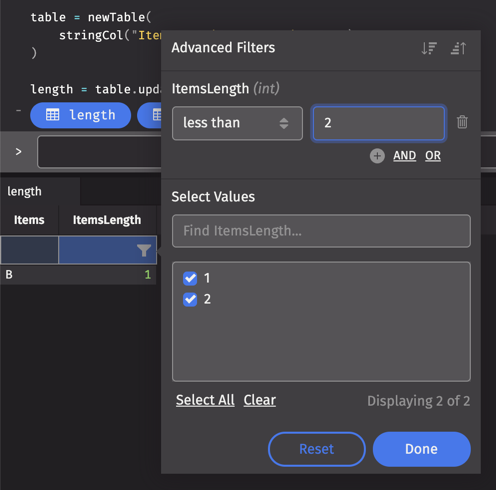
Guard the charAt call with a length check, the same way Unexpected null values guards it with a null check:
This works because of short-circuit evaluation. When Items.length() >= 2 is false, the engine skips Items.charAt(1), so it never reads past the end of a short string.
If you only care whether the string contains the i character, a better solution is:
As always, use the Deephaven IDE to validate that this change works and produces the result you expect!
Vectors behave differently. The following query uses groupBy to collect the Value column into a vector for each Key, then reads the third element of each vector:
The vector for Key 1 has only two elements, so ThirdValue is null in that row. The query doesn't fail. When a query reads vector elements by position, look downstream for unexpected null values.
Join key problems
Deephaven's join operations are one of its most powerful features. They combine tables by matching values in key columns to produce new tables.
Some joins allow any number of matching rows on each side, but others do not. By default, naturalJoin allows at most one right-table row for each key that a left row matches. If a left row's key matches more than one right-table row, the join fails. The following query shows this:
Because 31 appears twice in the DeptID column in the right table, the query fails. In this case, the first line of the stack trace already names the root cause:
If the right table can contain duplicate keys, pass NaturalJoinType.FIRST_MATCH or NaturalJoinType.LAST_MATCH as the joinType argument of naturalJoin to choose which match to keep. The Groovy console imports io.deephaven.api.* by default, so NaturalJoinType needs no import. The following query keeps the last match:
The join now succeeds. LAST_MATCH keeps the last right-table row for key 31, so DeptName is Marketing.
Non-deterministic formulas
Not all errors have stack traces. Some queries run without an error but produce wrong results.
A deterministic function is one that produces the exact same result every single time when given the same input parameters. A non-deterministic function, such as a random number generator, does not. In a formula column, a non-deterministic function can return a different value each time the column is read. Consider the following query:
The NumberTimesTwo values are all even, but most are not twice the value in Number. Here is why:
updateViewcreates a formula column. A formula column stores the formula, not the values, and calculates each value on demand.- Each time something reads
Number,randomIntruns again and returns a new value. NumberTimesTworeadsNumberagain, so it doubles a different random number than the oneNumbershows.
When a formula calls a non-deterministic function, create its column with update instead of updateView, so that Deephaven calculates and stores each value once:
Now every NumberTimesTwo value is exactly twice Number.
Errors like these are trickier to diagnose than an exception, so pay attention to which kind of column you create when a formula calls a non-deterministic function.
Out of memory
A common problem is running out of heap memory as data volume grows during the day. It happens when your Deephaven instance has too little heap. Unexpected data patterns, such as unusually large Kafka input, make it worse.
The most common out-of-memory error looks like this:
Start by increasing the heap. If that isn't enough, review the query for changes that reduce heap usage. In practice, the fix often combines several of the techniques below.
To increase the heap allocated to the Java Virtual Machine (JVM), set -Xmx in the START_OPTS environment variable, which Docker and the start script read (for example, START_OPTS=-Xmx8g). If you run Deephaven with Docker, as in the Docker install guide, make sure Docker itself has enough memory for that heap. See Configure and adjust heap size.
Increasing the heap is enough for many workloads. Be careful when you cross 32GB:
- Below about 32GB, the JVM uses compressed object pointers, which make each object reference smaller.
- At about 32GB and above, the JVM turns compressed object pointers off so it can address the whole heap.
- As a result, raising the heap from 30GB to 32GB leaves less usable heap for your query.
Tip
If you must cross the 32GB boundary, increase the heap well past it, because uncompressed object pointers use more of the heap.
The next step is to review your query code.
- Where you use
update, considerupdateView. It stores the formula instead of the values, which trades CPU time for memory. For simple computations, this is often a good trade. See Choose the right column selection method.- Only switch deterministic formulas.
updateViewrecalculates values each time they are read, so a formula that uses random numbers returns different values each time. See Non-deterministic formulas.
- Only switch deterministic formulas.
- Reuse tables instead of recomputing them. Look for duplicate tables, or tables that differ only in which columns they keep, and derive later tables from one shared table. Deephaven reuses the result of many repeated operations on the same table, but derive from a shared table explicitly rather than rely on that.
- Watch the number of unique keys in tables you pass to key-based operations such as
partitionBy,groupBy, andjoin. If keys are mostly unique within a table, such as aSaleIDcolumn,partitionBycan produce millions of single-row tables, each with some heap overhead. In that case, consider different keys or different operations. - Consider the order of your query operations. Filter data before you join tables.
- A very simple example is applying a
joinand awherecondition. Inderived = myTable.join(myOtherTable, "JoinColumn").where("FilterColumn = `FilterValue`"), thejoinmatches rows frommyTablethat thewhereexpression later filters out, so it uses much more heap than it needs to. - Filter first instead:
derived = myTable.where("FilterColumn = `FilterValue`").join(myOtherTable, "JoinColumn"). This uses less heap and reduces how many rows downstream tables process each time the left or right table updates.
- A very simple example is applying a
A query can use more heap than expected for many other reasons. Finding them requires a deep analysis of how the query performs at runtime. You may need to use a Java profiling tool (such as JProfiler) to identify poorly performing sections of your code.
Garbage collection (GC) pauses
GC pauses are another heap-related problem. They happen when your query has enough memory but processes a lot of data on each tick. A tick is one update cycle of a ticking table, which can add, modify, or remove rows.
- A long series of query operations allocates a lot of temporary heap on each tick.
- When those computations finish, the JVM garbage collector reclaims that memory.
- Garbage collection uses CPU time. Long collections pause query processing, and computations back up.
The symptom is periodic long pauses while the JVM frees memory. When you see this, reduce how often your tables tick.
Checklist for query string errors
Before you file a bug, check your query strings against this list.
-
Is the query string itself properly quoted as a Groovy string?
- Query strings in operations such as
whereorupdatemust be Groovy strings, in double or single quotes. For example,myTable.where("StringColumn = `TheValue`"). - If you pasted an expression from another app, such as Slack, check for Unicode curly quotation marks (U+201C and U+201D). Some apps substitute them for the ASCII quotation mark (U+0022).
- Query strings in operations such as
-
Do you have matching parentheses?
- Make sure every opening parenthesis has a matching closing parenthesis.
-
If you are referring to a column in a Deephaven query expression:
- Is the column name spelled and capitalized correctly?
- A formula or a range filter, such as
Price > 5, that references a column that doesn't exist fails with aFormulaCompilationException, because the engine cannot compile it. - A simple match filter, such as
StringColumn = `TheValue`, fails instead with a message that the column doesn't exist in this table, followed by the table's available columns.
- A formula or a range filter, such as
- Is the type of the column what you expect it to be?
- Did you account for null values?
- Is the column name spelled and capitalized correctly?
-
If your query string contains string literals, did you quote them properly?
- Inside a query string, quote string literals with backticks (
`) or Java double quotes ("), not single quotes ('), which Deephaven uses for character and date-time literals. - Do you have matching close quotes for your open quotes?
- Inside a query string, quote string literals with backticks (
-
If you are using date-times in your expressions:
- Did you use single quotes (
'), not double quotes (") or backticks (`)? - Did you use the proper format? The most common date-time format is
yyyy-MM-ddTHH:mm:ss[.SSSSSSSSS] TZ. The fractional seconds are optional and can have up to nine digits. For example,'2024-01-01T09:30:00 ET'or'2024-01-01T09:30:00.123 ET'.
- Did you use single quotes (
-
Are all classes that you are trying to use properly imported?
- A query string can use a class by its simple name only if the query library imports it. The query library imports a set of defaults, and server configuration and installed extensions can add more.
- A Groovy
importstatement makes a class available to your script, not to query strings. - To use any other Java class, write its fully-qualified name, such as
java.net.URI.create(`https://deephaven.io`). Or import it withimportClassorimportPackage, and then use its simple name. For example, afterExecutionContext.getContext().getQueryLibrary().importClass(java.net.URI.class), a query string can callURI.create(`https://deephaven.io`). See Java objects and classes in query strings.
Get help
If you've gone through all of the steps to identify the root of a problem, but can't find a cause in your query, you may have uncovered a bug. In this case, you should file a bug report. Be sure to include the following with your bug report:
- The Deephaven server and web UI versions. See Get version information.
- The complete stack trace, not just the list of
Caused bylines. - A code snippet or a description of the query.
- Any logs from your user console, or from your terminal if you run Deephaven in Docker.
- Support logs exported from the browser. Open User Settings and click Export Logs to download a zip with the browser logs and the current state of the application. See Export support logs.
You can also get help by asking questions in our GitHub Discussions forum.
Related documentation
- Deephaven's table types
- Arrays vs vectors
- Create a new table
- How to handle null, infinity, and not-a-number values
- Joins: Exact and Relational
- How to select, view, and update data in tables
- How to work with strings
- Filters in query strings
- Formulas in query strings
- Java objects and classes in query strings
- Date-time literals in query strings
- Configure and adjust heap size
- Connect to a Kafka stream
- Retrieve logs
- Decipher Groovy errors
- Get version information
- Query string overview
- Table filters in the UI
- How to reduce the update frequency of ticking tables
- Install and run with Docker
- Special variables
- Strings
- Arrays
emptyTablegroupByintColjoinnaturalJoinnewTablepartitionBystringColupdateupdateViewwhereNaturalJoinTypeJavadocQueryLibraryJavadocBasicJavadocRandomJavadocFormulaCompilationExceptionJavadocFormulaEvaluationExceptionJavadocTableInitializationExceptionJavadoc