snapshotWhen
The snapshotWhen method produces an in-memory copy of a source table that adds a new snapshot when another table, the trigger table, changes.
Note
The trigger table is often a time table, a special type of table that adds new rows at a regular, user-defined interval.
Caution
When snapshotWhen stores table history, it stores a copy of the source table for every trigger event. This means large source tables or rapidly changing trigger tables can result in large memory usage.
Syntax
Parameters
| Parameter | Type | Description |
|---|---|---|
| trigger | Table | The table that triggers the snapshot. This should be a ticking table, as changes in this table trigger the snapshot. |
| features | SnapshotWhenOptions.Flag... | The snapshot features. |
| features | Collection<SnapshotWhenOptions.Flag> | The snapshot features. |
| stampColumns | String... | The stamp columns. |
| options | SnapshotWhenOptions | The options dictate whether to take an initial snapshot, do incremental snapshots, keep history, and set stamp columns. |
Caution
The trigger table's stamp columns appear in the result table. If the source table has a column with the same name as a stamp column, a snapshot without HISTORY raises an error. With HISTORY, Deephaven does not reliably detect the conflict. The stamp column's values can be silently lost, or the snapshot can fail. To avoid the conflict, rename the stamp column in the trigger table using renameColumns.
Returns
A new table that captures a snapshot of the source table whenever the trigger table updates.
SnapshotWhenOptions
The snapshotWhen method's options parameter takes a SnapshotWhenOptions object. These are constructed using SnapshotWhenOptions.of(...). The syntax is given below.
Where INITIAL, INCREMENTAL, and HISTORY are booleans and stampColumns is one or more string values corresponding to columns in the trigger table.
INITIAL(Boolean): Whether or not to take an initial snapshot upon creating the result table. The default isfalse.INCREMENTAL(Boolean): Determines whether the resulting table should be incremental. The default value isfalse. Whenfalse, the stamp column in the resulting table will always contain the latest value from the stamp column in the trigger table. This means that every row in the resulting table will be updated each time the trigger table updates. Whentrue, only rows that have been added or updated to the source table since the last snapshot will have the latest value from the stamp column.HISTORY(Boolean): Determines whether the resulting table should keep history. The default value isfalse. Whentrue, the result appends a full snapshot of the source table and the stamp columns for each row the trigger table already has when you create the result, and for each row it adds later, so the result grows very fast. The trigger table must be append-only; if it modifies or removes rows, the result fails and stops updating. Whenfalse, the result holds only the latest snapshot.stampColumns(String...): One or more column names to act as stamp columns. Each stamp column will be included in the final result and will contain the value of the stamp column from the trigger table at the time of the snapshot. If you pass no stamp columns, all trigger table columns are appended to the source table.
Note
If HISTORY is true, INITIAL and INCREMENTAL must be false.
Examples
In the following example, the source table adds a row every second and the trigger table adds a row every five seconds. Thus, the result table updates each time trigger adds a row, about every five seconds. To avoid a name conflict error, the Timestamp column in the trigger is renamed.
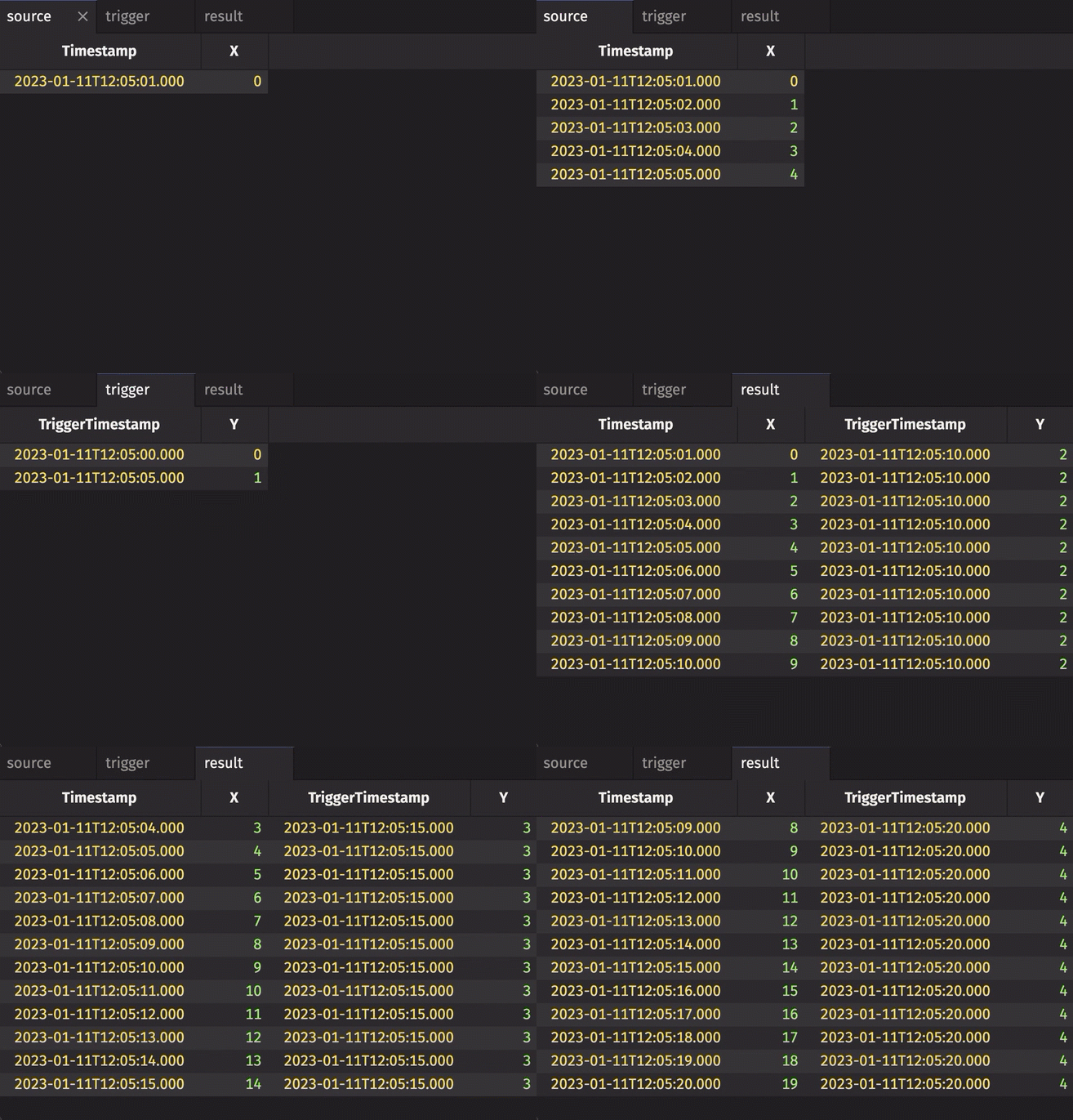
Notice three things:
- No stamp columns are passed, so every column from
triggeris included inresult. INCREMENTALisfalse, so the entireTriggerTimestampcolumn inresultis updated each time the trigger table updates and always contains the latest value from theTriggerTimestampcolumn intrigger.HISTORYisfalse, soresultholds only the latest snapshot ofsource. Each snapshot replaces the previous one instead of being appended.
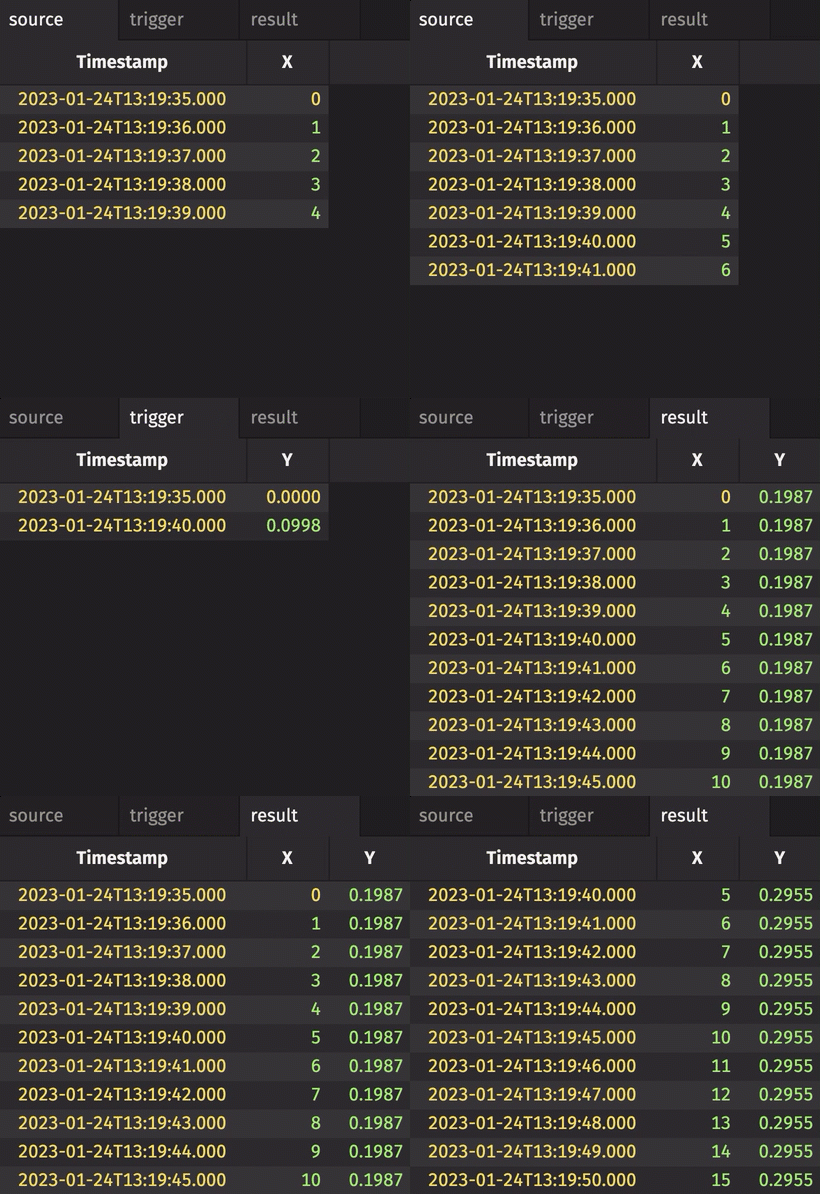
In the following example, the code is nearly identical to the one above it. However, in this case, the Y column is given as the stamp key. Thus, the Timestamp column in the trigger table is omitted from the result table, which avoids a name conflict error. This is an alternative to renaming the column in the trigger table.
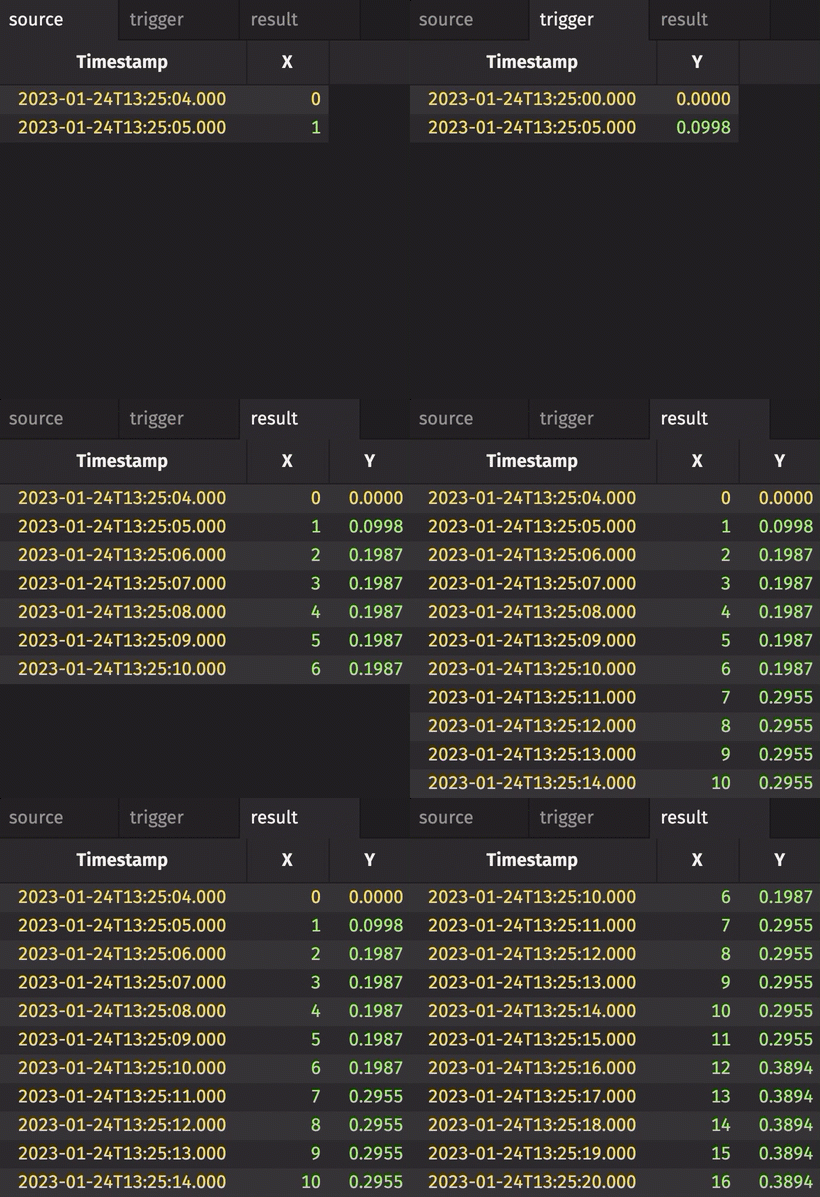
In the following example, HISTORY is set to true. Therefore, every row in source gets snapshotted and appended to result each time trigger adds a row, regardless of whether source has changed.
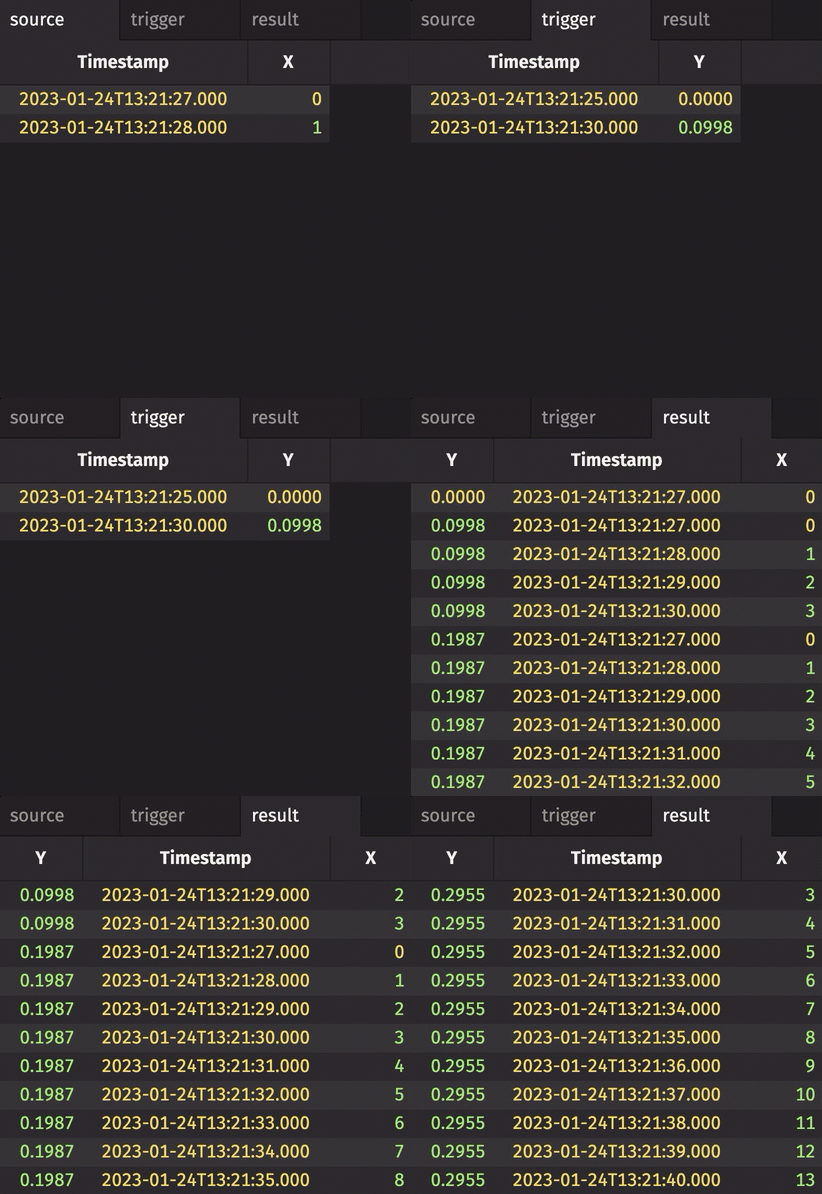
In the following example, INCREMENTAL is set to true. Thus, only the rows of source that were added or modified since the last snapshot get the latest Y value. Earlier rows keep the Y value from the snapshot that captured them. Contrast this with the first and second examples given above.