Create a ring table
This guide shows how to create a ring table from a blink table or an append-only table, and how to control whether the ring table starts with the rows already in its parent.
You build a ring table from another table, called its parent. The ring table holds at most a fixed number of the parent's latest rows. That number is the ring table's capacity. When a new row arrives and the ring table is full, the ring table removes its oldest row and reuses that row's storage. This bounds the ring table's own memory use.
Most ring tables use a blink table as their parent. A blink table keeps rows for only one update cycle. An update cycle is the periodic step in which Deephaven processes new data and updates tables whose contents change over time. A ring table built from a blink table can keep a longer history, such as the last 5000 rows.
A ring table tracks only the rows added to its parent. It ignores rows that the parent removes. If the parent modifies existing rows or moves them to different positions in the table, the ring table fails with an error during that update cycle. Use a ring table with a blink or append-only parent.
Create a ring table from a blink table
To keep more than one update cycle of a blink table's rows, pass the blink table as the first argument to RingTableTools.of, and set the second argument, capacity, to the number of rows to keep.
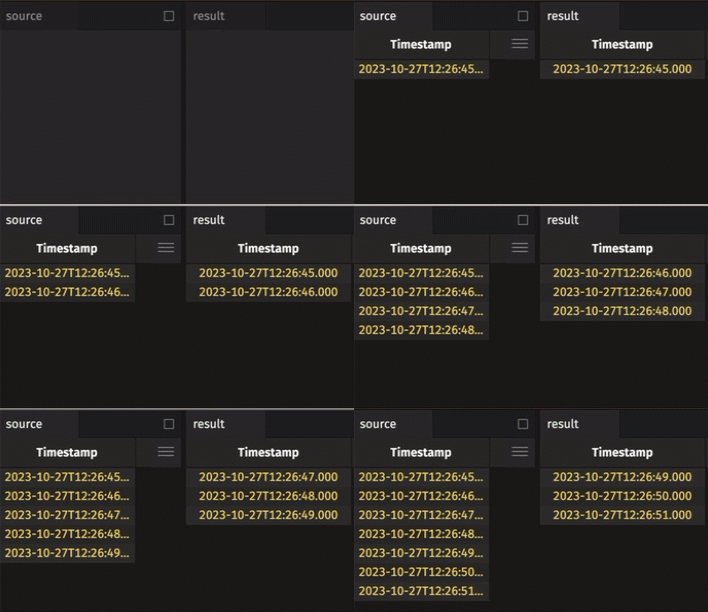
The following example creates a ring table from a blink time table, which adds a new row at a fixed interval. Deephaven removes each row from source at the start of the next update cycle, so source holds only the rows added in the latest cycle. result keeps up to the 5 most recent rows.
Create a ring table from an append-only table
A ring table built from an append-only table bounds only its own size. Unlike a blink table, an append-only parent keeps every row, so the ring table doesn't reduce total memory use.
The result is effectively the same as applying tail to the parent. If you only need the latest rows of an append-only table, tail is the simpler choice.
The following example creates a ring table with a 3-row capacity from an append-only time table.
Control the initial rows
RingTableTools.of takes an optional third argument, initialize, that controls whether the ring table starts with a snapshot of the rows already in its parent.
- When
initializeistrue, which is the default, the ring table starts with the latestcapacityrows that the parent holds when you create the ring table. - When
initializeisfalse, the ring table starts empty and holds only rows added to the parent afterward. - If the parent is static and
initializeisfalse,RingTableTools.ofthrows an exception. A static table never adds rows, so the ring table would always be empty.
The following example creates a ring table from a ticking table, which adds rows over time. The ticking table starts with 5 rows. The example builds that table by using merge to combine a static 5-row table with a time table. The time table only ever adds rows to the merged table, so the merged table is a valid parent. The example omits the third argument, initialize, so it defaults to true, and result starts with all 5 rows.
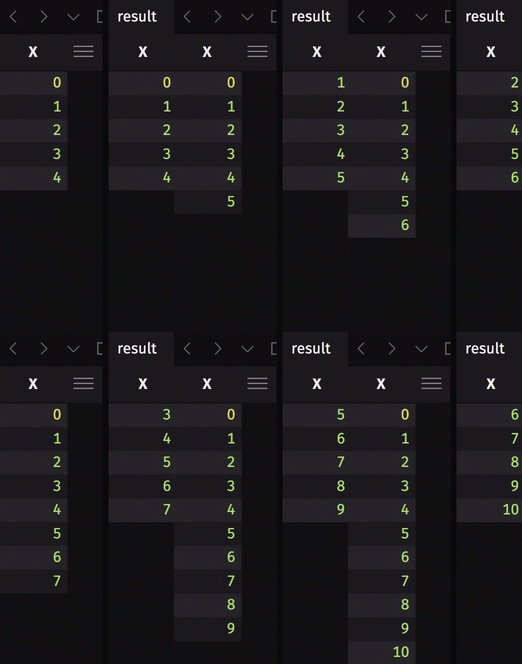
The following example is identical to the one above, except the third argument, initialize, is false. When you first run the query, result is empty.