Worker configuration
The Show Advanced section in both the UI query management and Code Studio connection dialogs exposes settings that control worker process allocation and JVM configuration. This page documents those shared settings.
All workers
The following settings are available for all worker types.
Additional Memory
The amount of additional memory (in GB) allocated to this worker process beyond the Java Virtual Machine (JVM) heap memory. This allows Deephaven to account for memory allocated by Python native code, Java direct memory, and other types of non-heap memory. This setting is especially important on Kubernetes, because if a worker's memory usage exceeds the total allocated heap and additional memory then the Linux kernel terminates it with an out-of-memory error. On bare metal or Podman, this setting is advisory and not enforced; it simply prevents the dispatcher from starting more queries.
JVM Profile
The JVM contains a garbage collector to free unreachable memory automatically. There are multiple garbage collection algorithms, and many tuning parameters available for each algorithm. Several predefined profiles are available, and administrators can define additional profiles using controller properties. See Remote Processing Profiles for more information. The JVM Profile drop-down menu provides the following options:
- Default - Use the default garbage collection parameters for your Deephaven system. This defaults to
G1 GC, but the Deephaven administrator can change the value. - CMS GC - Use Java's CMS (Concurrent Mark Sweep) garbage collection. Note that this garbage collector was removed in Java 17.
- G1 GC - Use Java's newer G1 (Garbage First) garbage collection.
- G1 MarkStackSize 128M - Use the custom
MarkStackSizeprofile - None - Do not use any garbage collection parameters. Manually define the desired garbage collection parameters in the Extra JVM Arguments field.
GC logs
Garbage Collection (GC) is a JVM memory management process that automatically frees unreachable memory by removing objects not in use by the Java application. When selected (the default), Deephaven includes Garbage Collection information in the worker logs.
Extra JVM Arguments
This field allows users to access different Java utilities that are not included in the base Deephaven installation. For example, you may want to run a different profiler or debugging processor. You can include these items in the Deephaven configuration by typing the extra JVM arguments in this field.
Extra environment variables
Pass additional environment variables to the Deephaven worker process. Use this field to supply configuration information that would otherwise need to be set at the system level.
Extra Classpaths
Tells Deephaven where to look on the file system for additional class files.
Warning
Extra classpath entries must follow Java's rules for inclusion. Entries should either be paths to .jar files, paths to directories containing .class files, or a path glob such as /path/to/jars/*.
See -classpath in Java Documentation.
Core+ workers
The following settings are available when a Core+ worker is selected.
Initialization Threads
Determines the number of threads available for parallel processing of initialization operations. Options include "Default" (uses server configuration), "All available processors", or a specific positive integer. For more information, see Managing thread pool sizes.
Update Threads
Determines the number of threads available for parallel processing of the Update Graph refresh cycle. Options include "Default" (uses server configuration), "All available processors", or a specific positive integer. For more information, see Managing thread pool sizes.
Core+ Python workers
The following settings are available when a Core+ Python worker is selected.
Python environment
- Create a temporary virtual environment for this worker (Create a temporary virtual environment for this query in the query settings) - When selected, Deephaven creates a new virtual environment for this worker. On bare metal installations, a worker may not change the default shared virtual environment. To install additional packages (either with the Additional Packages field or with
deephaven_enterprise.venv), you must create a temporary virtual environment. With the Deephaven Helm chart, worker pods run with a read-only root filesystem, so installing into the default virtual environment fails. Use a temporary virtual environment for runtime package installs, or customize the worker image to add packages to the default environment. - Include default packages - When selected, Deephaven initializes the temporary virtual environment with a copy of the packages in the default environment. Note that some of these packages are necessary for Deephaven to function, but you may want to exclude them so that you can experiment with different versions of the packages.
- Additional Packages - A space-separated list of additional requirements to install into the virtual environment on startup.
Kubernetes workers
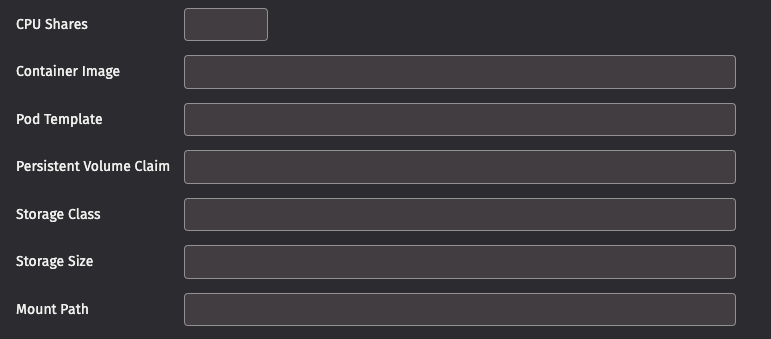
The following additional parameters are available when running on a Kubernetes cluster.
Note
Your Deephaven administrator may not permit changing all of these values. See Kubernetes worker parameters for more information.
- CPU Shares - Controls the number of CPU shares requested by the worker pod. If not specified, no explicit CPU request is made and the cluster uses the default value.
- Container Image - The path to the container image to use for this worker.
- Pod Template - An alternative pod template to use for this worker. This allows you to change many of the worker settings.
The following four options allow you to attach storage to your worker. This is necessary, for example, to create an in-worker DIS or Kafka Ingester:
- Persistent Volume Claim - Mount the persistent volume claim with this name in your worker pod, or create a persistent volume claim if it does not exist.
- Storage Class - If creating a new volume claim, use this storage class.
- Storage Size - The amount of storage in bytes, expressed in 'Mi', 'Gi', etc., as in
10Gi. - Mount Path - Location where the volume will be mounted in your worker.