Deephaven process management
This document provides a comprehensive guide to managing Deephaven processes across all deployment types. It covers process supervision, startup and shutdown procedures, configuration, and monitoring.
For quick reference commands, see the Deephaven operations guide.
Deployment types
Deephaven process management varies by deployment type:
| Deployment | Process supervision | Primary tools |
|---|---|---|
| Traditional (bare metal/VM) | monit + systemd | dh_monit, iris |
| Podman | monit (containerized) | dh_monit, iris |
| Kubernetes | Kubernetes controllers | kubectl, Helm |
Deephaven services
A Deephaven deployment consists of multiple services, each running as a separate process:
| Process name | Run user | Description |
|---|---|---|
configuration_server | irisadmin | Provides configuration to other services |
authentication_server | irisadmin | Handles user authentication |
iris_controller | irisadmin | Manages Persistent Query lifecycle |
db_query_server | dbquery | Dispatcher for query workers |
db_merge_server | dbmerge | Dispatcher for merge workers |
web_api_service | dbquery | Serves the Web IDE |
log_aggregator_service | irisadmin | Aggregates binary log entries |
db_dis | dbmerge | Data Import Server |
tailer1 | irisadmin | Streams data from binary logs |
db_tdcp | dbquery | Table Data Cache Proxy |
db_ltds | dbquery | Local Table Data Server |
db_acl_write_server | irisadmin | ACL Write Server |
Process dependencies
Services must start in a specific order due to dependencies:
The dh_monit wrapper automatically handles this sequencing.
System users
Deephaven processes run under specific system users for security and access control:
| User | Purpose | Default name |
|---|---|---|
| Admin user | Infrastructure services, administration | irisadmin |
| Query user | Query workers, web services | dbquery |
| Merge user | Merge workers, data import | dbmerge |
| Monit user | Process supervision daemon | irisadmin |
| etcd user | etcd database | etcd |
You can override these defaults in cluster.cnf. See Cluster configuration files for details.
Traditional and Podman deployments
Process supervision architecture
Traditional and Podman deployments both use monit for process supervision, but differ in how monit itself is managed:
Traditional deployments (bare metal/VM):
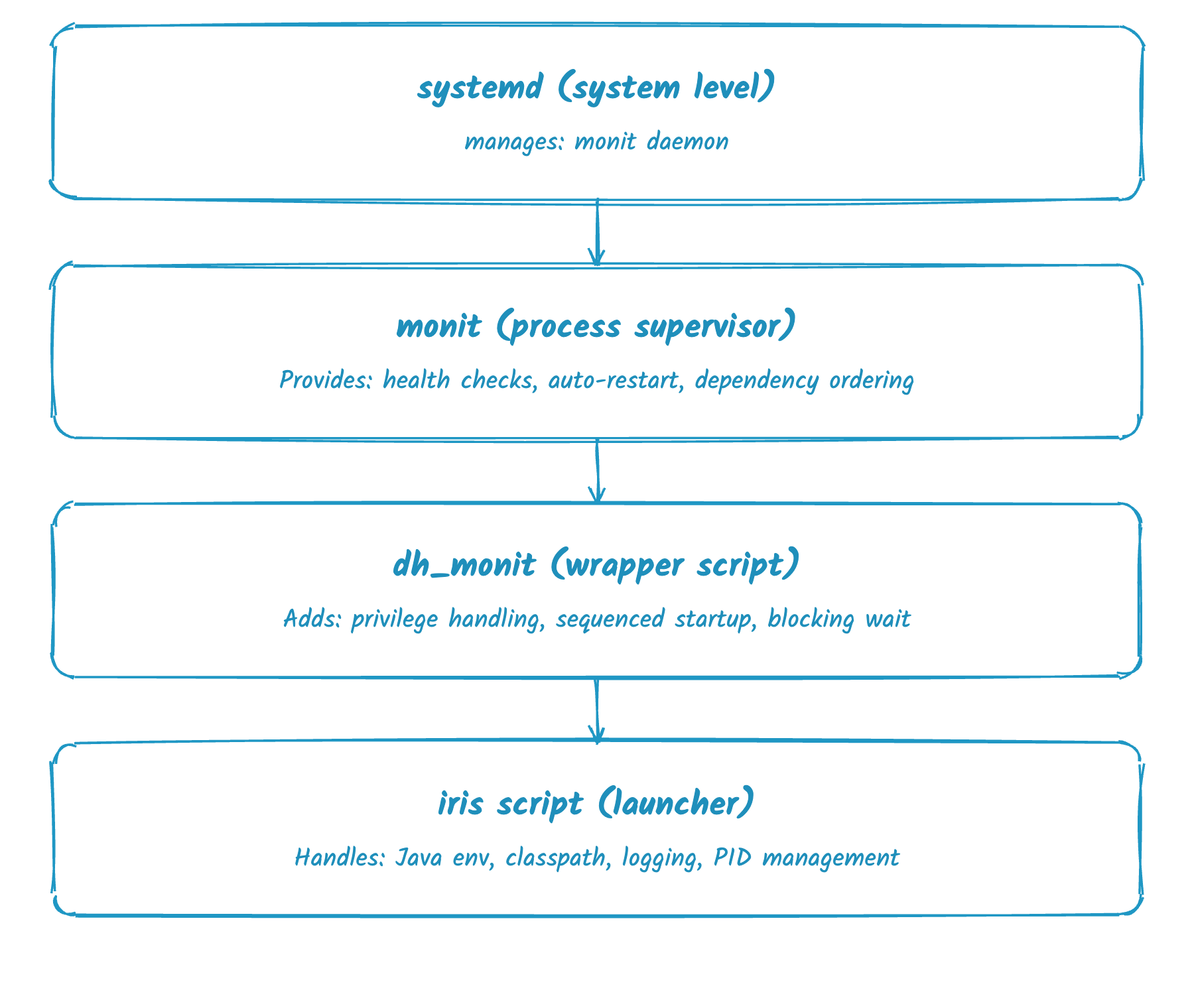
In traditional deployments, systemd manages the monit daemon. Use systemctl commands to start, stop, or check monit status.
Podman deployments:
In Podman deployments, the container entrypoint script starts monit directly — systemd is not involved. Do not use systemctl commands for monit management in Podman; instead, manage the container itself via podman commands.
The dh_monit wrapper
Deephaven provides dh_monit as a wrapper around monit that adds Deephaven-specific functionality:
- Privilege handling — Runs commands as the appropriate user without requiring root.
- Sequenced startup — Starts
configuration_serverandauthentication_serverfirst, waiting for each to be ready before continuing. - Blocking waits — Optionally waits for all services to reach their target state.
Basic commands
Starting and stopping services
Monitoring and unmonitoring
The iris script
The iris script is the actual process launcher invoked by monit. It handles:
- Java environment setup (
JAVA_HOME,JAVA_FLAGS) - Classpath construction
- Workspace and log directory creation
- Process user switching via
sudo - PID file management
For advanced troubleshooting, you can invoke it directly:
Configuration files
monit configuration
| Location | Purpose |
|---|---|
/etc/monitrc | Main monit configuration (override via DH_MONIT_RC) |
/etc/sysconfig/illumon.d/monit/*.conf | Per-service configuration |
Example service configuration (/etc/sysconfig/illumon.d/monit/configuration_server.conf):
Host configuration
Process launch parameters are configured in hostconfig files:
| Location | Purpose |
|---|---|
/etc/sysconfig/illumon.confs/hostconfig.system | System defaults (installer-managed) |
/etc/sysconfig/illumon | Custom overrides |
See Java process launch configuration for details.
Enabling and disabling services
Temporarily disable
Permanently disable
Re-enable
Kubernetes deployments
In Kubernetes, process management is handled by Kubernetes itself rather than monit.
Pod-based architecture
Deephaven services run as Kubernetes deployments and StatefulSets:
| Resource type | Services |
|---|---|
| Deployments | configuration-server, authserver, controller, query-server, merge-server, webapi, dis, las |
| StatefulSet | etcd cluster |
| Dynamic pods | Worker pods (created by dispatchers) |
Managing services
Check status
Restart services
View logs
Scale services
Configuration
Kubernetes deployments are configured through Helm values rather than file system access:
Apply configuration:
See Kubernetes process launch configuration for details.
Monitoring process status
Traditional/Podman
Kubernetes
Troubleshooting
Stale PID files
After an improper shutdown, stale PID files may prevent services from starting:
Interactive debugging
For services that fail to start, bypass monit for interactive debugging:
Monit won't start
If monit fails to start after an improper shutdown:
Traditional deployments:
Podman deployments:
Restart the container to restart monit. The container entrypoint automatically cleans stale PID files on startup.
Common issues
| Symptom | Likely cause | Solution |
|---|---|---|
| Service cycles between "Initializing" and "Execution failed" | Dependency not running | Check configuration_server and authentication_server |
| "Address already in use" | Port conflict | Find conflicting process: lsof -i :<port> |
| "Permission denied" | Wrong user or permissions | Verify file ownership and run user |
| Services won't start after reboot | Stale PID files | Remove /etc/deephaven/run/*.pid |
See Process startup troubleshooting for more details.
Related documentation
- Startup / Shutdown of Deephaven processes — Quick reference
- Java process launch configuration — Traditional deployments
- Kubernetes process launch configuration — Kubernetes deployments
- Process startup troubleshooting
- Process restart guide — Maintenance recommendations
- monit runbook — Detailed monit reference