Keyed row selection
This guide shows you how to control what happens when a user selects a row in the Deephaven UI: whether the selection covers just that one row, or every row that shares its key. You control this by marking key columns on the table.
By default, a table carries no metadata that says which columns identify a row, so the UI can't tell when two rows represent the same real-world entity. Without key columns, the UI tracks a selection by row position. When the table ticks and its rows shift, for example when new rows arrive at the top of a sorted table, the selection stays at the same positions and covers different rows. Marking one or more columns as key columns closes that gap. The UI then tracks a selection by key value, so on a ticking table the selection stays with its rows even as updates move them to new positions in the grid. Key columns are metadata only: setting them doesn't change any data in the table.
Select every row with a matching key
Use withKeys when rows can legitimately share the same key value, such as several rows that belong to the same group, and you want selecting one of them to select all of them.
Key1 and Key2 together form the key, and the combination of their values repeats every six rows. Selecting any row in the Deephaven UI selects every row that shares its combination. Selecting row 0, for example, selects rows 0, 6, 12, and so on, which all have Key1 = 0 and Key2 = 0:
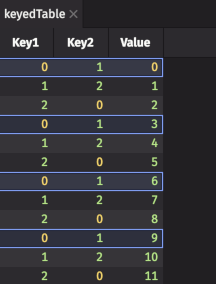
Both columns matter here. Key1 = 0 alone matches rows 0, 3, 6, 9, and so on, but rows 3 and 9 have Key2 = 1, so they aren't selected.
Because one key can cover many rows, the UI counts this selection in keys, not rows. The grid's screen-reader summary, for example, reads "1 key selected." for the selection shown above. When you copy the selection or download it with Download CSV, the UI includes every row that matches a selected key, not only the rows you can see.
withKeys stores the key columns in the keyColumns table attribute, a piece of metadata attached to the table. Print the attributes to see it:
See withKeys for the full syntax and parameter reference.
Select one row by its unique key
Your key columns form a true primary key when each combination of their values identifies exactly one row. For these keys, use withUniqueKeys instead of withKeys. It sets the same keyColumns attribute and also sets uniqueKeys to true, which records that no two rows share a key. Selection still follows the key, but the UI now counts each selected key as one row. The Only Selected Rows option in Download CSV, for example, shows how many rows you selected.
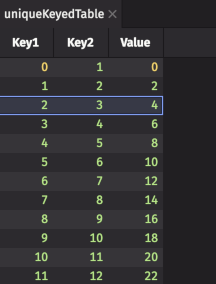
Every row here has a distinct combination of Key1 and Key2, so selecting a row selects only that row:
Printing the attributes shows uniqueKeys set to true alongside keyColumns:
Note
withUniqueKeys records that the key values are unique but doesn't check it. If two rows share a key, selecting one still selects both, but the UI counts them as one row. Row counts the UI shows for that selection, such as in the Download CSV dialog, are then too low.
See withUniqueKeys for the full syntax and parameter reference.
Keep key columns through later operations
Key columns are table attributes, and each operation decides which attributes to carry forward. Operations that preserve key columns include where, sort, reverse, flatten, updateView, naturalJoin, exactJoin, aj, and raj. The joins keep the left table's key columns. Most other operations, including select, update, join, and dropColumns, do not. For more operations that preserve key columns, see Preserved through table operations in the withKeys reference.
view does not preserve key columns, even though updateView does. The two names look alike, so this difference is easy to miss.
If an operation you need drops the key columns, call withKeys or withUniqueKeys again on the result:
The first println shows both keyColumns and uniqueKeys. The second shows that select dropped them, and the third shows them restored.