Extract data with a Java client
This guide shows you how to connect to a Deephaven server with a Java client, subscribe to a ticking table (a table whose rows update as new data arrives), and run code on the server from the client. The example simulates weather readings for a set of cities on the server and displays the latest reading for each city in a Java application.
Prerequisites
- Run Deephaven.
- Set up a Java project that depends on
io.deephaven:deephaven-java-client-barrage-dagger, which includes the Barrage, Arrow Flight, and session client libraries used below. - Run the client JVM with
--add-opens=java.base/java.nio=ALL-UNNAMED, which Arrow needs on Java 16 and later. With Deephaven 43.0 and later on Java 25 and later, also pass-Dio.netty.noUnsafe=false. See JVM configuration. - Optionally, clone the Deephaven Community repository to run the complete client examples described in The Java client.
The application
The application has two parts:
- The Python weather server: a Deephaven script that creates a ticking table of simulated weather readings for a set of cities and derives a table that holds the latest reading for each city. The script also defines a Python function that lets the Java client add more cities to watch.
- The Java client: a simple Java application that connects to the Deephaven server and displays the ticking results. It can also ask the server to watch more cities.
The following sections walk through each part. The server script is complete and runnable. The complete Java client isn't published, so this guide shows the parts of its code that connect to the server, subscribe to the table, listen for updates, and run code on the server.
Run the Python weather server
With Deephaven running, open the Deephaven IDE and run the following weather server script.
The script defines the following:
citiesis a keyed input table that holds the cities to watch.Cityis its key column, so adding a city that's already in the table replaces that city's row instead of adding a second one.readingsis the ticking table of weather readings.time_tableadds a row with aTimestampevery second,tail(1)keeps only the newest of those rows,joinpairs that timestamp with every watched city, andupdatecomputes simulatedTempandHumidityvalues from the timestamp and the city name.latest_by_cityuseslast_byto keep the latest reading for each city. The Java client subscribes to this table.begin_watchadds a city tocities. The Java client calls this function.
At this point, the weather server is ready to provide data to the Java client. The script watches no cities until something calls begin_watch. The Java client does that, and you can also call it in the IDE, for example with begin_watch("Denver").
The Java client
The Java client is a Swing UI that subscribes to the server's latest_by_city table and calls begin_watch to add cities.
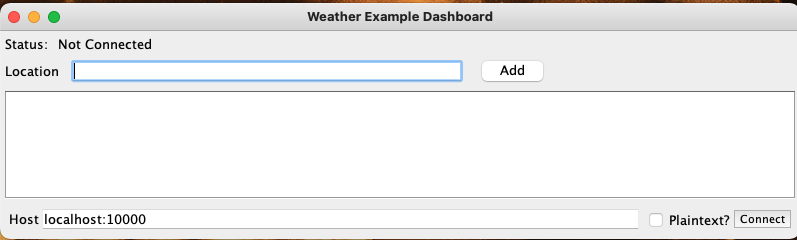
In the finished application, the user enters the server's host and port, such as localhost:10000, in the Host text box and clicks Connect. Next, the user types a city name, such as Denver, in the Location text box and clicks Add. The UI then displays the latest simulated reading for that city, and the reading updates every second.
For complete, runnable clients, see the examples in the repository's java-client/barrage-examples directory, such as SubscribeTable.
The Deephaven Java client can get table data from the server in two ways:
- A lightweight API that fetches Apache Arrow Flight data streams, for when you want your data in Arrow Flight format. For examples, see the repository's
java-client/flight-examplesdirectory. - Table subscriptions and snapshots over the Barrage streaming protocol. A subscription delivers a server table to the client as a local, ticking Deephaven table, and a snapshot delivers it as a local static table.
The Arrow Flight guide lists the Arrow types Deephaven supports.
This guide uses table subscriptions to get data, and a console session to run code on the server.
The snippets in the following sections use these variables from the application:
hostis the server's host and port, such aslocalhost:10000.plaintextistruewhen the server doesn't use TLS.pskis the server's pre-shared key (PSK), which the server prints in its startup log.flightScheduleris aScheduledExecutorService, such as one created withExecutors.newScheduledThreadPool(4). It runs the client's background work, including refreshing the session token.cityis the city name the user typed.logis the application's logger, a DeephavenLogger. Substitute your application's own logger.managedChannel,bufferAllocator, andbarrageSessionare fields of typeManagedChannel,BufferAllocator, andBarrageSession, which the snippets below assign.
They also use these imports:
Connect to the server
The first step is to create a ManagedChannel, the root connection between your application and the Deephaven server. The Java client creates most objects with builders. Here, the code configures a ManagedChannelBuilder and then calls build.
Once you have a channel to the server, create a BarrageSession. BarrageSession extends FlightSession and adds table subscriptions and snapshots. FlightSession adds Arrow Flight data transfer to a Deephaven session.
By default, a Deephaven server requires a PSK. Pass it with authenticationTypeAndValue, prefixed by the name of the PSK authentication handler.
Instead of building the channel yourself, you can create the session from a BarrageSessionFactoryConfig, as the SubscribeTable example does.
Subscribe to the table
The server script stores the result table in a query scope variable named latest_by_city. A remote client asks for a server table with a Flight ticket, which identifies one table stream. To build the ticket for a query scope variable, prefix the variable name with s/, as in s/latest_by_city. A client can fetch any table in the query scope the same way.
The subscription produces a local Deephaven table that the Deephaven engine inside the client process maintains. Before it subscribes, the client creates two objects:
- An update graph, which delivers each update to the local table and its listeners.
- An execution context, which gives the subscribing thread access to that update graph.
The code also opens a liveness scope, which holds the subscription and the subscribed table. Closing the scope releases them, and the server stops spending memory and CPU time on the subscription. Keep the scope open for as long as you read from or listen to the table, and close it when you finish, as the try-with-resources block below does.
To subscribe, the application does three things:
- Calls
TicketTable.fromQueryScopeFieldto build thes/ticket from the variable name, and asks the server for aTableHandlefor that ticket. - Calls
subscribeon theBarrageSessionto subscribe to that handle. - Calls
entireTable, which returns aFuture. TheFuturecompletes with the subscribedTableonce all of its rows arrive.
Inside the try block, latestTable is a local copy of the server's latest_by_city table, and it updates as the server's data changes. Use it only inside the block: when the block exits, the liveness scope closes and releases the table. This application displays the table directly, so the execution context above includes only what a subscription needs. Operations that compile formulas, such as a where filter or an update column on latestTable, also need a query compiler and an operation initializer in the execution context. Without them, those operations fail.
The steps above are adapted from the SubscribeTable example.
Listen to the table
Once the client has a local ticking table, such as latestTable from Subscribe to the table, it can process the table's data. You can read the data from the table directly. You can also add a listener to the table so that the application responds to each update. The Groovy table listeners guide covers the Java listener API used below.
Read the table or add the listener inside the try block that opened the liveness scope, and keep that block open for as long as the listener should receive updates. The SubscribeTable example does this by waiting on a CountDownLatch inside the block until it has received the number of updates it asked for. When the block exits, the scope closes and releases the subscription and the table, and the listener stops receiving updates.
The false argument tells InstrumentedTableUpdateListenerAdapter not to keep its own reference to the listener, so the code must keep the listener reachable itself. Being in scope isn't enough, because the JVM can collect a local variable that the code no longer uses. The final removeUpdateListener call uses listener at the end, which keeps it reachable until then, as the SubscribeTable example does. Without it, the JVM can garbage collect the listener, and the listener stops receiving updates.
Run code on the server
The Java client can also run code on the server through a ConsoleSession. For example, the client can create more derived tables with the same query language you use in the Deephaven IDE.
This example lets the user add cities to the set of watched cities.
This code sends the server a Python call to begin_watch that passes the escaped city name. It then checks the response for an error. The console type, "python", must match the server's scripting language. The server returns a Changes object, which tells the application what changed in the server's scope, such as which tables and variables the command created or updated.
Warning
This example embeds a user string into a command. escapeString stands for a helper that you write to escape quotes and other special characters within the string. Without it, a user can inject arbitrary code into the command that the server runs.
To send data from the client without running code on the server, use input tables.
Close the connection
When the application finishes, close the session and release the objects it used. Closing the BarrageSession doesn't shut down the channel, so shut down the channel and the scheduler separately, and then close the allocator: