Create and use partitioned tables
This guide shows you how to create partitioned tables, work with their constituent tables, and use them to improve query performance.
What is a partitioned table?
A partitioned table is a special Deephaven table that holds other tables, called constituent tables or subtables. The partitioned table stores its constituent tables in one column, called the constituent column. A partitioned table usually also has key columns that index its constituent tables, so you can access a particular one by key. partition_by creates these key columns from the columns you partition on. All constituent tables in a partitioned table must have the same schema.
This guide also calls each constituent table a partition.
Note
Partitioning a table into subtables with partition_by is different from grouping and aggregation. partition_by splits a table into constituent tables by key columns. Aggregation operators such as agg_by compute summary information over groups of data within a table.
You can think of a partitioned table in two ways:
- A list of tables stacked vertically. You can combine this list into a single table with
merge. - A map of tables. You can retrieve a constituent table by key with
get_constituent.
Partitioned tables are typically used to:
- Quickly retrieve subtables, in a user interface or in place of filters called repeatedly in a loop.
- Parallelize queries across multiple threads.
- Avoid tick amplification from grouping and ungrouping.
Create a partitioned table
Common ways to create a partitioned table include:
You can also create one with partitioned_agg_by, or from existing tables with from_partitioned_table and from_constituent_tables.
From a table
The simplest way to create a partitioned table is from another table. To show this, let's first create a new table.
Creating a partitioned table from the source table requires only one table operation: partition_by. In this simple case, partition_by splits source into subtables on the single key column Letter. The resulting partitioned table has three constituent tables, one for each unique value in the Letter column.
The key columns and the constituent column described in What is a partitioned table? live in an ordinary table that has one row per constituent. You access that table through the partitioned table's table attribute. The keys method returns the distinct key values as a table, which the example below displays.
You can partition a table by more than one key column. The following source table has two columns to use as keys: Exchange and Coin.
To partition by multiple keys, pass every key column to partition_by.
From a Kafka stream
Deephaven can consume data from Kafka streams. Use consume to ingest streaming data into a table, or consume_to_partitioned_table to ingest it directly into a partitioned table.
A partitioned table consumed from Kafka has one constituent table for each partition of the Kafka topic. A Kafka topic partition is Kafka's own unit of a topic, not a partitioned-table partition. The Kafka partition number is the key, stored in the Partition column.
The following example ingests data from the Kafka topic orders directly into a partitioned table.
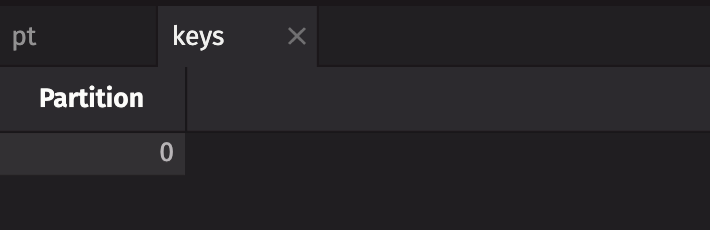
For more information and examples on ingesting Kafka streams directly into partitioned tables, see consume_to_partitioned_table.
Work with partitioned tables
Partitioned tables have their own methods, which differ from those of standard tables. This section covers the most common ones. The Related documentation section links to the reference page for each method.
The following code uses new_table to create two tables, quotes and trades, with hypothetical stock quote and trade data. It then partitions each one on its Ticker column into pt_quotes and pt_trades, which the rest of this section uses.
Grab a constituent with get_constituent
When you create a partitioned table with partition_by, each constituent has a unique key, so you can retrieve it with get_constituent. The code block below grabs a constituent from each of the pt_quotes and pt_trades tables based on a key value.
Merge
Just as you can merge a list of tables with identical schemas into a single table, a partitioned table's merge method stacks its constituents vertically into a single standard table. This is often the best and easiest way to get a standard table from a partitioned table.
The following example merges the pt_quotes and pt_trades tables to return tables similar to the original quotes and trades tables they were created from.
Modify a partitioned table
There are two ways to apply table operations to every constituent of a partitioned table: transform and proxy. A proxy supports most common table operations, and a transform can apply any function that returns a table. To choose between them, see Should I use transform or proxy?.
Transform
A transform applies a user-defined transformation function to every constituent of a partitioned table. The function receives each constituent as a standard table, so it can call any standard table operation. When the transformation function uses operations that compile formulas or use the query scope, such as update and where, it must run them inside an execution context. In a console session, open the context inside the function, as shown below.
The engine can call the transformation function on several constituents at once, and on an empty constituent. Write it so that it keeps no state between calls, is safe to run concurrently, and returns a valid table for an empty input.
The following code block uses transform to apply an update to every constituent of the pt_trades table.
Proxy
A PartitionedTableProxy is an alternative to transform. You call standard table operations on the proxy, and the proxy applies each one to every constituent of the partitioned table.
The following code block applies an update to every constituent of the pt_trades table by creating a proxy rather than applying a transform.
Note
When using a partitioned table proxy, you must access the target attribute to obtain the underlying partitioned table.
Should I use transform or proxy?
A transform and a proxy produce the same results for the operations a proxy supports. Choose based on what matters more for your query:
- Use
transformfor greater control and, for some queries, better performance. A transform can apply any operation, including ones a proxy doesn't provide, such asrename_columnsanddrop_columns. - Use
proxyto call standard table operations directly on a partitioned table.
Combine two partitioned tables with partitioned_transform
You combine standard tables with joins. To join two partitioned tables constituent by constituent, use partitioned_transform.
A partitioned transform is similar to a transform, except the transformation function takes two tables as input and returns a single table. The function can apply any table operations to either input table. It has the same requirements as a transform function: it keeps no state between calls, is safe to run concurrently, and returns a valid table for empty inputs.
Most uses of partitioned_transform join the two partitioned tables together, as in the following example.
You can get the same result with a partitioned table proxy.
Caution
When both inputs are partitioned, the engine joins or filters each pair of matching constituents separately. This happens with partitioned_transform and with a proxied operation whose right-hand table is also a proxy. If rows with the same join or filter key fall in more than one partition of either input, the result can differ from running the same operation on unpartitioned tables. This applies to joins such as join, natural_join, and aj, and to the where_in and where_not_in filters.
To get correct results, partition both tables so that all rows with a given join or filter key fall in constituents with the same partition key.
The sanity_check_joins argument to proxy controls an extra check on proxied joins and filters:
- It defaults to
True. - When it is
Trueand the right-hand table is also a proxy, the engine checks that each join,where_in, orwhere_not_inkey exists in only one partition of each input. - The check does not verify that a key is in the same partition of the left and right tables.
- The check adds work and reduces parallelism. Set
sanity_check_joins=Falseto skip it.
Why use partitioned tables?
So far this guide has shown how you can use partitioned tables in your queries. The following sections explain why you may want to use them, covering the uses listed in What is a partitioned table?.
Quickly retrieve subtables
If a partitioned table has key columns, you can use it like a map and retrieve constituent tables with get_constituent. This can be useful in user interface components that need to quickly display a subset of a table.
For instance, the following animation shows the pt_trades partitioned table from the earlier examples opened in the UI. The UI displays the constituent for the key value IBM. Menu options atop the table let you view the key values, merge the table, or switch between key values to see data in each constituent.
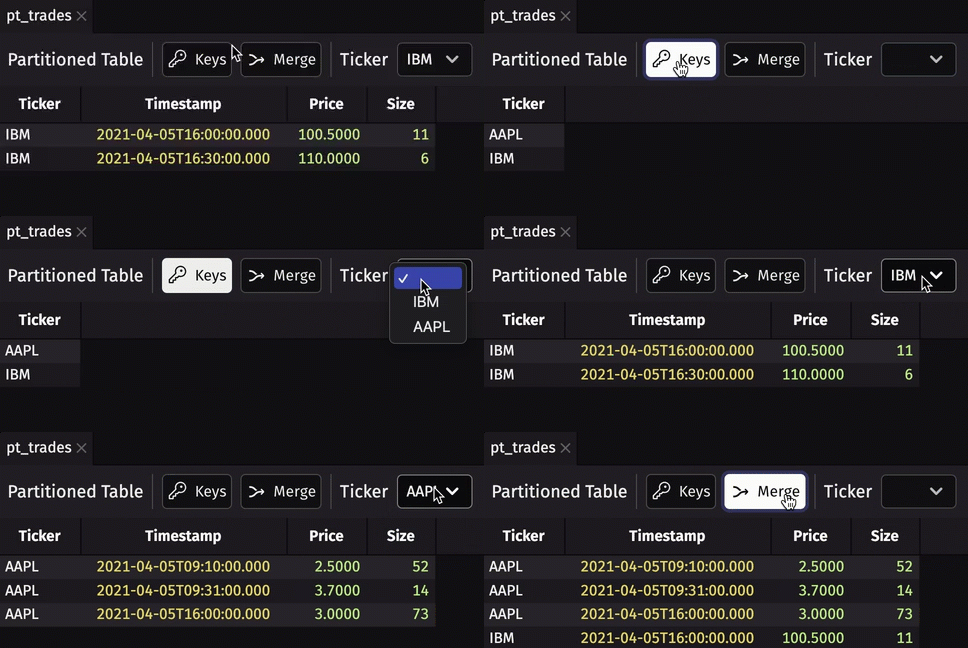
The same lookup can replace filters called repeatedly in a loop. Instead of calling where on the full table once per key, partition the table once and retrieve each key's constituent with get_constituent.
Parallelization
Partitioned tables can improve query performance by running an operation on each constituent in parallel. Take, for example, an as-of join between two tables. An as-of join matches some key columns exactly and matches the last column, usually a timestamp, to the closest value at or before it. If you partition both tables by the exactly matched columns and join them with partitioned_transform or a proxy, the engine can join each pair of constituents in parallel.
The following example shows this in action. It creates two new, larger tables, quotes and trades, which replace the smaller tables of the same names used earlier on this page. Each has 5 million rows of data, split across 4 unique exchanges and 7 unique symbols, for a total of 28 partitions. It then performs the join operation on both the standard and partitioned tables and times how long each takes.
On a machine with multiple cores, the partitioned version is usually faster because the engine runs the join on each pair of constituents in parallel.
Partitioned tables don't improve performance in every case. Parallelization helps most when:
- Shared resources between concurrent tasks are minimal.
- Each partition holds a substantial amount of data, rather than the data being spread across many nearly empty partitions.
Caution
Python's Global Interpreter Lock (GIL) prevents threads from running Python code concurrently, unless the Python build is free-threaded. To maximize parallelization, keep transformation functions limited to table operations, as partitioned_aj does. Don't call Python functions from the formulas those operations evaluate. For example, avoid a formula such as update(["Y = my_func(X)"]).
If you are unsure whether partitioned tables could improve your query's performance, ask on Slack for guidance.
Avoid tick amplification
Partitioned tables also help avoid tick amplification. Tick amplification occurs when an operation produces downstream updates that touch many more cells than the upstream change. A common example is group_by followed by ungroup. If you use partition_by and merge instead, the engine processes each constituent independently and does not check entire groups for changes.