What is Barrage?
Barrage is Deephaven's streaming data protocol for efficient, real-time table transport between servers and clients. Built on top of Apache Arrow Flight, Barrage extends the standard Flight protocol to support Deephaven's incremental update model—enabling clients to receive only the data that has changed rather than entire table snapshots.
Why Barrage?
When working with real-time data, traditional approaches have significant limitations:
- Polling: Repeatedly fetching entire tables wastes bandwidth and CPU cycles, especially for large tables with small changes.
- Standard Flight: Apache Arrow Flight provides efficient data transport, but lacks native support for incrementally updating datasets.
Barrage solves these problems by:
- Streaming only the rows that have been added, removed, or modified.
- Supporting viewports so clients can subscribe to just the visible portion of a table.
- Batching updates to balance latency against network efficiency.
When to use Barrage
| Use Case | Barrage Feature |
|---|---|
| Real-time dashboards: Display live-updating tables in a UI | Subscribe to streaming updates |
| Server-to-server data sharing: Move tables between Deephaven instances | Subscribe or snapshot via shared tickets |
| Point-in-time analysis: Capture table state for offline processing | Snapshot to get a static copy |
| Large table visualization: Display a scrollable view of a million-row table | Viewports (via web UI or JS client) |
Key concepts
Subscriptions vs. snapshots
Barrage supports two primary modes of retrieving data:
-
Subscription: Opens a persistent connection that streams updates as the source table changes. The client receives an initial snapshot followed by incremental updates. Use this for ticking tables you want to monitor in real time.
-
Snapshot: Retrieves a one-time, static copy of the table. The table doesn't update after the data is delivered, but the Barrage session stays open for more requests until you close it. Use this for static tables or when you need a point-in-time capture.
Shared tickets
Shared tickets are endpoints that allow tables to be published and consumed across different sessions. A client can publish a table to a shared ticket, and other clients (or servers) can subscribe to or snapshot that ticket.
See Capture Python client tables for complete examples.
Viewports
A viewport defines a window over a table — a range of row positions and a subset of columns. Viewports are essential for interactive applications where users scroll through large tables. Rather than streaming millions of rows, the server sends only the data visible in the current view.
Viewports are automatically managed by Deephaven's web UI and JavaScript client. When a user scrolls or resizes a table view, the client updates its viewport subscription accordingly.
Note
The Python BarrageSession API currently supports full-table subscriptions. Viewport functionality is available through the JavaScript client or by subscribing to pre-filtered tables.
Update intervals and batching
Barrage aggregates table updates before sending them to subscribers. This batching reduces network overhead when tables update frequently. The update interval is configurable:
- Server default: Set via
-Dbarrage.minUpdateInterval(milliseconds). Default: 1000 (1 second). - Per-subscription: Configurable when initiating the subscription (advanced use).
A shorter interval reduces latency but increases network traffic. A longer interval reduces traffic but introduces delay.
Architecture overview
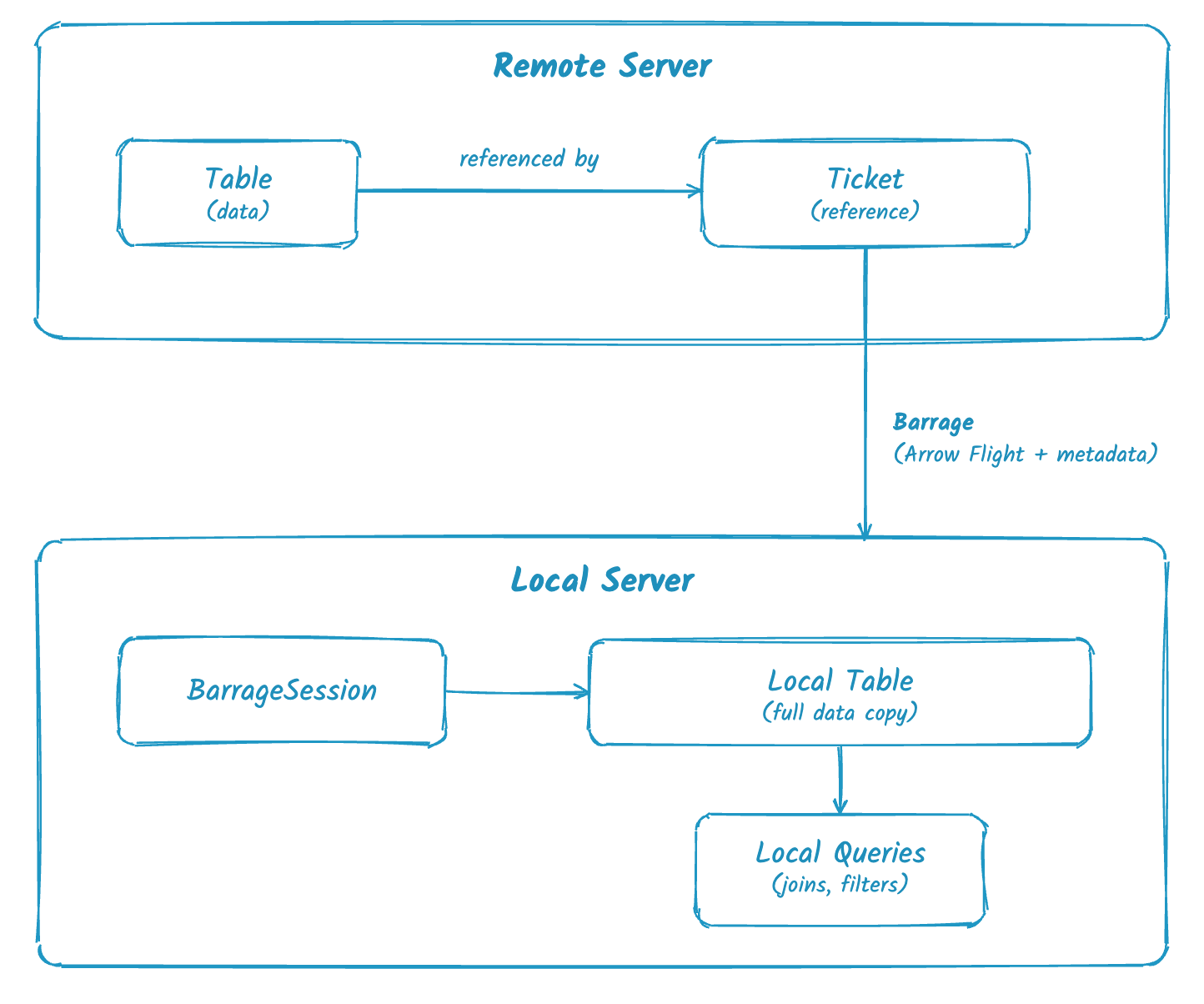
- Remote server hosts a table referenced by a ticket — the ticket is just a reference, not the data itself. Tickets can be scope tickets (variables in the global scope) or shared tickets for cross-session access. An export ticket belongs to the client session that created it, so the local server's Barrage session can't use it.
- Barrage protocol transports the actual data using Arrow Flight with incremental update metadata.
- Local server subscribes via
BarrageSessionand receives a full local copy of the data that stays synchronized with the source. This local table can participate in downstream queries (joins, filters, aggregations) that execute on the local server.
Note
Clients that run the full Deephaven engine, such as the Java client or a Deephaven server (Python or Groovy) that captures tables over Barrage, can perform downstream computation locally. Other clients (the Python client pydeephaven, JavaScript, C++) receive data but rely on the server for query execution.
Barrage vs. Arrow Flight
| Feature | Standard Arrow Flight | Barrage |
|---|---|---|
| Data format | Arrow columnar format | Arrow columnar format |
| Static table transfer | ✅ Supported | ✅ Supported |
| Incremental updates | ❌ Not supported | ✅ Native support |
| Viewports | ❌ Not supported | ✅ Supported |
| Update batching | ❌ N/A | ✅ Configurable |
| Row shifts/modifications | ❌ N/A | ✅ Efficient encoding |
Barrage is fully compatible with Arrow Flight — you can use a standard Flight client to fetch static snapshots via DoGet. The incremental update features require a Barrage-aware client.
Performance considerations
-
Large initial snapshots: When subscribing to a large table, the initial snapshot can be memory-intensive. Use subscription growth controls to break large snapshots into smaller chunks.
-
High-frequency updates: Tables that tick rapidly can generate significant network traffic. Consider increasing
barrage.minUpdateIntervalor filtering data before subscription. -
Column selection: Subscribe only to the columns you need. Fewer columns means less data to transfer.
-
Monitoring: Use the Barrage performance tables to track subscription health and identify bottlenecks.
Related documentation
barrage_sessionreference - API reference for creating Barrage sessions- Capture Python client tables with Barrage
- Barrage metrics - Monitor Barrage performance
- Interpret Barrage metrics - Understand what the metrics mean
- Barrage schema annotation - Annotate schemas for complex types
- Incremental update model - How Deephaven represents table changes
- Core API design - Technical details on the Deephaven API
- Barrage protocol documentation - Low-level wire format reference