Rolling aggregations
This guide shows how to use the update_by table operation for rolling calculations and aggregations. It returns a new table that adds columns calculated by one or more UpdateByOperation objects. The calculations can be cumulative, windowed by rows (ticks) or by time, or exponentially weighted.
To compare rolling aggregations with the other ways Deephaven summarizes data, and to choose between them, see Aggregations in Deephaven.
update_by takes one or more UpdateByOperations and zero or more key columns. The result contains every source column plus any new columns the operations create. An operation whose output column has the same name as an existing column replaces that column. Without key columns, each operation runs over all rows. With key columns (also called grouping columns), each operation runs separately on each unique group.
For the full list of UpdateByOperations you can pass to update_by, see the update_by parameters reference.
update_by vs updateby
This document refers to update_by and updateby throughout. They are not identical:
update_byalways refers to theupdate_bytable operation. You always call it as a method on a table:
updatebyis the Python module that defines the operations you pass toupdate_by, such asema_tickandrolling_formula_tick.
Keep this distinction in mind throughout the guide.
What are rolling aggregations?
Rolling aggregations differ from dedicated and combined aggregations in two ways: they preserve data history, and they can calculate over a window of rows instead of the whole group.
Preservation of data history
Most dedicated and combined aggregations output a single row for each group. The exceptions are head_by and tail_by, which output up to n rows for each group. In contrast, rolling aggregation tables have the same number of rows as the source table, so they preserve the data history that other aggregations discard.
To illustrate this, consider a cumulative sum on a single grouping column with two key values. Notice how result_dedicated and result_combined have two rows — one for each group. In contrast, result_rolling has 20 rows — one for each row in the source table. You can see how the cumulative sum increases over time in the latter case.
Note
The syntax SumValue=Value names the output column SumValue and computes it from the input column Value.
Windowing
Dedicated and combined aggregations calculate each group's aggregated value over all of the group's rows. In contrast, rolling aggregations can be cumulative, windowed, or exponentially weighted.
A windowed aggregation calculates over a subset of the table called a window. You define the window as a number of rows (ticks) or as a span of time. For example, a windowed sum can add up the previous 10 rows. When a new row arrives in a ticking (live, updating) table, Deephaven updates the result to include the new row and drop the row that left the window.
To illustrate this, consider the following example, which calculates a cumulative sum and a rolling sum with update_by. The rolling sum uses a 3-row window (the current row and the two rows before it), so the RollingSumValue column differs from CumSumValue:
Basic usage examples
The following examples demonstrate the fundamental patterns for using update_by.
A single UpdateByOperation with no grouping columns
The following example uses rolling_sum_tick to calculate the rolling sum of the X column in the source table. Setting rev_ticks=3 and fwd_ticks=0 makes the window the current row and the two previous rows. Tick-based vs time-based windows explains both parameters. The example passes no key columns, so all rows of the table form a single group.
Multiple UpdateByOperations with no grouping columns
The following example builds on the single-operation example by performing two UpdateByOperations in a single update_by. It calculates the cumulative minimum and maximum, then derives the range from them with update.
Multiple UpdateByOperations with a single grouping column
The following example builds on the ungrouped multiple-operation example by specifying a grouping column. The grouping column is Letter, which contains alternating letters A and B. As a result, update_by calculates the cumulative minimum, maximum, and range separately for each letter. The example splits result by letter with where to show this.
Multiple UpdateByOperations applied to multiple columns with multiple grouping columns
The following example builds on the single-grouping-column example by applying each UpdateByOperation to multiple columns and specifying multiple grouping columns. The grouping columns, Letter and Truth, contain alternating letters and random true/false values. Each unique combination of letter and boolean forms a group. The example splits result by letter and truth value to show the groups.
Applying an UpdateByOperation to all columns
The following example uses forward_fill to fill null values with the most recent previous non-null value. The example passes no columns to forward_fill, so it fills all columns in source except the key columns. The forward-filled columns replace the original columns of the same name, such as X and Y, in result.
Cumulative aggregations
Cumulative aggregations are the simplest operations in the updateby Python module. They are statistics computed over all previous data points in a series. Deephaven supports the following cumulative statistics:
| Cumulative statistic | updateby function |
|---|---|
| Minimum | cum_min |
| Maximum | cum_max |
| Sum | cum_sum |
| Product | cum_prod |
| Count where | cum_count_where |
The count-where operations, such as cum_count_where, count the rows that match a filter you supply, rather than aggregating a column's values.
Cumulative sum
To illustrate a cumulative statistic, consider the cumulative sum. For each row, this operation calculates the sum of all previous values in a column, including the current row's value. The following illustration shows this:
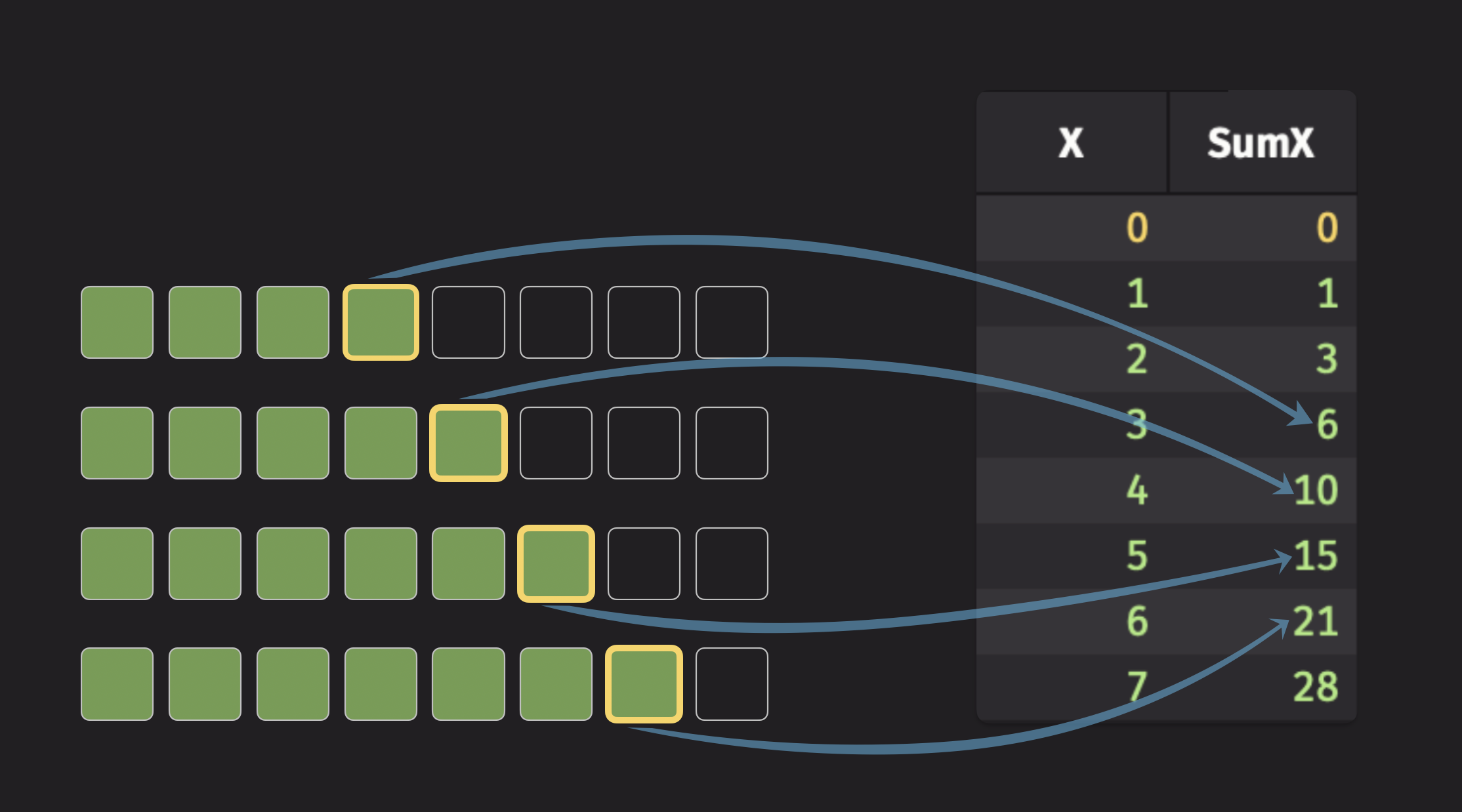
The code for the illustration above looks like this:
Cumulative average
The updateby module does not directly support a function to compute the cumulative average of a column. However, you can still compute the cumulative average with a single cum_sum operation that sums both the column and a column of ones, then divide:
This demonstrates the flexibility of the update_by table operation. When no single operation computes the statistic you need, you can often combine an update_by call with update, as shown here.
Windowed aggregations
Windowed aggregations operate on a finite window of rows rather than on all previous rows, as introduced in Windowing. This section shows how to define a window by rows (ticks) or by time, and lists the operations that use one.
Tick-based vs time-based windows
Tick-based windows aggregate values over a specified number of rows with fixed window sizes defined by the rev_ticks and fwd_ticks parameters:
rev_ticks: The number of rows the window extends backward, counting the current row. A value ofNincludes the current row and theN-1preceding rows.fwd_ticks: The number of subsequent rows to include in the window. The default is 0.- A negative
fwd_ticksends the window before the current row, and arev_ticksof 0 or less starts the window after the current row. Use them to build windows that lie entirely before or entirely after the current row.
Here are some examples of tick-based windows:
rev_ticks=1, fwd_ticks=0: Contains only the current row.rev_ticks=10, fwd_ticks=0: Contains the 9 previous rows and the current row.rev_ticks=0, fwd_ticks=10: Contains the following 10 rows and excludes the current row.rev_ticks=10, fwd_ticks=10: Contains the previous 9 rows, the current row, and the following 10 rows.rev_ticks=10, fwd_ticks=-5: Contains 5 rows, from 9 rows before to 5 rows before the current row (inclusive).rev_ticks=11, fwd_ticks=-1: Contains 10 rows, from 10 rows before to 1 row before the current row (inclusive).rev_ticks=-5, fwd_ticks=10: Contains 5 rows, from 6 rows after to 10 rows after the current row (inclusive).
Cumulative operators like cum_sum are special cases of tick-based operators, where the window begins at the first row of the group and continues through to the current row.
Time-based windows aggregate values over time durations with variable window sizes defined by the rev_time and fwd_time parameters:
rev_time: Duration to look back in time, as a duration string such as"PT5s"or"PT00:00:05", or as a number of nanoseconds.fwd_time: Duration to look forward in time.- A negative
fwd_timeends the window before the current row's timestamp, and a negativerev_timestarts the window after it. - Time-based windows require a timestamp column, which you name with the
ts_colparameter.
Here are some examples of time-based windows:
rev_time="PT0s", fwd_time="PT0s": Contains rows that exactly match the current timestamp.rev_time="PT1m", fwd_time="PT0s": Contains rows from 1 minute earlier through the current timestamp (inclusive).rev_time="PT10m", fwd_time="PT0s": Contains rows from 10 minutes earlier through the current timestamp (inclusive).rev_time="PT0s", fwd_time="PT10m": Contains rows from the current timestamp through 10 minutes following the current timestamp (inclusive).rev_time=60_000_000_000, fwd_time=60_000_000_000: Contains rows from 1 minute earlier through 1 minute following the current timestamp (inclusive).rev_time="PT10m", fwd_time="-PT5m": Contains rows from 10 minutes earlier through 5 minutes before the current timestamp (inclusive). This is a purely backward-looking window.rev_time=-5_000_000_000, fwd_time=10_000_000_000: Contains rows from 5 seconds following through 10 seconds following the current timestamp (inclusive). This is a purely forward-looking window.
Tick-based windowed calculations
The following example:
- Creates a static source table with two columns.
- Calculates the rolling sum of
Xgrouped byLetter.- Uses three windows: one before, one containing, and one after the current row.
- Splits the
resulttable by letter viawhereto show that each group gets its own windowed calculation.
Time-based windowed calculations
The following example uses the time-based window parameters described in Tick-based vs time-based windows. It:
- Creates a static source table with three columns.
- Calculates the rolling sum of
Xgrouped byLetter.- Uses three windows: one before, one containing, and one after the current row's timestamp.
- Splits the
resulttable by letter viawhereto show that each group gets its own windowed calculation.
Simple moving aggregations
Simple moving aggregations are statistics computed over a finite, moving window of data. These operations don't weight data points by their distance from the current row. Every point in the window counts equally, except in the weighted average, where a weight column you supply sets each point's weight. Deephaven supports the following simple moving statistics:
| Simple moving statistic | Tick-based | Time-based |
|---|---|---|
| Count | rolling_count_tick | rolling_count_time |
| Minimum | rolling_min_tick | rolling_min_time |
| Maximum | rolling_max_tick | rolling_max_time |
| Sum | rolling_sum_tick | rolling_sum_time |
| Product | rolling_prod_tick | rolling_prod_time |
| Average | rolling_avg_tick | rolling_avg_time |
| Weighted average | rolling_wavg_tick | rolling_wavg_time |
| Standard deviation | rolling_std_tick | rolling_std_time |
| Count where | rolling_count_where_tick | rolling_count_where_time |
To illustrate a simple moving aggregation, consider the rolling average. For each row, this operation calculates the average of all values within a specified window. The following illustration shows this:
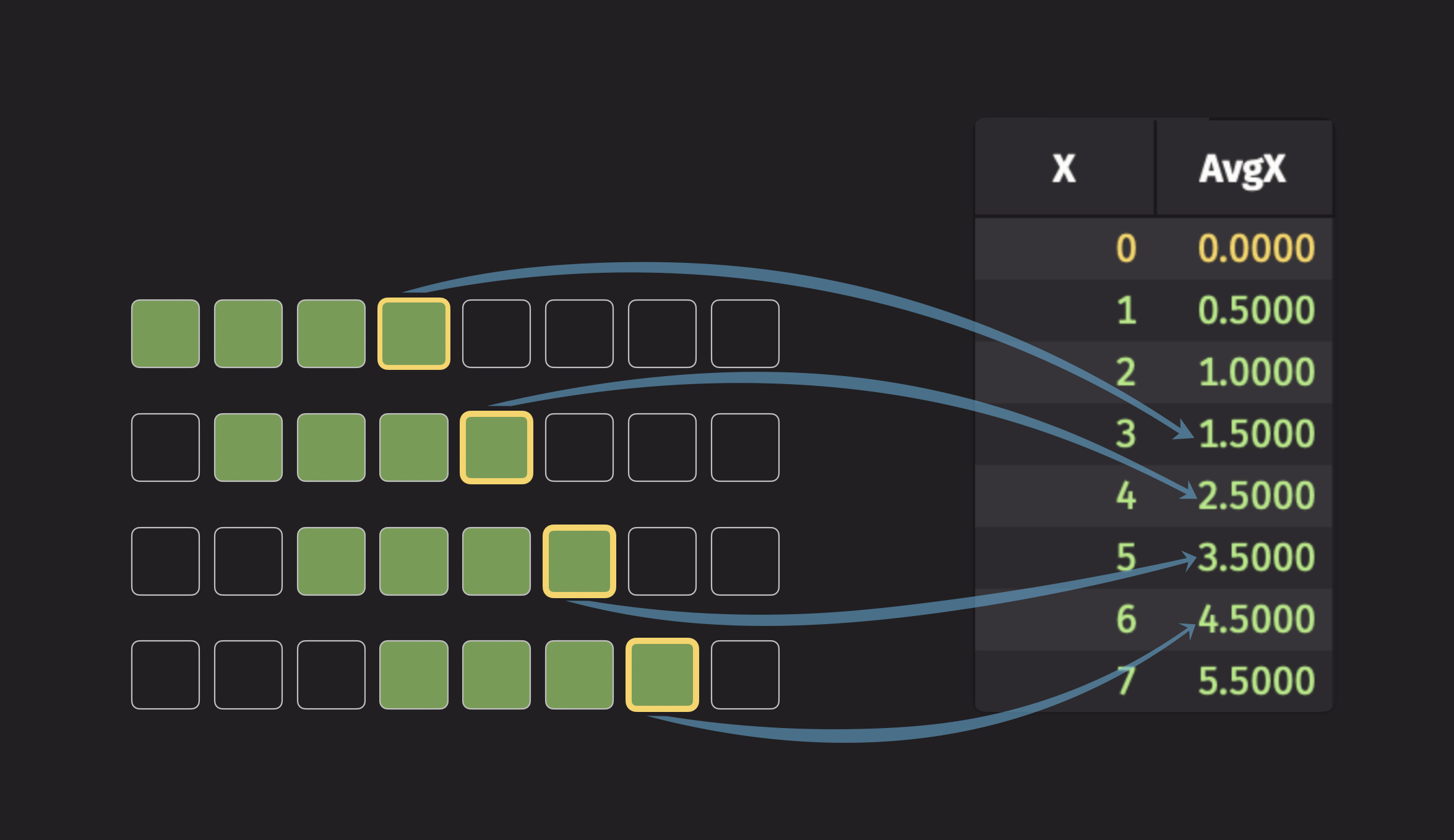
The code for the illustration above looks like this:
Additional rolling operations
Deephaven offers two more kinds of rolling operations that don't compute a fixed statistic. One kind groups values, and the other applies a custom formula:
| Rolling operation | Tick-based | Time-based |
|---|---|---|
| Grouping | rolling_group_tick | rolling_group_time |
| Custom formula | rolling_formula_tick | rolling_formula_time |
The grouping operations collect the values in each window into a vector. The custom formula operations apply a formula you write to the values in each window. To work with the grouped vectors, see how to work with arrays.
Rolling groups
The following example uses rolling_group_tick to collect the values of the current row and the 3 rows before it into a vector, separately for each ID value:
The same example can use rolling_group_time to define the window by time instead of by rows:
Note
A built-in simple moving aggregation, such as rolling_avg_tick, is generally more performant than a rolling group followed by a calculation.
Rolling formulas
A rolling formula can use any of Deephaven's built-in functions, arithmetic operators, or user-defined Python functions.
The following example uses rolling_formula_tick to compute the rolling geometric mean of the X column, grouped by the Letter column. The formula names the output column (GeomMeanX) and refers to the input column (X) directly. Within the formula, X is the vector of the window's values:
rolling_formula_time does the same with a time-based window:
Exponential moving aggregations
Exponential moving aggregations are moving statistics that, unlike windowed aggregations, use all preceding data points. However, they assign more weight to recent data and exponentially down-weight older data. This means distant observations have little effect on the result, while closer observations have a greater influence. A decay parameter controls how fast the weight decreases. Deephaven supports the following exponential moving statistics:
| Exponential moving statistic | Tick-based | Time-based |
|---|---|---|
| Minimum (EMMin) | emmin_tick | emmin_time |
| Maximum (EMMax) | emmax_tick | emmax_time |
| Sum (EMS) | ems_tick | ems_time |
| Average (EMA) | ema_tick | ema_time |
| Standard deviation (EMStd) | emstd_tick | emstd_time |
The decay parameter is decay_ticks for tick-based operations and decay_time for time-based operations:
Tick-based decay (decay_ticks):
- Smaller values decay faster and put more weight on recent data.
decay_ticks=1: Each row has ~37% of the weight of the row after it.decay_ticks=10: Each row has ~90% of the weight of the row after it.- Higher values create smoother, slower-responding averages.
Time-based decay (decay_time):
- Controls how quickly older data loses influence over time.
decay_time="PT1s": Data from 1 second ago has ~37% of the current row's weight.decay_time="PT10s": Data from 10 seconds ago has ~37% of the current row's weight.- Longer decay times create more stable, less responsive averages.
To visualize an exponential moving statistic, consider the exponential moving average (EMA). The following illustration shows this:
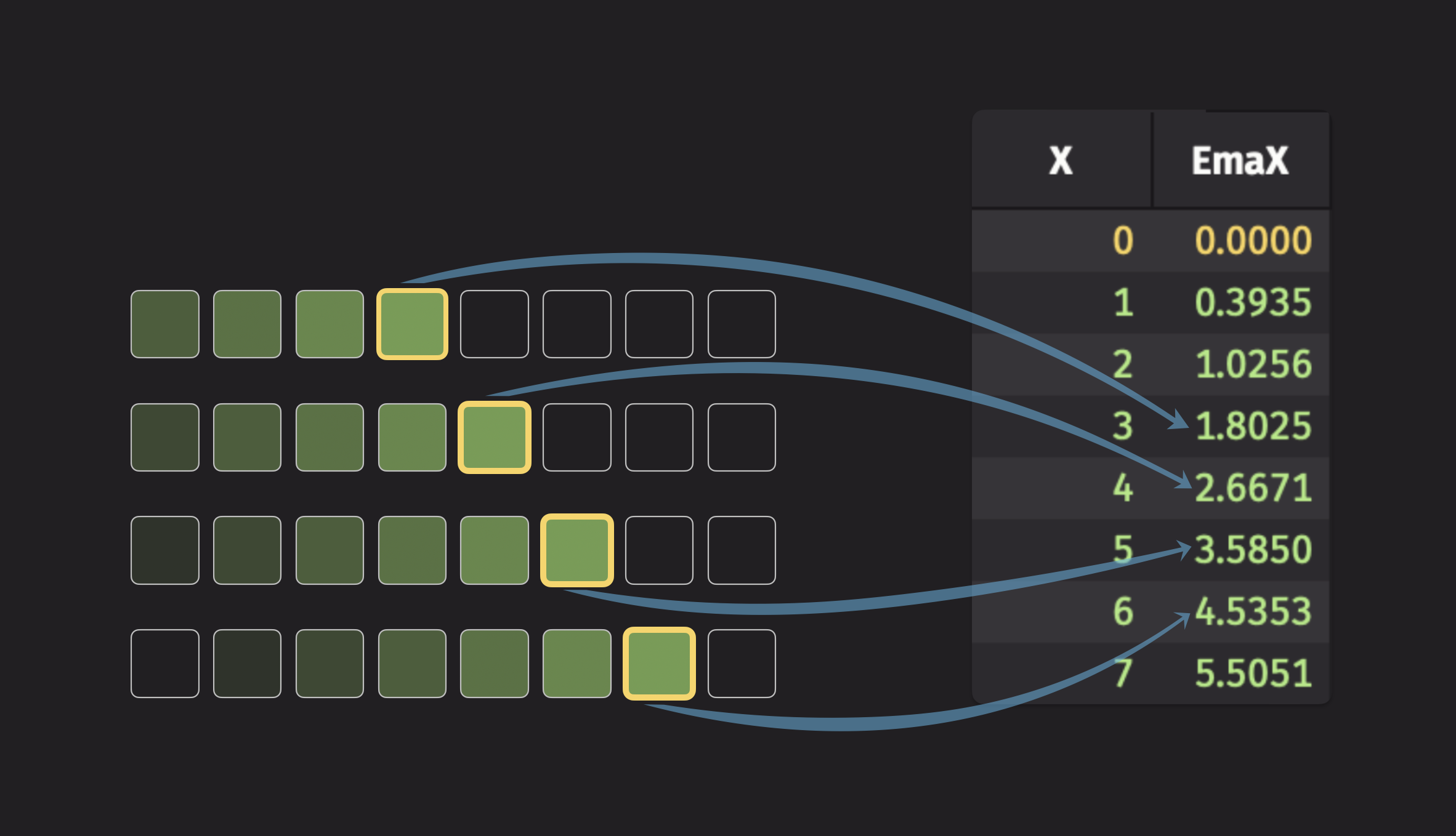
The code for the illustration above looks like this:
The following example uses ema_tick to show the effect that different decay rates have on the exponential moving average:
To decay by time instead of by ticks, pass a timestamp column and a decay_time to ema_time. This version of the decay-rate example uses 2-, 4-, and 6-second decay times:
A row's weight falls to ~37% after one decay_time, so EmaValue_2 responds fastest and EmaValue_6 responds slowest.
Bollinger Bands
Bollinger Bands are a technical-analysis tool, common in finance, that uses a moving average and a moving standard deviation to draw bands around a price series.
To compute Bollinger Bands:
- Compute the moving average.
- Compute the moving standard deviation.
- Compute the upper and lower envelopes: the moving average plus and minus
wmoving standard deviations, wherewsets the width of the bands.
Note
The examples in this section plot with the built-in plotting API, which is no longer under active development. For most plotting tasks, use Deephaven Express instead.
Tick-based Bollinger Bands using simple moving statistics
This example passes rolling_avg_tick and rolling_std_tick to update_by to compute the moving average and standard deviation, then computes the envelope with update. rev_ticks sets the size of the rolling window in ticks.
Time-based Bollinger Bands using simple moving statistics
Using the source table, w, and plot_bollinger from the tick-based example, this example passes rolling_avg_time and rolling_std_time to update_by to compute the moving average and standard deviation, then computes the envelope with update. rev_time sets the length of both rolling windows.
Tick-based Bollinger Bands using exponential moving statistics
Using the source table, w, and plot_bollinger from the tick-based example, this example passes ema_tick and emstd_tick to update_by to compute the moving average and standard deviation, then computes the envelope with update. decay_ticks sets the decay rate in ticks, which controls how much weight earlier rows get.
Time-based Bollinger Bands using exponential moving statistics
Using the source table, w, and plot_bollinger from the tick-based example, this example passes ema_time and emstd_time to update_by to compute the moving average and standard deviation, then computes the envelope with update. decay_time sets the decay rate as a duration, which controls how much weight earlier rows get.
Sequential difference and forward fill
update_by also supports two operations that are not rolling aggregations: delta and forward_fill.
Sequential difference
The delta operation calculates the difference between a row's value and the previous row's value in a given column. This is useful for calculating the rate of change. The following example demonstrates this:
You can calculate sequential differences per group, like all other update_by operations:
Detrend time-series data
Note
This example plots with the built-in plotting API, which is no longer under active development. For most plotting tasks, use Deephaven Express instead.
Sequential differencing is a common first step in detrending time-series data, which means removing a long-term upward or downward trend so that short-term changes are easier to see. The delta operation makes this easy. The following example plots Price and its sequential difference, DiffPrice, for each ticker:
Null handling with DeltaControl
To control how delta treats null values, pass a DeltaControl value as its optional delta_control argument. The following behaviors are available:
DeltaControl.NULL_DOMINATES: A valid value following a null value returns null.DeltaControl.VALUE_DOMINATES: A valid value following a null value returns the valid value.DeltaControl.ZERO_DOMINATES: A valid value following a null value returns zero.
Because X contains nulls, the delta columns differ on the rows where a valid value follows a null. DefaultDeltaX matches NullDomDeltaX, because delta uses NULL_DOMINATES by default.
Forward fill
forward_fill fills in null values with the most recent non-null value, which is useful for filling in missing data points in a time series. The example in Applying an UpdateByOperation to all columns fills every column. This example fills a single column per group:
Handling erroneous data
It's common for tables to contain null, NaN, or other erroneous values. Each family of update_by operations has a default way of handling them, and some operations accept a control parameter that changes it. To replace nulls with the most recent non-null value, use forward_fill.
Default null handling behavior
By default, update_by operations handle null values as follows:
- Cumulative operations (
cum_sum,cum_max, etc.): Skip null values and continue with the last valid result. - Rolling statistics (
rolling_avg_tick,rolling_sum_time, etc.): Exclude null values from window calculations. - Count-where operations (
cum_count_where,rolling_count_where_tick,rolling_count_where_time): Evaluate their filter on every row, so a row with a null value is counted when the filter matches it. - Rolling groups and formulas (
rolling_group_tick,rolling_formula_time, etc.): Keep null values in the window's vector, so your formula decides how to treat them. - Exponential operations (
ema_tick,emmax_time, etc.): Skip null values unless configured otherwise viaop_control.
Operations with explicit error handling controls
You can configure some operations to handle erroneous data through control parameters:
- Exponential moving operations (
ema_tick,ems_tick,emmin_tick,emmax_tick,emstd_tick, and their_timeversions): Pass anOperationControlas theop_controlparameter. delta: Pass aDeltaControlas thedelta_controlparameter. See Null handling withDeltaControl.
For detailed configuration options, see the OperationControl reference guide.
Choose the right aggregation
The following questions help you choose between dedicated aggregations, combined aggregations, and update_by operations.
Do you need to preserve data history?
As shown in Preservation of data history, dedicated and combined aggregations and update_by differ in how many rows they return:
- Use
agg_by(orsum_by,avg_by, etc.) when you want a single aggregated result per group. - Use
update_bywhen you need to see how the aggregated value progresses row by row. - Use a dedicated or combined aggregation with a time-bucket key column when you want one row per group per interval, which gives a partial history. See Downsampling.
For example, the following groups rows into buckets of five with a TimeGroup key column, which stands in for a time interval. (int) keeps the bucket number an integer, because dividing two integers in a query string returns a double:
What type of aggregation window do you need?
- Cumulative aggregations (
cum_sum,cum_max, etc.): Use when you want to aggregate all data from the beginning up to the current row. - Windowed aggregations: Use when you want to consider only a window of rows before, around, or after the current row:
- Tick-based windows (
rolling_sum_tick, etc.): Use when your window should be defined by a fixed number of rows. - Time-based windows (
rolling_sum_time, etc.): Use when your window should be defined by a time duration and you have a timestamp column.
- Tick-based windows (
How should recent vs distant data be weighted?
- Simple moving aggregations (
rolling_avg_tick,rolling_sum_time, etc.): Use when a data point's weight shouldn't depend on how far it is from the current row. - Exponential moving aggregations (
ema_tick,emmax_time, etc.): Use when recent data should have more influence than older data, with weights that decay exponentially by rows or by time.
Do you need custom calculations?
- Standard operations: Use built-in functions such as
rolling_sum_tick,rolling_avg_time, andcum_maxfor common statistical calculations. - Custom formulas: Use
rolling_formula_tickorrolling_formula_timewhen you need to apply custom mathematical expressions to windowed data. - Grouping operations: Use
rolling_group_tickorrolling_group_timewhen you need to collect data into vectors for further processing.