How Deephaven works: A mental model and patterns of use
Deephaven works differently from tools like pandas, polars, or SQL — and even if you haven't used those, some of Deephaven's behavior might surprise you. Code that looks straightforward can produce unexpected results. This guide explains how to think about Deephaven so you can write effective queries and avoid common pitfalls.
This isn't a deep technical dive — for that, see Deephaven's design. Instead, this guide builds the mental model you need to work productively with Deephaven from day one.
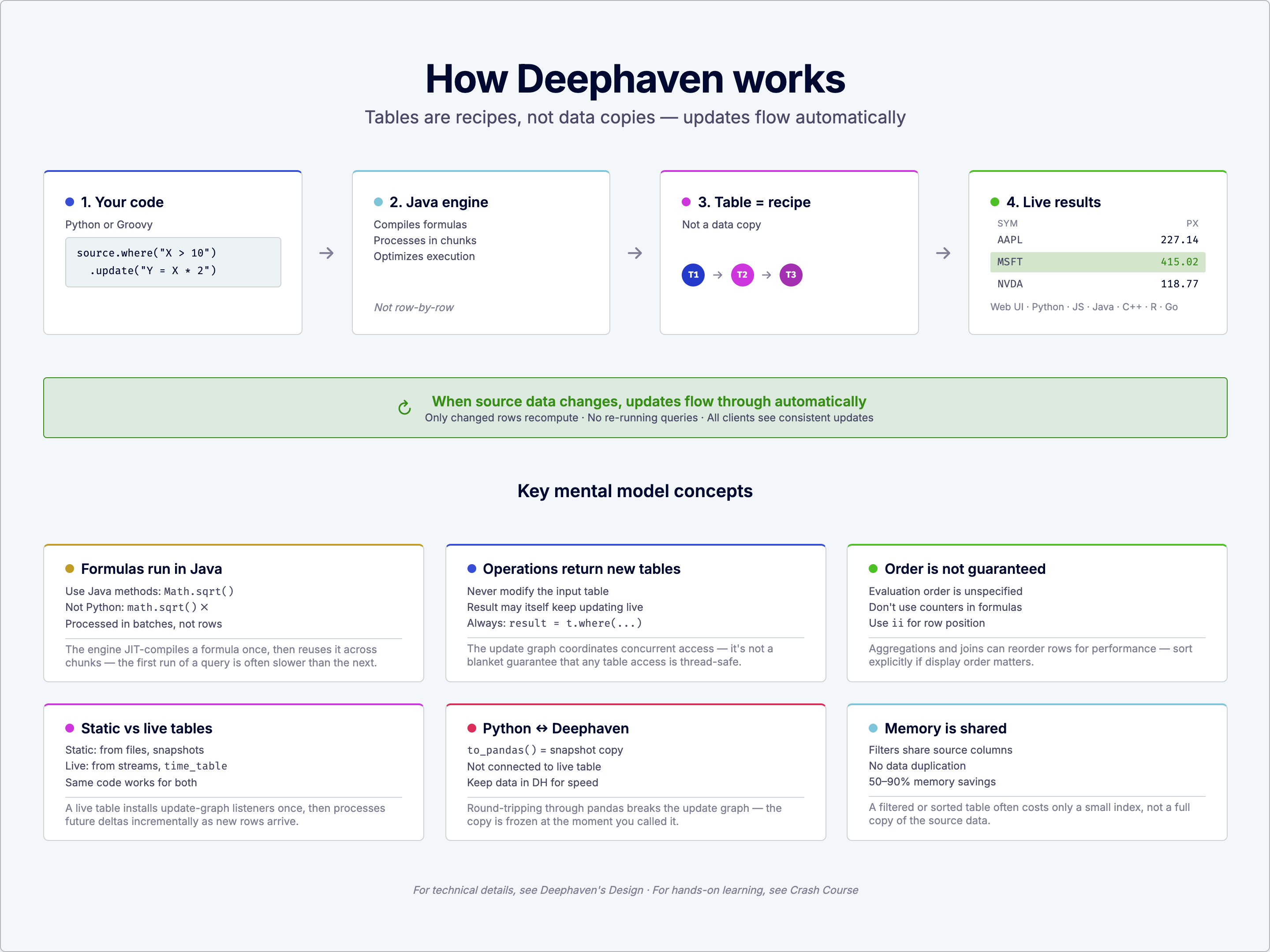
For technical details, see Deephaven's design. For hands-on learning, see the Crash course.
Tables are recipes, not data
In pandas, a DataFrame is a container holding your data. When you filter or transform it, you get a new container with different data inside.
Deephaven tables work differently. When you call where or update, Deephaven doesn't copy the source data — it builds a new table that shares the parent's unchanged columns and computes only what's new (a filtered RowSet, or a computed column). That new table also keeps a live dependency on its parent, so it recomputes automatically when the source changes, without you rerunning any code.
source is a live table — it adds one row for each one-second period that elapses, so it grows by roughly a row per second (a slow or delayed update cycle can add several rows at once). filtered immediately reflects whichever rows currently satisfy X > 2, and it maintains a dependency on source: as new rows arrive, filtered and doubled automatically recompute and reflect the change, without you rerunning any code.
Why this matters:
- You don't need to re-run your filter when data changes — it happens automatically.
- Multiple transformations can share the same source without duplicating data.
- Operations are typically much faster than copying entire datasets.
When you call a table operation, Deephaven establishes the dependency and computes the initial result. That dependency remains active — if the source data changes, downstream tables update automatically without you re-running code. Operations like view are an exception: they store the formula but defer evaluation until values are actually accessed, which saves memory for columns you rarely read.
Formulas run in the engine, not in Python
When you write a formula string like "Y = X * 2", that code doesn't run in Python. It runs inside Deephaven's Java-based engine, which is optimized for processing millions of rows efficiently.
The engine parses and executes the string "Y = Math.sqrt(X * X + 1)", not Python's interpreter.
Tip
Query strings use Java-style syntax: backticks (`) for strings, single quotes for duration literals ('PT1S' for 1 second), and casts like (int) to specify return types. Note that API arguments like time_table("PT1S") pass the duration as a Python string, while formulas require the query-literal syntax.
This has important implications:
- Java methods, not Python functions: Use
Math.sqrt, notmath.sqrt. UseStringmethods liketoUpperCase, not Python string methods. - Python variables are available: Local and global variables from your script are automatically resolved through query scope, but you can also call Python functions (with a performance cost).
- Much faster: The engine processes data in optimized batches, not one row at a time.
Calling Python from formulas
You can call Python functions from formulas, but understand that this crosses a boundary:
When you reference a Python function in a formula, the engine must cross into Python to evaluate it. When the call is eligible for auto-vectorization — a bare function call with simple column or constant arguments and a supported return type, as in this example — the engine batches it into one Python call per chunk of rows; otherwise, it falls back to one Python call per row. Either way, this is slower than pure-engine formulas. For performance-critical code, prefer engine-native expressions.
Your code doesn't run row-by-row
This is the most common surprise for new users. Consider this code:
You might expect Value to be [1, 2, 3, 4, 5]. In general, the engine can evaluate rows in any order, potentially in parallel across multiple threads, so a stateful formula like this could produce [3, 1, 4, 2, 5] or something else entirely, with results differing between runs. (Deephaven treats formulas that reference Python functions as non-parallelizable on standard Python builds, for performance reasons, so this particular example is likely to come back in order here. That doesn't make the formula safe, though: the same stateful pattern in a pure-engine formula — or in Python on a free-threaded build, where this restriction doesn't apply — can still reorder, depending on the engine's parallelism settings.)
The rule: Formulas should be stateless — the result for row N should depend only on the input values for row N, not on what happened when processing other rows. Immutable Python variables (like configuration values) are fine; mutable state and order-dependent logic are not.
Replacing counters with row positions
If you need deterministic row numbering on static or append-only tables, use ii (the row position) instead of a counter:
Note
These variables work on static and certain streaming tables, but general refreshing tables reject them because positions and keys can shift. If you need row identity on a ticking table, use a stable key column instead. See special variables for the full compatibility matrix.
For more complex cases involving state, see parallelization and the serial execution options. For details on ii and other special variables, see the reference documentation.
Static vs. live: understanding mutability
Deephaven tables come in two flavors:
- Static tables: Data that doesn't change. Loaded from files, created with
empty_tableornew_table, or snapshots of live data. - Refreshing (live) tables: Data that updates continuously. Created with
time_table, connected to streams, or other real-time sources.
The key insight: Most transformations on live tables produce live results — filter a live table, and the filtered result updates automatically. snapshot is a deliberate exception: it's a transformation that takes a live table and returns a static copy at that single point in time.
You don't need to poll for changes or re-run queries — the engine handles propagation automatically.
Moving data between Python and Deephaven
Data lives in two places: Python variables and Deephaven tables. Understanding when data moves between them helps you write efficient code.
From Python to Deephaven
When you create a table from Python data, the engine copies that data:
From Deephaven to Python
When you extract data back to Python, you're taking a snapshot:
For live tables, this snapshot represents the data at one moment in time. The table may continue updating, but your snapshot won't.
Performance tips
Moving data between Python and Deephaven takes time. For large datasets:
- Keep data in Deephaven tables and use engine operations (fast).
- Avoid repeatedly converting between pandas and Deephaven (slow).
- Use snapshots strategically, not in tight loops.
What you can build
Deephaven isn't just a table engine — it's a platform for building data applications.
Interactive UIs
Create live dashboards entirely in Python with deephaven.ui:
The UI updates automatically as data changes and as users interact with controls. See deephaven.ui for a full introduction.
Data sources and sinks
| Source | How to use |
|---|---|
| Parquet | read("/path/to/file.parquet") |
| CSV | deephaven.csv.read("/path/to/file.csv") |
| Kafka | consume |
| Manual entry | Input tables — edit cells in the UI |
| Programmatic | Table Publisher — push data from your code |
| Destination | How to use |
|---|---|
| Parquet | write(table, "/path/to/output.parquet") |
| Kafka | produce |
| Python | to_pandas(table) or to_numpy(table) |
| Remote clients | Connect via Python, Java, JavaScript, or C++ clients |
Client-server architecture
Deephaven runs as a server. Multiple clients can connect simultaneously:
- Web UI: Built-in interactive console and grids
- Python client:
from pydeephaven import Session - JavaScript client: For web applications
- Java/C++ clients: For high-performance integrations
Clients that subscribe to the same table see consistent, live updates. Tables can be shared between sessions using shared tickets.
Common patterns
Pattern: Prefer engine operations over Python loops
See agg_by for all aggregation options.
Pattern: Use ii and i instead of counters
Pattern: Use view for lightweight derived columns
Use view when you want derived columns without storing them. Use update when you need the results cached for repeated access or downstream operations.
Pattern: Compose queries step by step
Build complex analytics by chaining simple operations. Each step produces a table you can inspect, reuse, or build on:
Each intermediate table (cleaned, enriched) is a first-class object you can display, join, or use as input to further operations.
Pattern: Same code for batch and streaming
Write your logic once — it works identically on files and live streams:
No need for separate batch and streaming codebases.
Pattern: Partition large datasets
Split data by key and process each partition efficiently:
Partitioned tables let you parallelize processing, quickly retrieve subtables by key, and improve filter performance in loops. See partition_by and Partitioned tables for details.
Pitfalls to avoid
Pitfall: Treating tables like DataFrames
Pitfall: Stateful functions in formulas
Pitfall: Converting unnecessarily
Quick reference
| I want to... | Use this |
|---|---|
| Check if a table updates | table.is_refreshing |
| Take a static snapshot | table.snapshot() |
| Edit data manually | Input tables |
| Push data programmatically | Table Publisher |
| Process by groups | partition_by |
| Build a dashboard | deephaven.ui |
| Connect remotely | Python/Java/JS client |
| Engine capability | What it means |
|---|---|
| Incremental updates | Typically recompute only what changed, not entire datasets |
| Automatic propagation | Downstream tables update when sources change |
| Parallel execution | Multiple threads process data simultaneously |
| Shared data structures | Filtered views share memory with source tables |
Related documentation
- Quickstart — Get Deephaven running
- Crash course — Hands-on tutorial
- Table types
- Deephaven's live DAG
- Create tables
- Select, view, and update
Understanding how to think about Deephaven