with_keys
The with_keys method returns a table that shares the underlying data and schema with the source table, but with the specified columns marked as its key columns.
Key columns are metadata used by consumers such as the Deephaven UI to identify which rows represent the same real-world entity. They do not affect the table's data. Multiple rows may share the same key column values. To additionally assert that each combination of key values identifies exactly one row, use with_unique_keys instead.
Syntax
Parameters
| Parameter | Type | Description |
|---|---|---|
| cols | Union[str, Sequence[str]] | The key column name(s). Must name at least one existing column in the source table. |
Returns
A table that shares the underlying data and schema with the source table, with the keyColumns attribute set to the specified column names. If the source table already has this exact set of key columns, the source table itself may be returned.
Note
with_keys only sets keyColumns; it does not clear an existing uniqueKeys attribute. If the source table was previously marked with with_unique_keys, uniqueKeys remains True after calling with_keys, even though the new key columns may no longer be unique. To fully convert such a table, also remove the attribute with without_attributes: table.with_keys(cols).without_attributes("uniqueKeys"), where cols is the same key column name(s) passed to with_keys.
Preserved through table operations
The keyColumns and uniqueKeys attributes are preserved by:
where,where_in,where_not_in, andwhere_one_ofsortandsort_descendingreverseflattenupdate_viewandlazy_updatenatural_joinandexact_join
Other operations that build a new result from the table's data — including select, update, view, join, and drop_columns — clear both attributes. Call with_keys or with_unique_keys again on the result to restore them.
with_attributes and without_attributes are a separate case: they preserve every attribute they aren't explicitly asked to add or remove, so keyColumns and uniqueKeys survive them unless you target those specific keys.
Examples
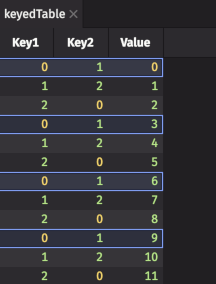
In this example, Key1 and Key2 together form the key column set for keyed_table. Because the same combination of values repeats across rows, selecting one of them in the Deephaven UI selects every row that shares that combination.